
- Price
- $82 a year per account
- Billing
- Auto-renews. Also $11 monthly or $148 every 2 years.
- Where photos live
- Flickr's platform, with unlimited full-resolution uploads
- What you get
- Groups, stats and ad-free viewing on flickr.com
- Ownership
- Photos live on Flickr. Subscriptions are non-refundable.
Flickr alternative
Host the photo club on a site you own.
Flickr Pro bills every photographer. MediaVerse is one plugin on one site, and however many members join, the price does not move. Albums, tags, privacy and favourites are in the free plugin.
- 4.8/5 on Trustpilot
- No Per-Member Fees
- Albums and Tags
- 9 Privacy Levels
- Flickr Connector (Pro)
- Photo Challenges (Pro)
- GPL Licensed
Price Free, Pro from $69/yr
- Licensed
- Per site, not per member
- Albums, tags, privacy
- Free
- Photo challenges
- Pro
- Flickr import
- Pro connector, per member
- Where photos live
- Your WordPress hosting
FLICKR PRICES FROM FLICKR.COM, SEPTEMBER 17, 2026
Flickr Pro is a subscription per photographer. MediaVerse runs on a site you own.
- Price
- Free, Pro from $69 a year
- Billing
- Or $199 once for a lifetime Pro license
- Where photos live
- Your WordPress hosting and database
- What you get
- Your own community, with a REST API, blocks and template overrides
- Ownership
- Photos stay in your uploads folder and database.
3-YEAR COST FOR A PHOTO CLUB
Twenty members on Flickr Pro, or one site running MediaVerse.
Flickr Pro at $82 a year per account, from flickr.com on 2026-09-17. MediaVerse prices from this store. Your WordPress hosting is not counted.
Each photographer pays their own $82 subscription every year.
Unlimited full-resolution uploads, no ads and view stats for one account.
One payment for one site: Pro layouts, challenges, cloud storage and the Flickr connector.
Uploads, albums, tags, privacy, reactions and follows for every member.
A 20-member club on Flickr Pro spends $4,920 over three years. On MediaVerse Pro lifetime the same club spends $199 plus hosting, however many members join.
FLICKR TO MEDIAVERSE
The Flickr habits your members have, and where they live now
Flickr terms from flickr.com and the Flickr API, read 2026-09-17. Items marked (Pro) need MediaVerse Pro. The rest ship free.
Organising photos
| On Flickr | In MediaVerse | What changes |
|---|---|---|
| Albums (photosets) |
| Collections fill themselves from tag, type, author or date rules. |
| Tags |
| Owners can merge duplicate tags across the whole site. |
| Full-resolution uploads with Flickr Pro |
| JPEG re-compression stays off unless you switch it on. |
Show the remaining 4 rows across 2 more categories Hide the full comparison
Who sees what
| On Flickr | In MediaVerse | What changes |
|---|---|---|
| Public, friends, family or private |
| The connector maps friends-only photos to friends and family-only photos to private. |
Community
| On Flickr | In MediaVerse | What changes |
|---|---|---|
| Groups |
| Group members share media inside the group, with a group-only privacy level. |
| Faves and comments |
| Six reactions give more signal than a single fave. |
| Views, referrers and engagement stats with Flickr Pro |
| Stats cover the whole site and sit with the owner in wp-admin. |
FROM FLICKR (PRO)
Bring photos across with the Flickr connector
Each member connects their own Flickr account. Imports copy photos into your library, and nothing is deleted on Flickr.
- 01
Install MediaVerse and Pro
Both plugins run at the same version, on WordPress 6.5+ and PHP 7.4+.
- 02
Switch on connectors
Turn on connectors in Pro settings and add a Flickr API key. Members can also use their own key.
- 03
Members connect Flickr
From their dashboard, each member signs in to Flickr and approves access.
- 04
Pick photos to import
The import window lists their Flickr photos with an album filter. Select photos and follow the progress bar.
- 05
Check titles, tags and privacy
Titles, descriptions and tags come across. Flickr visibility is mapped to the nearest MediaVerse privacy level.
- 06
Send new work back (optional)
Members can upload a MediaVerse photo to Flickr, so an existing Flickr presence can continue.
The Flickr connector, in Pro
A bridge, not a one-way door
Photos move across per member, per photo, and your Flickr account stays exactly as it was.
Flickr to your site
Import
- The photo itself, at the largest size Flickr serves for it
- Title and description
- Tags
- Visibility, mapped to a MediaVerse privacy level
Nothing is removed from Flickr. A photo is copied, and the Flickr id is stored with it.
Your site to Flickr
Export
- A member uploads one of their MediaVerse photos to Flickr
- The MediaVerse privacy level sets the Flickr visibility flags
- The photo can drop straight into a Flickr album they pick once
- Auto-export sends every new upload across without asking again
Useful when a photographer wants to keep an audience on Flickr while the club moves.
Where each Flickr visibility lands
| On Flickr | In MediaVerse | Sent back as |
|---|---|---|
| Public | Public | Public |
| Friends and family | Members | Friends and family |
| Friends only | Friends | Friends only |
| Family only | Private | Private |
| Private | Private | Private |
MediaVerse has no family list, so a family-only photo arrives private rather than half open. Check those before you make an album public.
- Who connects
- Each member signs in to their own Flickr account. One member connecting does not pull in anyone else.
- Whose API key
- The site can hold one Flickr app key for everyone, or a member can use their own.
- Running it twice
- Imports are matched on the Flickr photo id, so a repeat run brings in only what is new.
- Switched off until you want it
- Connectors are off in Pro settings until you turn them on and add the key.
Read this before you move
Six things Flickr does that this does not
Worth knowing now rather than after a hundred photos are across.
-
Camera settings are not shown
EXIF is read when a photo is uploaded, and location data is removed by default. Aperture, shutter and lens do not appear on the photo page.
-
No licence picker on a photo
There is no Creative Commons field to set per photo. Licence terms go in the description or on a page of your own.
-
Photosets do not rebuild themselves
The importer filters by Flickr album so a member can work through one set at a time, then they group what arrived into a MediaVerse album.
-
The import takes the largest size Flickr will serve
For most accounts that is the original. Where Flickr does not offer the original for a photo, the largest size it does offer comes across instead.
-
Stats are site-wide, not per-photo referrers
Owners see views, reactions and downloads across the site in wp-admin, with a CSV export. There is no per-photo referrer breakdown.
-
Nothing here sells prints
Neither the free plugin nor Pro puts a photo up for sale. The optional per-member storage limit caps what a member stores. It does not sell anything.
Photo challenges (Pro)
Give the club a reason to shoot every week
Run themed challenges where members enter a shot and the community votes. Autopilot can start a new themed challenge on a schedule, so the calendar never goes quiet.
Themed challenges
Set a theme and dates. Members enter, then vote once entries close.
Autopilot scheduling
New challenges start on a recurring schedule, drawn from a theme library you keep.
Battles and tournaments
Two photographers face off in a 1v1 battle, or a bracket tournament runs round by round.
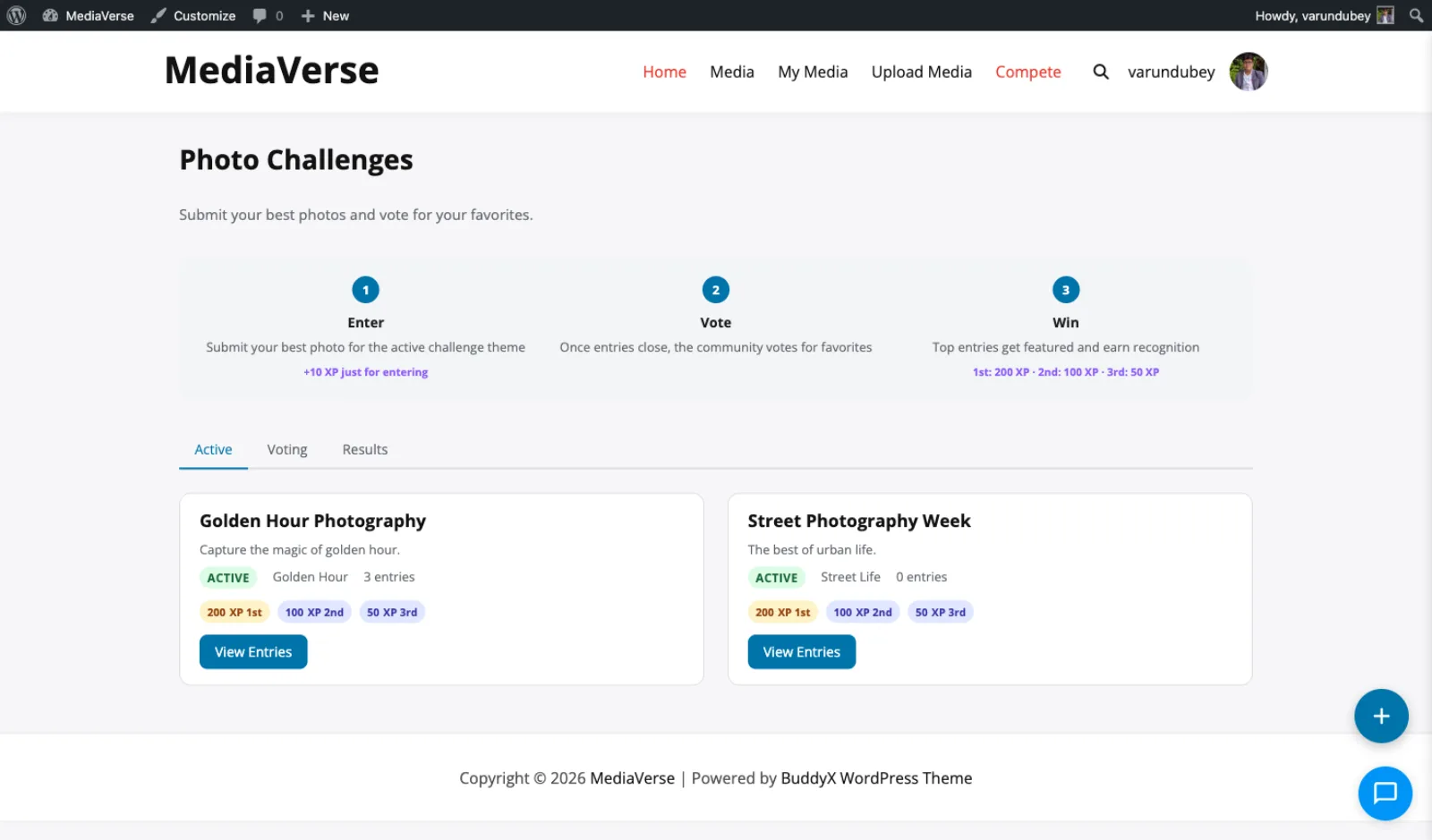
Photo Challenges: Golden Hour Photography and Street Photography Week are active, with XP for the top three.
A photo community, screen by screen
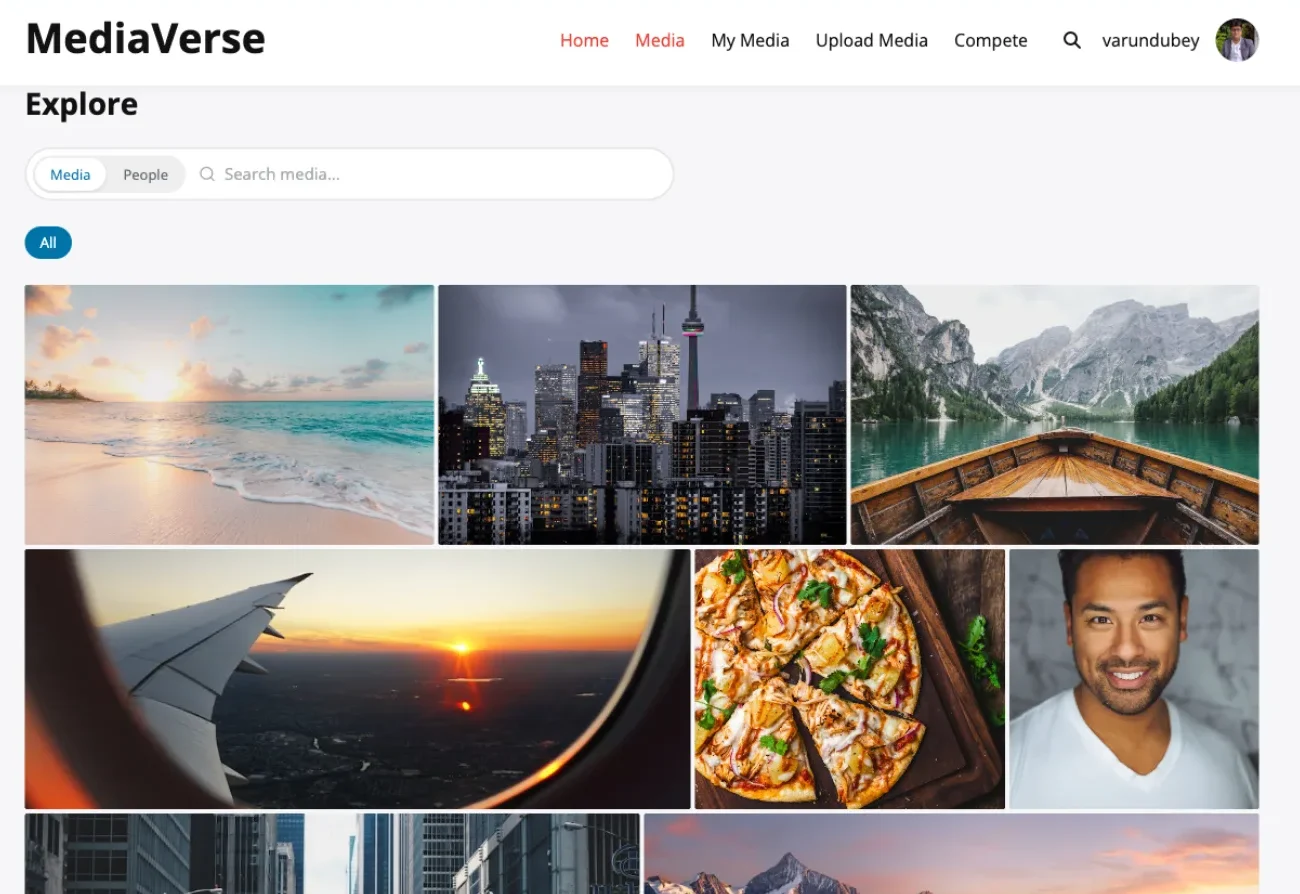
A photographer's profile: uploads, followers and following above a grid members can search and filter by tag.
Alpine Mountain Sunrise on its own page, with reactions, favourite, share and 111 views.
Tournaments (Pro): Spring Photography Championship is open for registration, with 11 of 16 spots left.
My Media, Challenges tab (Pro): the active Street Photography Week challenge and a member's own entries.
Pay per site, however many photographers join
Pay once and own it forever, or pick the annual plan. All features included in every plan, no hidden add-ons.
MediaVerse Free
Unlimited sites
Free
- Unlimited sites, no license key
- Photo, video and audio uploads
- Albums, smart collections and explore feed
- Lightbox, reactions, comments and follows
- Direct messages with media and voice
- Moderation queue, reports and OpenAI checks
- BuddyPress activity, profile and group media
- 9 blocks, 14 shortcodes and a REST API
- Forever free, no feature locks
Most popular
Pro Personal
1 site
$199 one-time
or $69/year
- Everything in Free, plus:
- 1 site license
- Instagram, Pinterest, Flickr and Dribbble layouts
- Stories, boosts and upload streaks
- Photo challenges, battles and tournaments
- Cloud storage: S3, BunnyCDN, R2, Spaces
- Watermarking
- Flickr connector and rtMedia, MediaPress, BuddyBoss importers
- Member document drive
- Updates and support, annual or lifetime
Pro Professional
5 sites
$299 one-time
or $99/year
- Everything in Pro Personal
- 5 site licenses
- Priority support
- Updates and support, annual or lifetime
Pro Agency
Unlimited sites
$499 one-time
or $199/year
- Everything in Personal, plus:
- Unlimited site licenses
- Priority email support
- 30-day money-back guarantee
The plugin keeps working. Updates and support stop until you renew.
Free forever. Annual licenses include a year of updates and support and renew at 30% off. Lifetime licenses are a one-time payment and never expire.
Leaving Flickr: what photographers ask first
Can I import my Flickr photos?
Yes, with Pro. Each member connects their Flickr account, filters by album and imports the photos they pick. Titles, descriptions, tags and privacy come along.
Are my Flickr albums recreated?
Not automatically. The album filter helps members choose photos to import. They then group them into MediaVerse albums.
Does it show EXIF camera data?
No. EXIF is read at upload and GPS location is removed by default, but camera settings are not shown on photo pages.
Can I set a Creative Commons license on a photo?
No. MediaVerse has no per-photo license field. Put your license terms in the photo description or on a site page.
Are full-resolution originals kept?
Yes. The original is stored as uploaded. Photos open at 1024px in the lightbox by default, and owners can switch that to the original file.
Can members sell prints?
No. Neither the free plugin nor Pro sells media.
Where do the photos live?
In your WordPress uploads folder and database. Pro can move public photos to S3, BunnyCDN, Cloudflare R2 or DigitalOcean Spaces. Private photos stay on your server.
What does it cost to run?
The plugin is free on unlimited sites. Pro for one site is $69 a year or $199 once. Hosting is a separate cost you choose.
More plugins for a photography community
- Just want the photos MediaVerse free Uploads, albums, tags, privacy, reactions and follows on unlimited sites.
- Want the connector MediaVerse Pro The Flickr connector, four feed layouts, challenges, watermarks and cloud storage.
- A gallery, not a club A gallery members fill The same library run as a gallery, without the community layer around it.
Give your photo club a home it owns.
The free plugin runs on unlimited sites. Pro for one site is $69 a year, or $199 once.