
Free job board plugin
Open a job board your members will actually use.
Employers register, post from the front end and work their applications. Candidates filter, save and apply without making an account. You decide what goes live. All of it free, with nothing to buy before the first employer posts.
- 4.8/5 on Trustpilot
- 30-Day Money-Back Guarantee
- Priority Support
- Works With Any Theme
- GPL Licensed
Three people use a job board. Each gets a proper screen.
Employers, candidates and you each work from a dashboard, so nobody emails CVs around or asks for wp-admin access.
Two people, one board
A job board only works if both sides get all the way through
An employer who cannot post without your help, or a candidate who has to make an account before applying, is a board that quietly stops being used. Here is each path end to end, and what you control in between.
The employer
Someone with a role to fill and no interest in learning your admin.
- Registers themselves Sign-up with a company logo, and a dashboard of their own from the first visit.
- Posts in four steps, with a preview They see the listing as a candidate will before it goes anywhere. They can even start before creating an account.
- Waits for you The job sits pending until you approve it. A rejection can be answered with a resubmission rather than a new post.
- Works the applications Five statuses, private notes, and a bulk CSV export for the ones who prefer a spreadsheet.
- Keeps a public profile Their company page sits in a directory, so a candidate can read about them before applying.
The candidate
Someone scanning for the one job worth their afternoon.
- Narrows the board Type, category, location, tag and experience, plus a salary range slider. You can reorder the filters to suit your market.
- Saves what looks good Jobs, companies and resumes all bookmark, so a shortlist survives closing the tab.
- Applies without an account The apply drawer opens beside the job with a cover letter and a resume, and a guest can use it. Requiring an account is your choice, not ours.
- Gets reminded before it closes Saved a job and did not apply? An email lands three days out, and again one day out.
- Tracks what happened A dashboard with every application and where it got to, so nobody has to email you asking.
And you, in the middle
What reaches the board is your call
- Nothing goes live unread
- Every job arrives pending. Approve it, reject it, or send it back for another go.
- Members can report a listing
- A reported job lands in a flagged queue rather than waiting for someone to notice it.
- Both forms are spam-guarded
- reCAPTCHA v3 or Turnstile on posting and on applying, whichever you prefer.
- The emails are yours to edit
- Nine templates, editable bodies, and a test send so you can read one before a candidate does.
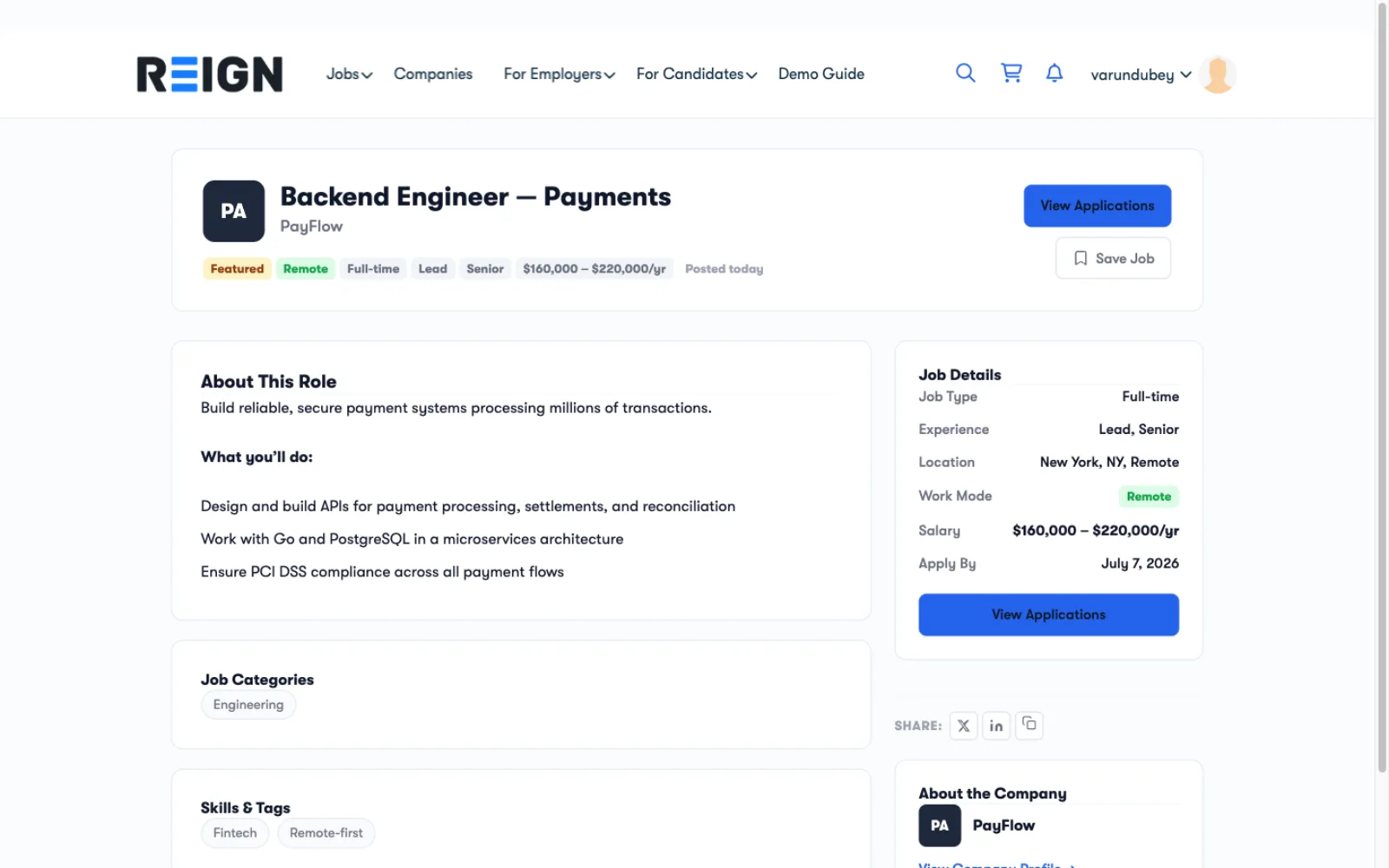
Everything a candidate needs to apply, on one page
Each job shows salary, job type, experience, work mode and the apply-by date beside the description. Candidates save the job or apply without leaving the page.
A job page with salary range, work mode, apply-by date, a Save Job button and the company card
Coming from WP Job Manager? Here is what changes
Checked on WP Job Manager's wordpress.org page on 17 September 2026. Its core links each job to an email or website, and add-ons cover the rest.
Two routes to a working job board. WP Job Manager starts lean and grows through paid add-ons. WP Career Board ships applications and dashboards free, and its importer copies your jobs without changing the originals.
From install to the first job post in one sitting
What your job board runs on, free
No add-ons to buy before the first employer posts.
-
Two posting forms
A four-step wizard with a preview step, or a single-page form you can place on any page or sidebar.
-
Live filters and a salary slider
Candidates filter by keyword, job type, category, location, experience and salary range without a page reload.
-
Expiry and deadline reminders
Jobs close on schedule, featured flags expire after the days you set, and saved-job reminders go out automatically.
-
Company profiles and directory
Employers publish a company page with a logo and open positions. Visitors browse companies by industry and size.
-
Emails you can edit
Nine notification templates with editable bodies and a test send. One sender name and address covers all of them.
-
Moderation and spam protection
Approve or reject jobs, review reported listings, ban employers, and add reCAPTCHA v3 or Turnstile to forms.
-
Import from WP Job Manager
Run the importer from Career Board > Import or WP-CLI. Your original WP Job Manager data is left unchanged.
-
BuddyPress and Reign ready
Employer and candidate member types and activity posts on BuddyPress. Styling follows Reign and BuddyX Pro.
-
Privacy tools built in
Candidates export or erase their data and can delete their account, with a 14-day grace period to cancel.
-
REST API and translations
A documented REST API with application passwords. German, French, Spanish, Dutch and Korean translations are bundled.
A job board seen from both sides of the hire
A job page with salary, work mode, apply-by date and share buttons
Step one of the posting form: Basics, then Details, Categories and Preview
My Jobs with Live, Draft, Pending, Closed and Rejected filters and applicant counts
The applications inbox per job, filtered by status, with List and Board layouts
A candidate's applications with each status and a Withdraw option
Free to launch. Pro when employers start paying.
Pay once and own it forever, or pick the annual plan. All features included in every plan, no hidden add-ons.
- Unlimited sites, no license key
- Full Gutenberg-block job board
- Employer + candidate dashboards
- Company profiles + applications
- Guest applications + resume upload
- Salary range slider + filter chips
- BuddyPress + Reign Theme integration
- JobPosting schema.org structured data
- REST API + Abilities permissions
- Forever free, no feature locks
- Everything in Free, plus:
- 1 site license
- AI applicant ranking and summaries
- Kanban board with custom stages
- Paid job credits: Stripe, PayPal, WooCommerce
- Resume builder and candidate directory
- Job alerts, maps and job feeds
- Multiple boards, incl. BuddyPress groups
- Updates and support, annual or lifetime
- Everything in Pro Personal
- 5 site licenses
- Priority support
- Updates and support, annual or lifetime
- Everything in Pro Personal, plus:
- Unlimited site licenses
- Priority support
- Updates and support, annual or lifetime
- 30-day money-back guarantee
The plugin keeps working. Updates and support stop until you renew.
Free forever. Annual licenses include a year of updates and support and renew at 30% off. Lifetime licenses are a one-time payment and never expire.
Questions before you launch the board
Is the free version enough to run a real job board?
Can candidates apply without an account?
Can I charge employers to post jobs?
I run WP Job Manager. Can I switch?
Do I need BuddyPress or a specific theme?
Does it need WooCommerce?
Do I get it with Reign Theme?
What are the requirements?
Build the rest of the community around it
- Ready to charge for posts What Pro adds Paid job packages, featured listings and the tools to run the board as a business.
- A board inside a community The 26-plugin community bundle Profiles, groups and messaging around the people using your board.
- Freelance, not employment A services marketplace instead Where the work is a paid order rather than a job application.
Post the first job on your site today, free
Posting, applications, dashboards and moderation are all in the free plugin.