
Free marketplace plugin
Run a services marketplace from the brief to the payout.
Vendors sell packages or answer posted jobs. Buyers send requirements, work arrives, revisions happen, disputes get a ruling, and vendors draw their balance. All of that is the free plugin, and none of it needs WooCommerce.
- 4.8/5 on Trustpilot
- WordPress 6.9 Tested
- PHP 8.1+
- No WooCommerce Required
- Self-Hosted
- GPL Licensed
- RTL Ready
Built around the service order, not a product cart.
A service is not shipped. It is briefed, worked on, delivered, revised and approved, and each of those steps is its own order status here.
The order, end to end
A service order has eleven states, and you will meet most of them
A product cart has paid and shipped. A service has a brief, a delivery, a revision, sometimes an argument, and a payout at the end. Each of those is a real status here, not a note in a spreadsheet.
-
Paid for
pending_paymentThe order exists the moment checkout starts. Stripe, PayPal or an offline method you confirm yourself.
-
Waiting on the brief
pending_requirementsNothing starts until the buyer answers the vendor’s questions. Files can come with the answers.
-
Being worked on
in_progressBuyer and vendor talk in the order itself, so the brief and the conversation never separate.
-
Delivered, awaiting approval
pending_approvalThe vendor hands work over. The buyer accepts it, asks for a revision, or opens a dispute.
-
Completed
completedThis is where the money settles: commission comes off and the rest lands in the vendor’s balance.
Then the vendor asks to be paid, and that is its own ledger.
The detours, and where each one leads
- Revision requested
- Back to being worked on, or straight to a new delivery. The package sets how many revisions the buyer gets.
- Late
- Set for you when the deadline passes, with both sides notified. The order carries on from there, it is not cancelled.
- On hold
- A deliberate pause. The only ways out are back to work or cancelled, so nothing rots quietly in this state.
- Cancellation requested
- One side asks to stop. It ends in cancelled, a dispute, or back to work if they agree to carry on.
- Disputed
- Four rulings: complete, cancel, refund, or refund part of it. A dispute closed without a ruling puts the order back where it was.
- Partly refunded
- Not an ending. The buyer got some money back and the vendor is still owed the rest, so the work continues. Only a full refund is final.
You can also override all of it. A site administrator can force an order into any state, and the record keeps a forced change apart from one the rules allowed, so an audit can tell them apart later.
Running without you
What moves on its own
- Late orders get flagged
- A sweep finds work past its deadline, marks it late and tells the buyer and the vendor.
- Deliveries auto-complete
- A delivery nobody answers closes on its own after three days. Change the number, or set zero and nothing auto-closes.
- Silent briefs get chased
- Reminders go out for missing requirements and approaching deadlines, so you are not the one nagging.
- Briefs can time out
- A buyer who never answers can release the order after a set number of days, and it can start work anyway. Off until you set it.
- Seller levels recalculate
- Rising Seller and Top Rated are earned from the record, not awarded by hand.
Getting vendors paid
The part most plugins are vague about
Commission comes off when an order completes, and the rest sits in the vendor’s balance. A withdrawal request runs pending, approved, then completed, or rejected, which puts the money back in their balance. You can raise those requests automatically each week.
In the free plugin, marking one paid records the payment and debits the wallet. It does not send money. Paying each vendor by their own method is your step, and the confirmation says so before you click it. There is a CSV export for a bank or PayPal bulk upload.
Pro is what makes the money actually move, through Stripe Connect or PayPal Payouts.
Every order shows what the vendor earns and what you keep
Commission comes off automatically. The admin order screen shows the total, the vendor's earning and your commission next to the status and messages.
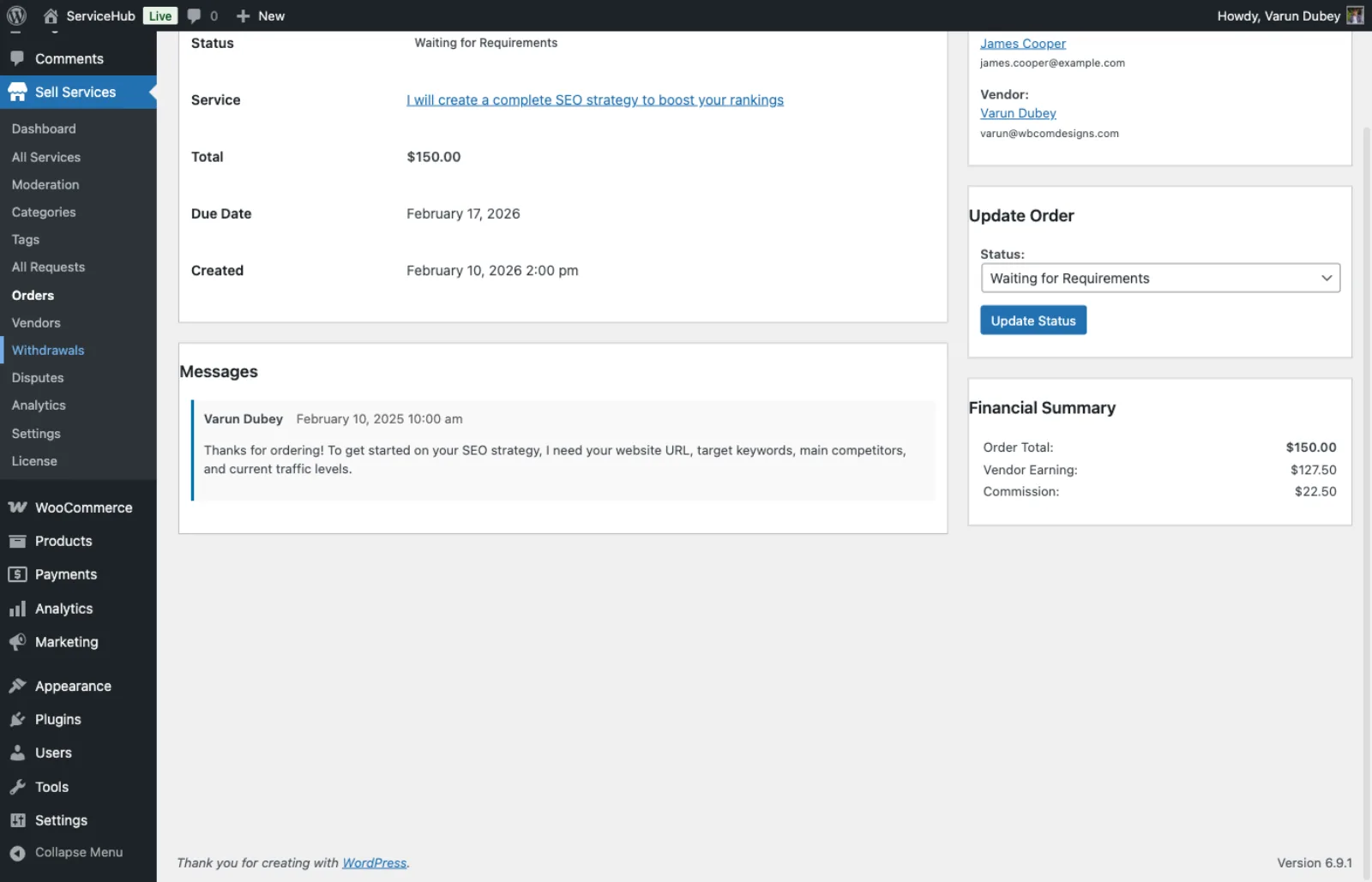
A $150 order in wp-admin: $127.50 vendor earning and $22.50 commission, beside the status control
What the free plugin gives buyers, vendors and you
Everything here is in the free plugin unless it says Pro.
-
Frontend vendor dashboard
Vendors manage services, sales orders, portfolio, earnings and messages without opening wp-admin.
-
Six-step service wizard
Vendors build a listing with packages, gallery, FAQs, add-ons and requirement questions in guided steps.
-
Buyer requests and proposals
Buyers post a job with a budget. Vendors reply with a fixed price or a milestone plan.
-
Milestones, extensions and tips
Split big jobs into paid phases, quote extra work mid-order, and let buyers tip after delivery.
-
Reviews and seller levels
Star reviews with vendor replies. Vendors earn Rising Seller and Top Rated automatically, and you grant Pro Seller.
-
Optional moderation
Hold new services or new reviews for your approval before they go live.
-
Vacation mode
Vendors pause new orders while away. Orders already in progress carry on.
-
Email and in-app notifications
Order events send emails you can switch off one by one, plus an on-site notification center.
-
REST API and WP-CLI
The wpss/v1 REST API covers the marketplace with Application Password auth. WP-CLI commands load demo data.
-
Blocks, shortcodes, template overrides
Six blocks and 19 shortcodes place services on any page. Override templates in your theme to change markup.
Walk through a live order, screen by screen
A service page: package tabs with price, what is included and revisions, beside the seller card
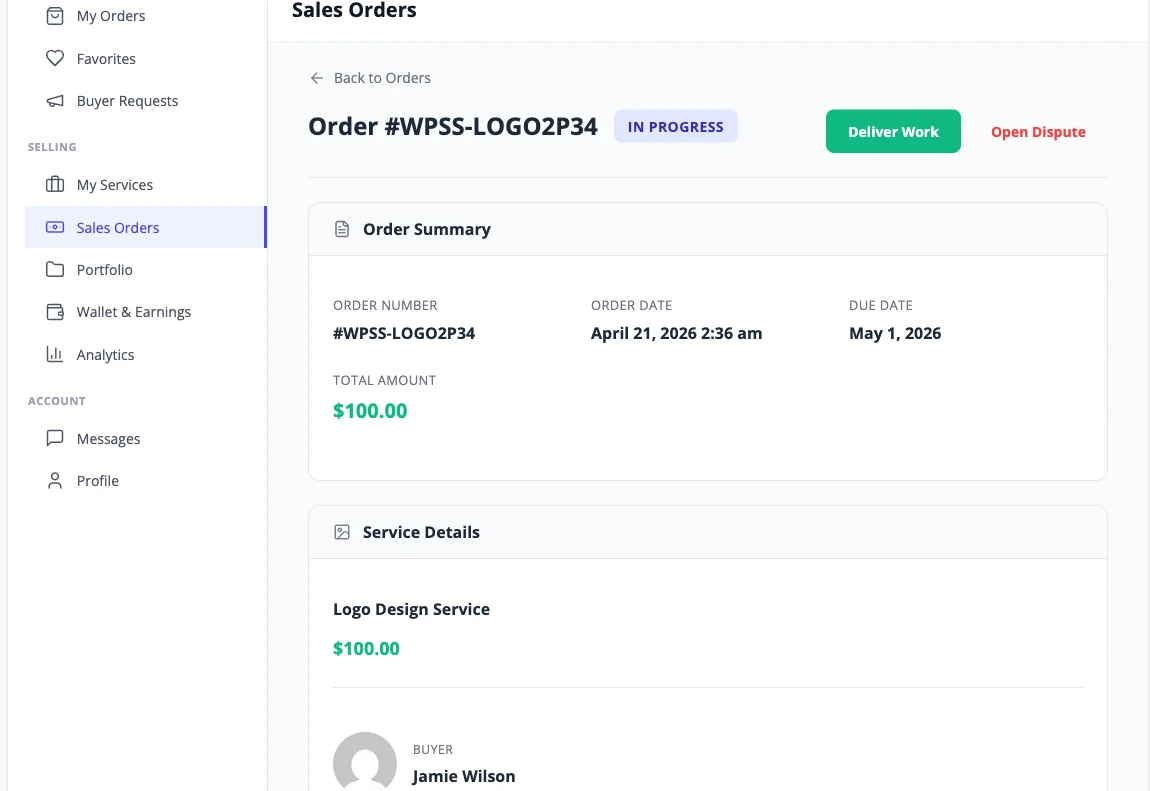
The vendor's order: Deliver Work and Open Dispute at the top, the timeline, and a box to quote paid extra work
Revision requested: the buyer is waiting for a revised delivery
A milestone contract: approved phases in green, the next one awaiting payment, later ones locked
Rated 4.8/5 on Trustpilot from 93 reviews
Top notch support! I've been frustrated generally by the slow support for most themes and plugins, but they are helpful and quick to reply. Highly recommend!
Woods
Trustpilot Review
I wanted to build a community website and these guys created the perfect plugins for me. To be honest, I want to buy every single one of their plugins.
Sora Seaton
Trustpilot Review
The template from Wbcom Designs is truly great. Modern, flexible, and easy to use. The support is very helpful and friendly. For questions or problems you receive fast, competent assistance.
Barry Bohme
Trustpilot Review
The marketplace is free. Pro adds automation.
Pay once and own it forever, or pick the annual plan. All features included in every plan, no hidden add-ons.
- Unlimited sites, no license key
- Full service order flow
- Built-in Stripe, PayPal, offline checkout
- Buyer requests and milestone contracts
- Reviews, disputes, commission, withdrawals
- Vendor dashboard and seller levels
- REST API and WP-CLI
- Free forever
- Everything in Free, plus:
- 1 site license
- WooCommerce checkout
- Razorpay payments
- Stripe Connect and PayPal Payouts
- Vendor subscription plans
- Tiered commission rules
- Admin and vendor analytics
- Cloud storage for deliveries
- White-label branding
- Unlimited gallery, add-ons, FAQs, requirements
- Updates and support, annual or lifetime
- Everything in Pro Personal
- 5 site licenses
- Priority support
- Updates and support, annual or lifetime
- Everything in Pro, plus:
- Unlimited site licenses
- Priority email support
- 30-day money-back guarantee
The plugin keeps working. Updates and support stop until you renew.
Free forever. Annual licenses include a year of updates and support and renew at 30% off. Lifetime licenses are a one-time payment and never expire.
Questions before you launch your marketplace
Do I need WooCommerce?
What happens after a buyer pays?
Can buyers post a job instead of buying a listing?
How do vendors get paid?
How much commission can I take?
What is capped in the free plugin?
Can I charge buyers a subscription for a service?
Will it work with my theme and language?
Pick the marketplace you are building
- Building a freelance platform Jobs, proposals and milestone payments Clients post a brief, freelancers send proposals, and big jobs are paid one phase at a time.
- Starting a tutoring site Tutors sell lesson packages Each tutor sets packages with a price and delivery time, and students answer intake questions first.
- Running a coaching marketplace Each client engagement in one thread Intake questions, private order messages and deliveries stay together for every coaching order.
- Tried Dokan for services An order flow made for services See where a product checkout stops and a service order keeps going.
Open your services marketplace this week, free.
The whole order flow, the payments and the payout ledger are free. Pro is for when you want the money to move itself.