WP Sell Services Pro

Stop being the one who sends every payment.

The free plugin already runs the orders and keeps the books. Pro is what moves the money: Stripe Connect or PayPal Payouts, plans that charge vendors to sell, commission rules that change by category or seller level, and the reporting to see which of it is working.

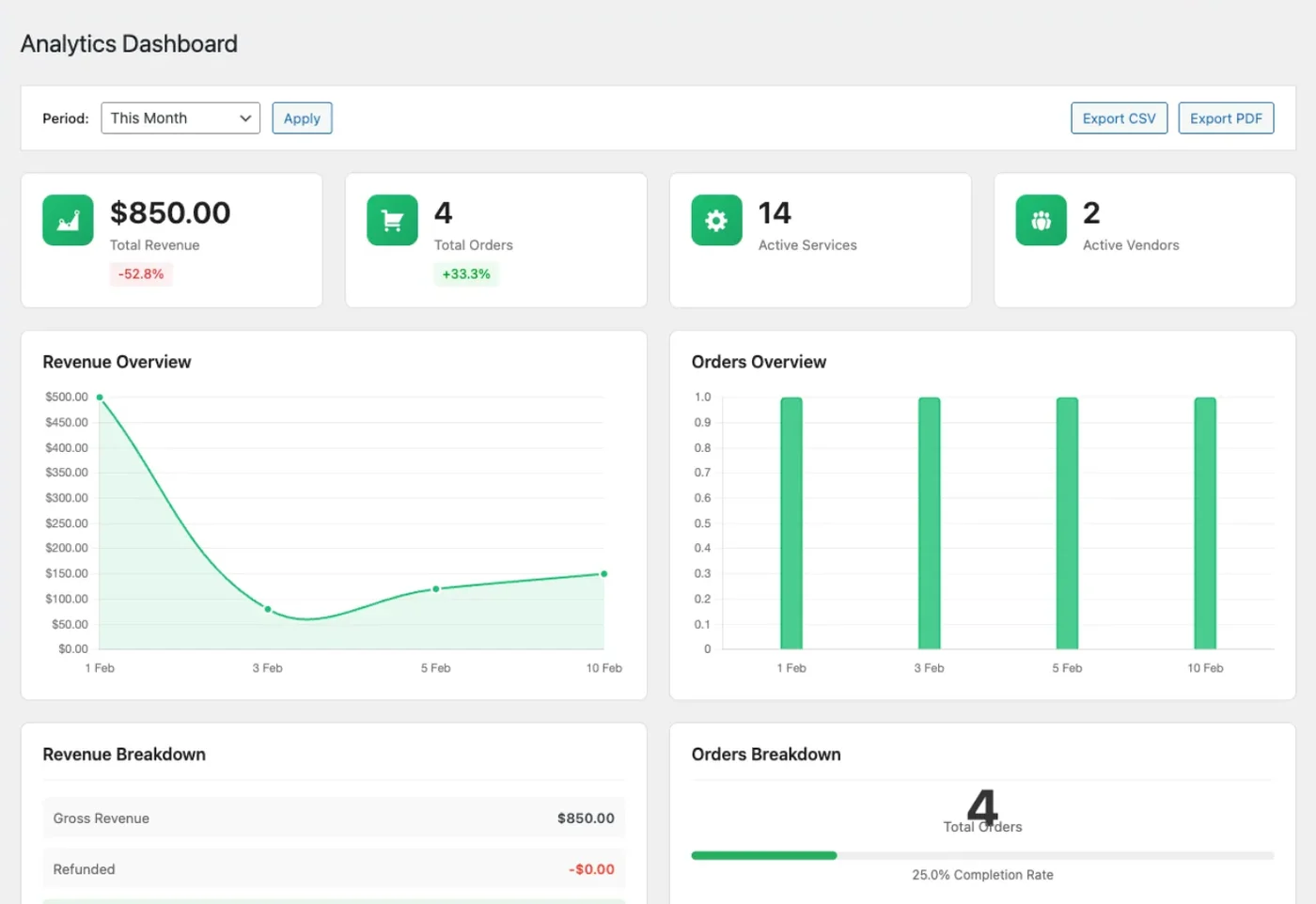
The Pro analytics dashboard: revenue, orders, active services and vendors across the top, with revenue and order charts below
The Pro analytics dashboard, with revenue and orders over the period you pick.
  • 4.8/5 on Trustpilot
  • Extends the Free Plugin
  • Every Feature on Every Tier
  • 30-Day Money-Back Guarantee
  • Priority Support
  • GPL Licensed
Pro Personal $99/yr or $249 lifetime
Every license includes
All Pro features
Tiers differ by
Sites and support
Requires
Free plugin, WP 6.4+, PHP 8.1+
Not included
Recurring billing for services
Refund window
30 days
UPDATED 2026-09-17

Paying vendors

Automated payouts are two different things, and the difference matters

One of them hands the vendor their share while the job is still unstarted. That is a fair trade for some marketplaces and the wrong call for others, so here is each rail with the part nobody puts on a feature list.

In the free plugin

You pay, the site keeps the books

The vendor asks, you approve, you send the money yourself.

When the vendor is paid
After you make the transfer, by whatever method you already use
What the site does
Tracks the balance, the request and the approval, and exports what is owed as CSV
What it costs you
Your time, every payout run
The catch
Marking a withdrawal paid records it and debits the wallet. No money leaves anywhere.

Pro, PayPal Payouts

One batch pays everyone you pick

You choose who is due, and send them in a single batch.

When the vendor is paid
When you run the batch, so you still decide the timing
What the site does
Submits the batch, polls PayPal for each item and debits the wallet as items complete
What it costs you
One action per payout run instead of one per vendor
The catch
A vendor with no PayPal address on file cannot be in a batch

Pro, Stripe Connect

The money splits as the buyer pays

There is no payout run. Stripe sends the vendor their share at checkout.

When the vendor is paid
At the moment of payment, which is before the work is delivered
What the site does
Adds your commission to the charge as the platform fee and offsets its own ledger so nobody is paid twice
What it costs you
Nothing per order. Vendors onboard themselves through Stripe Express.
The catch
Refunding later may not get the money back, because the vendor already has it

When the split quietly does not happen

Connect is not all-or-nothing. In these three cases the order settles the free way instead, and knowing that in advance is the difference between a puzzle and a support ticket.

A cart with two vendors in it
One payment can only have one destination, so the platform keeps the charge and both vendors settle through the wallet on completion, as they would without Pro.
A vendor who has not finished onboarding
Until Stripe marks the account able to both take charges and receive payouts, that vendor’s orders behave exactly like the free plugin.
A refund the vendor has already spent
Stripe tries to pull the share back. Once the vendor has moved it to their bank there is nothing to pull, so the shortfall is recorded against their wallet and written to your log rather than quietly disappearing.

WHAT PRO DOES, BY JOB

Pick the job your marketplace has outgrown.

Each tile groups Pro features by the job they do. Every Pro license includes all six.

Paying vendors

Stripe Connect with Express onboarding and PayPal Payouts batches pay vendors without manual transfers. Balances can live in TeraWallet, WooWallet or MyCred.

2 payout rails, 3 wallet plugins

Earning from vendors

Subscription plans charge sellers to list, with limits such as maximum services and an optional commission override per plan.

Vendor plans billed through Stripe

Commission rules

Rules by service category, sales volume or seller level, applied in priority order. The first matching rule wins.

3 rule types

Seeing what sells

A wp-admin dashboard for revenue, orders, top services and top vendors, plus analytics in each vendor's dashboard. Export reports to CSV.

Admin and vendor analytics

Checkout and files

Use WooCommerce as the checkout, add Razorpay, and store delivery files in Amazon S3, Google Cloud Storage or DigitalOcean Spaces.

WooCommerce, Razorpay, 3 storage providers

Brand and reach

White label the dashboard, emails, checkout and login pages. Show approximate prices in the shopper's currency and send Firebase push notifications.

White label, display currency, push
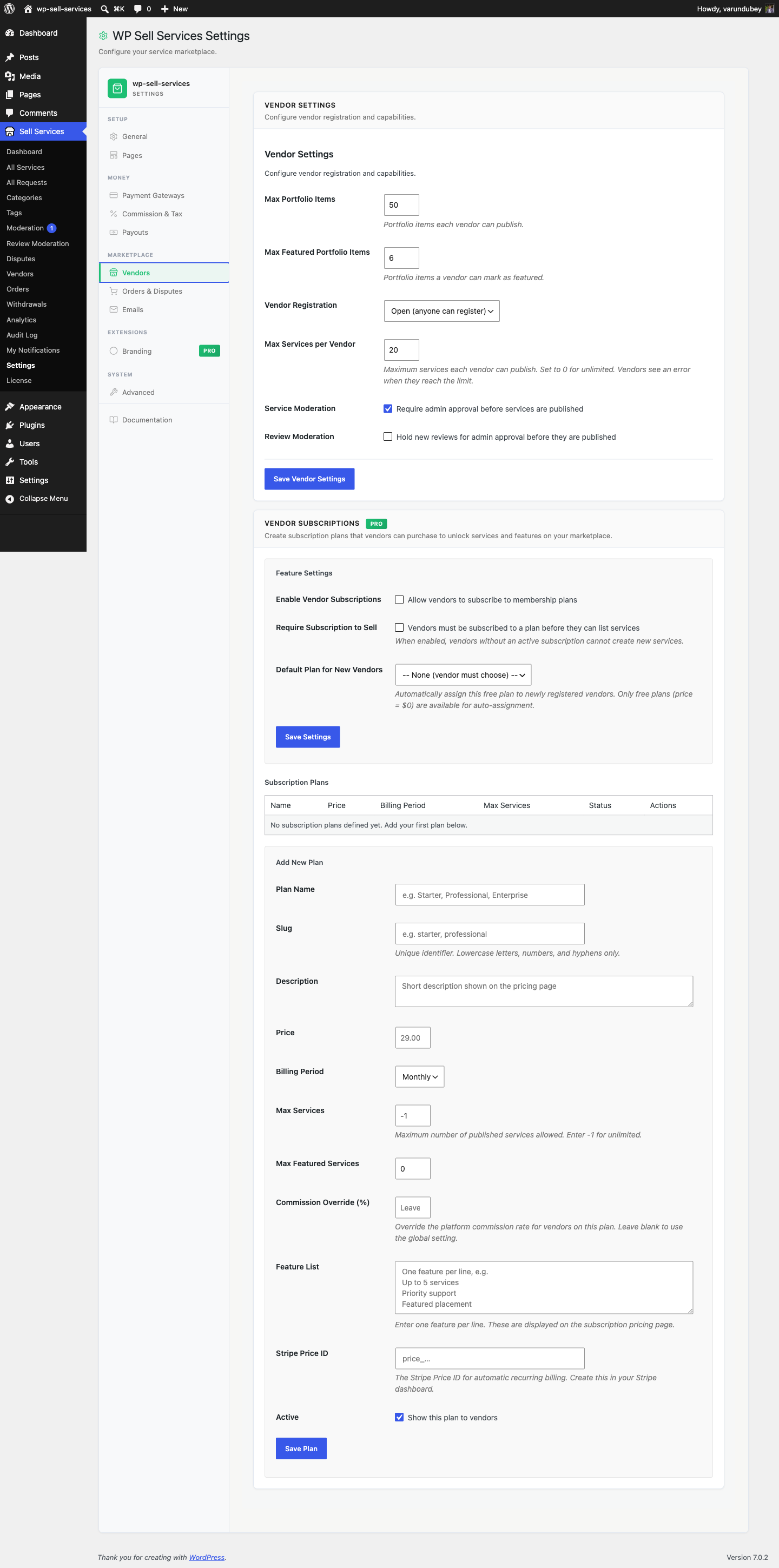
Vendor Subscriptions

Charge vendors a plan fee to sell on your marketplace

Create plans with a price and billing period, then require an active plan before a vendor can list services. The feature stays off until you enable it.

Limits per plan
Set maximum services and featured services for each plan, or leave them unlimited.
Commission override
Give a plan its own commission rate, or leave it blank to use your global rate.
Billing through Stripe
Each plan links to a Stripe Price ID. A free plan can be assigned to new vendors automatically.
Vendor Subscriptions settings with a plan builder for price, billing period, max services and commission override

Vendor plans: price, billing period, service limits, commission override and the switch that requires a plan to sell

More in Pro, feature by feature

Every item below needs Pro. If a license lapses, the free plugin keeps your orders running.

  • Unlimited listing media

    Vendors add as many gallery images, add-ons, FAQs and requirement questions as a service needs. Free caps them at 4, 3, 5 and 5.

  • WooCommerce as checkout

    Take service payments through WooCommerce, HPOS compatible, with a multi-service cart. One checkout is active at a time.

  • Razorpay payments

    UPI, cards and netbanking for marketplaces selling in India, on the built-in checkout.

  • Stripe Connect payouts

    Vendors onboard with Stripe Express and receive their share without you sending transfers.

  • PayPal Payouts batches

    Pay many vendors in one PayPal batch and track each payout's status.

  • Cloud storage for deliveries

    Delivery files go to S3, Google Cloud or DigitalOcean Spaces and download through short-lived signed links.

  • White label

    Your brand name, logo and color on the dashboard, emails, checkout and login pages, without the Powered by credit.

  • Push notifications

    Firebase push notifications reach members' phones for events they already receive. Off until you add credentials.

  • Display currency

    Shoppers see an approximate price in their own currency. Orders and payouts still settle in your base currency.

The Pro settings you will configure

Commission rules: add rules by category, seller level or sales volume under your global rate

Payment Gateways: Stripe, PayPal and offline come free. Stripe Connect and Razorpay come with Pro

White label: brand name, logo, primary color, email sender and footer, and a toggle to hide plugin branding

Advanced settings: choose a cloud storage provider and test the connection, then turn on display currency

Every Pro feature on every license. Choose by site count.

Pay once and own it forever, or pick the annual plan. All features included in every plan, no hidden add-ons.

WP Sell Services Free
Unlimited sites
Free
  • Unlimited sites, no license key
  • Full service order flow
  • Built-in Stripe, PayPal, offline checkout
  • Buyer requests and milestone contracts
  • Reviews, disputes, commission, withdrawals
  • Vendor dashboard and seller levels
  • REST API and WP-CLI
  • Free forever
Get WP Sell Services Free
Personal
1 site
$249 one-time
or $99/year
  • 1 site license
  • All Pro features included
  • White-label ready
  • Updates and support, annual or lifetime
  • Priority email support
  • 30-day money-back guarantee
Get Personal
Most popular
Professional
5 sites
$499 one-time
or $199/year
  • 5 site licenses
  • Updates and support, annual or lifetime
  • Priority email support
  • 30-day money-back guarantee
Get Professional
Agency
Unlimited sites
$629 one-time
or $249/year
  • Unlimited site licenses
  • Updates and support, annual or lifetime
  • Priority email support
  • 30-day money-back guarantee
Get Agency

The plugin keeps working. Updates and support stop until you renew.

Free forever. Annual licenses include a year of updates and support and renew at 30% off. Lifetime licenses are a one-time payment and never expire.

Upgrade questions from marketplace owners

Do I need the free plugin?
Yes. Pro is an add-on and needs WP Sell Services installed and active. Both need WordPress 6.4 or newer and PHP 8.1 or newer.
Will upgrading change my orders or vendors?
No. Keep the free plugin active, install Pro and enter your license key. Services, orders, vendors, reviews and settings stay as they are.
What happens if my license lapses?
The marketplace keeps running, because orders, messages, deliveries, disputes, commission and withdrawals live in the free plugin. Pro features stop loading until you renew, and no data is deleted. Delivery files already in cloud storage stay downloadable.
Which license tier do I need?
Choose by site count. Personal covers 1 site, Professional covers 5 and Agency is unlimited. Every tier includes every Pro feature.
Do I need Pro to pay vendors?
No. The free plugin handles withdrawal requests, marking them paid and a CSV export of what is owed. Pro automates the transfer with Stripe Connect or PayPal Payouts.
Can Easy Digital Downloads or FluentCart run checkout?
Not yet. Both integrations are in beta, cannot take a service purchase and are hidden by default. WooCommerce is the supported store checkout in Pro today.
Does Pro add recurring billing for services?
No. Recurring billing for services is not available in this release, so do not buy Pro for it. Vendor subscription plans, which charge sellers, are available.
Can I get a refund if Pro is not a fit?
Yes. Every Pro plan has a 30-day money-back guarantee.

Turn on automated payouts and vendor plans today.

Every licence includes every Pro feature. Tiers differ by how many sites they cover, and there is a 30-day money-back guarantee.