
Wbcom Designs Dokan Alternative for Service Marketplaces
Dokan Alternative No WooCommerce Service Marketplace Free v1.0.0

Looking for a Dokan alternative? Built for services, not just products.

Dokan is a solid multi-vendor plugin - for physical product marketplaces. But if you are building a service marketplace, you need an order workflow designed for services: requirements collection, delivery tracking, revision cycles, and dispute resolution. WP Sell Services does all of this without WooCommerce. The free version includes the full marketplace. No $499/year license. No plugin stack.

Download Free Try Live Demo Try Live Demo See All Features
Looking for a Dokan alternative? Built for services, not just products. — product screenshot
87 Five-Star Reviews on TrustpilotNo WooCommerce RequiredFree ForeverWordPress 6.9 TestedPHP 8.1+GPL LicensedSelf-Hosted

Dokan works great for product stores. It was never designed for service marketplaces.

WooCommerce is mandatory
Dokan requires WooCommerce for everything - checkout, payments, orders. That means extra database tables, cart overhead, and product-focused admin screens that make no sense for services. Your site runs slower before you even add your first vendor.
No service order workflow
Dokan treats every transaction like a product shipment. There is no requirements collection after purchase, no delivery submission, no revision tracking, no auto-complete timer. You are left stitching together workarounds for the most basic service marketplace needs.
Pricing adds up fast
Dokan Starter is $149/year, Professional is $249/year, and Business is $499/year. Each tier unlocks features that should be standard. WooCommerce extensions add even more cost. A complete service marketplace stack on Dokan can easily reach $600-800/year.
No buyer requests or proposals
Dokan only supports the browse-and-buy model. There is no way for clients to post project briefs and receive competing proposals from vendors. Half of the service marketplace model is completely missing.
WP Sell Services was built from day one for service marketplaces. Complete order lifecycle, standalone checkout, and a free version that includes everything you need to launch.
The only plugin of its kind

Everything Dokan cannot do for service marketplaces. In one plugin.

The gap between a product marketplace plugin and a service marketplace plugin is not a few missing features. It is a fundamentally different order workflow. WP Sell Services handles the entire service transaction lifecycle that Dokan was never designed to support.

01

Service-specific order lifecycle

11 order statuses purpose-built for services: pending payment, requirements collection, in-progress, delivery submission, revision requests, auto-complete, and dispute resolution. Every stage of a service transaction is tracked and automated.

02

Standalone checkout - no WooCommerce needed

Built-in Stripe, PayPal, and offline payment processing. Multi-vendor cart splits orders by vendor automatically. No WooCommerce overhead, no extra plugins, no unnecessary product catalog infrastructure.

03

Free version with the complete marketplace

Vendor dashboards, gig listings, buyer requests, reviews, disputes, commission tracking, and REST API - all included in the free version. No feature gating behind a $149+ annual license.

Switch from Dokan or start fresh in under 10 minutes

1
Install WP Sell Services (no WooCommerce needed)
Activate the plugin and run the setup wizard. Set your marketplace name, currency, commission rate, and vendor registration method. Essential pages are created automatically. No WooCommerce install required.
2
Vendors create service listings with tiered pricing
A 6-step wizard guides vendors through creating professional service listings with Basic, Standard, and Premium pricing tiers, portfolio images, FAQs, and project requirements. No product-style forms.
3
Clients buy services or post project briefs
Clients browse and purchase services directly, or post project briefs with budgets for competing proposals. The system collects requirements, tracks delivery, handles revisions, and manages reviews - the workflow Dokan does not have.

Who it's for

Dokan users running service marketplaces
Stop forcing service transactions through a product checkout. Get a purpose-built order workflow with requirements, delivery tracking, revisions, and disputes - without WooCommerce overhead.
New marketplace builders choosing a plugin
Start with a free plugin that includes the full service marketplace workflow. No $149+ annual license to unlock basic features. Scale to Pro only when you need WooCommerce integration or Stripe Connect.
Agencies building client marketplaces
Deliver service marketplace projects faster with a plugin that has the right architecture from day one. REST API with 21 controllers, 78 overridable templates, and 233 hooks for full customization.
Consulting and professional services platforms
Build a marketplace where consultants list service packages, clients post project briefs, and every engagement follows a managed workflow. Ideal for legal, accounting, marketing, and IT consulting platforms.
Creative services marketplace owners
Designers, writers, and video editors sell packaged services with tiered pricing, portfolio showcases, delivery tracking, and revision limits per tier. Seller levels reward consistent performers.
Teams who already have WooCommerce
WP Sell Services works standalone, but Pro also integrates with WooCommerce if you already use it. Keep your existing store for products and add a proper service marketplace alongside it.

WP Sell Services vs Dokan vs WCFM - side by side for service marketplaces

Dokan and WCFM are popular multi-vendor plugins built for WooCommerce product stores. They work well for that purpose. But service marketplaces need a different set of capabilities. Here is how they compare when the goal is selling services, not shipping products.

Capability
WP Sell Services
Service-First
Dokan
WC Required
WCFM
WC Required
WooCommerce required
Service order workflow (11 statuses)
Requirements collection after purchase
Delivery submission and tracking
Revision requests with configurable limits
Dispute resolution with admin mediation
Buyer requests and vendor proposals
Standalone checkout (no WC dependency)
Full REST API
Free version with full marketplace
Price (annual) Free / $69 Pro$149 - $499/yr$0 - $348/yr

Dokan and WCFM are strong choices for physical product marketplaces. But if your vendors sell services - consulting, design, development, tutoring, writing - you need a plugin built for that workflow. WP Sell Services is the only WordPress plugin with a complete service order lifecycle, and it works without WooCommerce.

What Dokan cannot do

The service marketplace workflow that product plugins were never built for

A service transaction is fundamentally different from a product sale. After payment, the vendor needs to collect project requirements. Then they work on it, submit a delivery, and the client reviews it. If the client wants changes, a revision cycle begins. If there is a disagreement, a structured dispute process with admin mediation resolves it. This entire workflow does not exist in Dokan or WCFM because they were designed to ship boxes, not deliver services.

Requirements collection after checkout
When a client purchases a service, the order enters a requirements phase. The vendor defines what information they need (project brief, brand assets, login credentials, reference files) and the client fills it in before work begins. Dokan has no equivalent.
Delivery, approval, and revision cycles
Vendors submit completed work as a delivery. Clients review and either approve (completing the order) or request a revision with feedback. Configurable revision limits per pricing tier prevent endless cycles. Auto-complete protects vendors if the client goes silent.
Structured dispute resolution
If the client and vendor cannot agree, either party opens a dispute. Both submit evidence. An admin reviews and decides: full refund, partial refund, or dismissal. Transparent, fair, and built into the core - not an afterthought add-on.
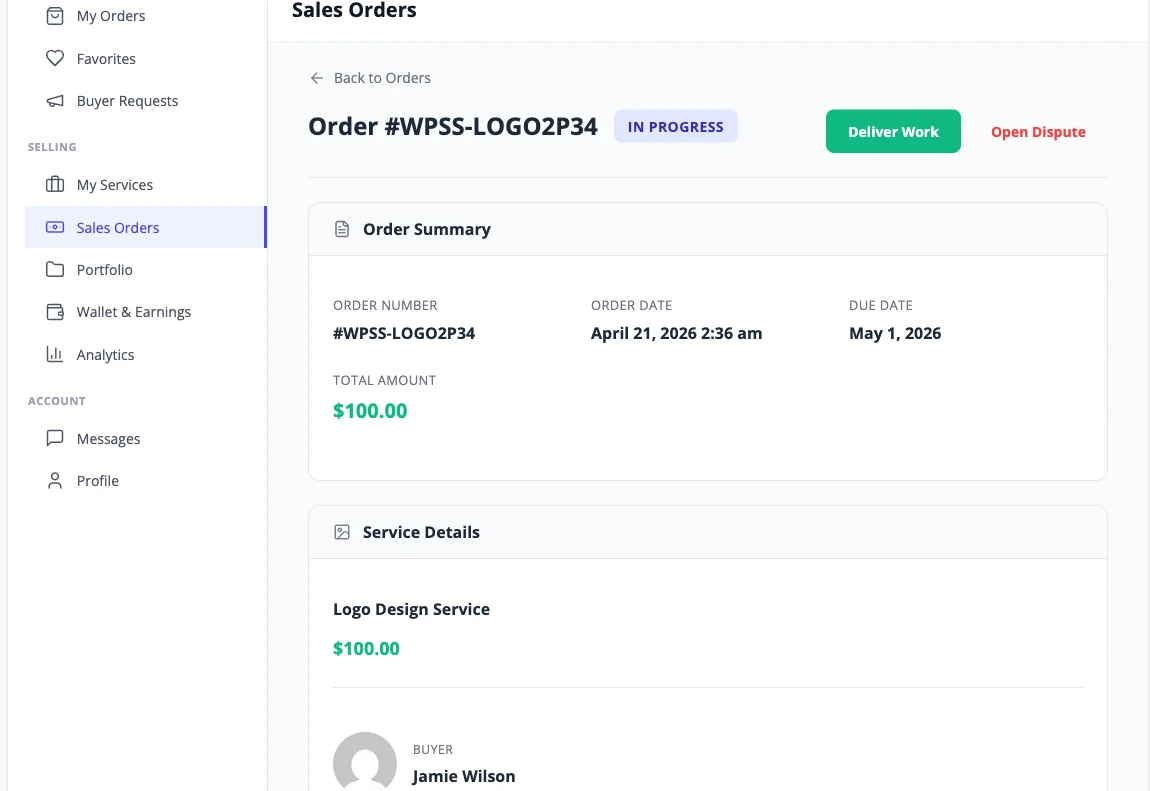
Service order view showing delivery, revision, and requirements workflow

Every service order follows a managed lifecycle from requirements to delivery to review. The workflow Dokan was never designed to handle.

Everything your community needs

No extensions to buy. No integrations to configure. It ships with all of this.

No WooCommerce dependency

Built-in Stripe, PayPal, and offline payment processing. Standalone cart and checkout. No WooCommerce, no EDD, no extra plugins to install. Dokan requires WooCommerce for everything - WP Sell Services does not.

Service order lifecycle

11 order statuses purpose-built for services: pending payment, requirements collection, in-progress, delivery, revision, auto-complete, dispute, and more. Dokan uses WooCommerce order statuses designed for product shipments.

Requirements collection

Vendors define what they need from clients before work begins. Clients fill in project briefs, upload files, and provide details after purchase. Orders do not start until requirements are submitted.

Delivery and revision tracking

Vendors submit deliverables, clients review and approve or request changes. Configurable revision limits per pricing tier. Auto-complete protects vendors when clients go unresponsive.

Buyer requests and proposals

Clients post project briefs with budgets and deadlines. Vendors browse open requests and submit competing proposals. The client picks the best fit. This entire marketplace model does not exist in Dokan.

Vendor dashboard

Vendors manage services, orders, earnings, messages, and portfolio from a responsive frontend dashboard. No wp-admin access required. Similar to Dokan's vendor panel but designed for service workflows.

Dispute resolution

Structured dispute process with evidence submission from both sides, admin mediation, and configurable outcomes: full refund, partial refund, or dismissal. Not a bolt-on extension.

Commission and earnings

Global commission rate with per-vendor overrides. Configurable clearance periods and minimum withdrawal thresholds. Pro adds tiered commission rules and automated payout processing.

Reviews and seller levels

5-star review system with sub-ratings. 4 auto-calculated seller levels (New, Rising, Top Rated, Pro Seller) based on performance metrics. Seller reputation drives marketplace trust.

Full REST API (21 controllers)

Complete API coverage for services, orders, reviews, conversations, disputes, earnings, cart, and authentication. Batch endpoint for mobile apps combines 25 requests into one call.

6 Gutenberg blocks + 19 shortcodes

Service Grid, Search, Categories, Featured Services, Seller Card, and Buyer Requests blocks. Full page-building flexibility without custom code.

Free forever - no feature gating

The free version includes vendor dashboards, gig listings, buyer requests, reviews, disputes, commission tracking, Stripe and PayPal checkout, and REST API. Dokan's free version is limited to basic product listings.

Simple, honest pricing

One-time payment or annual subscription. All features included in every plan — no hidden add-ons.

Free
Unlimited sites
Free
  • Unlimited sites
  • Full marketplace features
  • Stripe & PayPal checkout
  • Vendor dashboards
  • Reviews & disputes
  • REST API
Get Free
Most popular
Pro Personal
1 site
$69 /year
  • Everything in Free
  • 1 site license
  • WooCommerce & EDD
  • Vendor analytics
  • Cloud storage
  • Automated payouts
Get Pro Personal
Pro Agency
Unlimited sites
$199 /year
  • Everything in Pro
  • Unlimited sites
  • Stripe Connect
  • White-label
  • Recurring services
  • Priority support
Get Pro Agency

Free forever. Pro plans renew annually. Cancel any time.

30-day money-back guarantee. No questions asked.

Rated 4.7/5 on Trustpilot from 87 reviews

Top notch support! I've been frustrated generally by the slow support for most themes and plugins, but they are helpful and quick to reply. Highly recommend!

Woods

Trustpilot - 5 stars

I wanted to build a community website and these guys created the perfect plugins for me. To be honest, I want to buy every single one of their plugins.

Sora Seaton

Trustpilot - 5 stars

The template from Wbcom Designs is truly great. Modern, flexible, and easy to use. The support is very helpful and friendly. For questions or problems you receive fast, competent assistance.

Barry Bohme

Trustpilot - 5 stars

Common questions

Is WP Sell Services a direct Dokan replacement?
It depends on what you are building. If you need a physical product marketplace with WooCommerce, Dokan is a solid choice. If you are building a service marketplace where vendors deliver work (not ship products), WP Sell Services is purpose-built for that use case. It handles requirements collection, delivery tracking, revision cycles, and dispute resolution - workflows that Dokan does not support.
Can I migrate my existing Dokan marketplace to WP Sell Services?
WP Sell Services uses its own custom database tables and order system, so there is no one-click migration from Dokan. However, vendors can recreate their service listings using the 6-step wizard, and you can run both plugins side by side during a transition period. If you have a large marketplace and need migration assistance, contact our support team.
Does WP Sell Services work with WooCommerce?
The free version works completely standalone - no WooCommerce needed. The Pro version optionally integrates with WooCommerce, EDD, FluentCart, and SureCart if you already use one of those platforms. The key difference from Dokan is that WooCommerce is optional, not required.
What if I already have WooCommerce installed?
WP Sell Services works alongside WooCommerce without conflict. You can keep WooCommerce for physical products and use WP Sell Services for your service marketplace. Or upgrade to Pro to use WooCommerce as the checkout layer for services too, gaining access to 100+ WooCommerce payment gateways.
Is the free version actually free, or is it limited like Dokan Lite?
The free version includes the complete service marketplace: vendor dashboards, gig listings with 3-tier pricing, buyer requests and proposals, order lifecycle management, Stripe and PayPal checkout, reviews, disputes, commission tracking, and a full REST API. Pro adds WooCommerce integration, analytics, cloud storage, automated payouts, and advanced features. The free version is not a trial and has no time limit.
What does Dokan do better than WP Sell Services?
Dokan has a larger ecosystem for physical product marketplaces. It supports shipping modules, product variations, inventory management, and has been around longer with a bigger community. If your marketplace sells physical products that need to be shipped, Dokan is the better fit. WP Sell Services is specifically designed for service-based transactions.
How much does WP Sell Services cost compared to Dokan?
WP Sell Services Free includes the full marketplace at no cost. Pro Personal is $69/year for one site. Pro Agency is $199/year for unlimited sites. Dokan Starter is $149/year, Professional is $249/year, and Business is $499/year - and you still need WooCommerce plus potentially additional extensions. The total cost of a Dokan service marketplace stack is typically 3-5x higher.
Does WP Sell Services support physical products too?
WP Sell Services is designed for service marketplaces. If you need both product sales and service delivery on the same site, you can run WP Sell Services alongside WooCommerce (or Dokan). Each handles what it was built for. We do not try to be a product marketplace plugin because that is not what service marketplace owners need.
What payment gateways are available without WooCommerce?
The free standalone checkout includes Stripe, PayPal, and offline payments. These cover the majority of online transactions globally. Pro adds optional WooCommerce integration if you need access to 100+ additional gateways, plus EDD, FluentCart, SureCart, and Razorpay as alternative payment platforms.
Can vendors set their own prices and delivery times?
Yes. Vendors create service listings with 3-tier pricing (Basic, Standard, Premium), each with its own price, delivery time, and revision limit. They can also add optional paid extras. You set the platform commission rate. This is similar to how Dokan handles vendor pricing, but with service-specific delivery times and revision counts instead of shipping and inventory.

Ready to run a real service marketplace? Start free. No WooCommerce required.

One license. Instant download. Works with any WordPress theme.

Buy Dokan Alternative for Service Marketplaces Read the docs Try the demo