Build the course
Create lessons, topics, quizzes and questions, then drag them into order. Clone a course to start the next cohort.
Course builderDashboard for LearnDash
One page, four views. Instructors build courses, grade essays and assignments, watch who is falling behind and track their earnings. Students follow their progress, group leaders run their groups, and the back office stays yours.
Why a front end
LearnDash's course builder lives in wp-admin, so every teacher who adds a lesson needs access to your site's admin.
Essays and assignment files wait for review in wp-admin, a place you would rather keep for yourself.
LearnDash sells the course but does not split the sale with the teacher or track what you paid out.
Dashboard for LearnDash moves all of this to one front-end page, and each role sees only its own tools.
An instructor’s day
Handing an instructor a wp-admin login means handing them your whole site. This is the same work, done in a dashboard that only ever shows them their own.
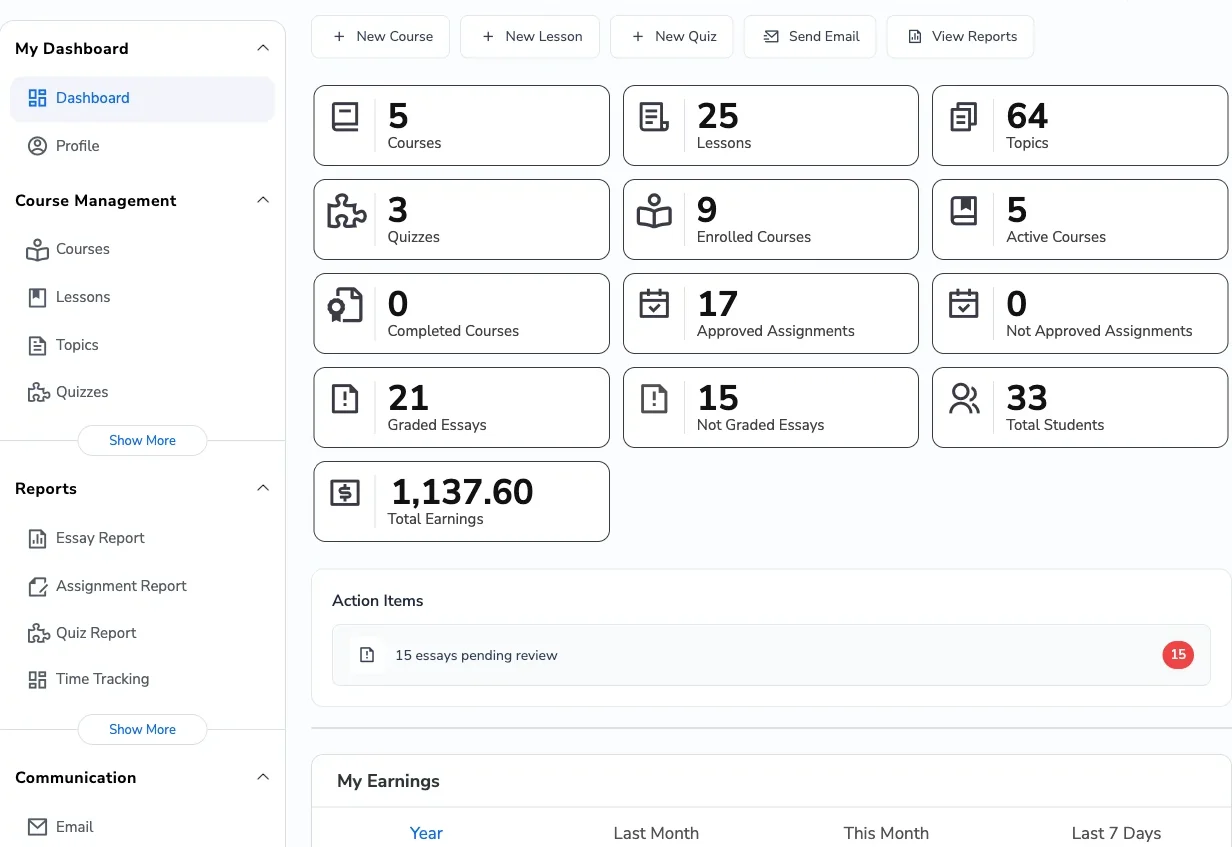
The home tab counts courses, lessons, quizzes and students, and flags the essays sitting unreviewed. That is the morning triage, on the front end of your own site.
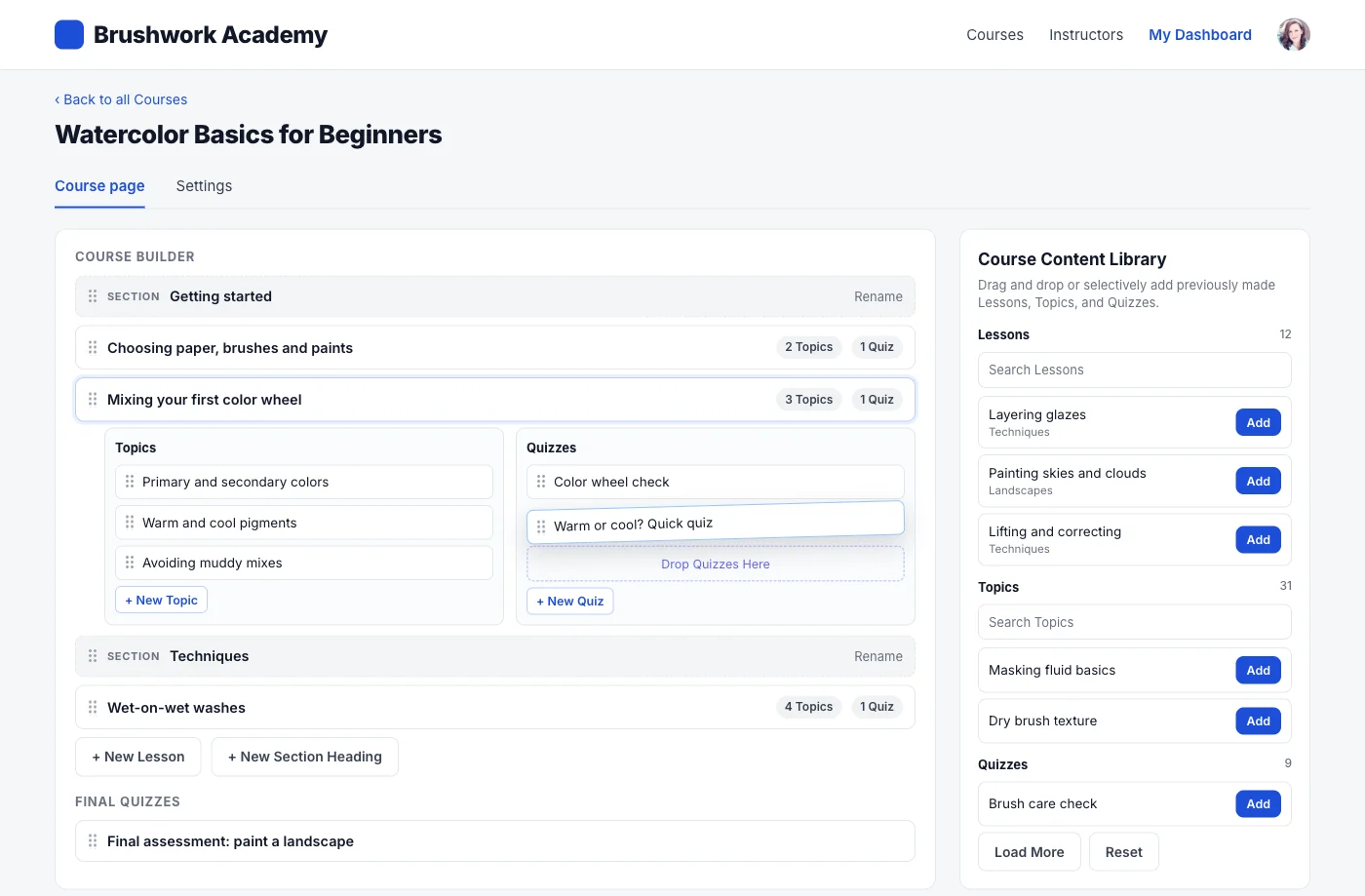
Courses, lessons, topics, quizzes, questions and certificates all have their own tab, with create and edit on the front end. Drag a quiz from a lesson into one of its topics and it parents itself the way LearnDash does. Clone a course when the next cohort starts.
Essays, assignments and quiz attempts each get a report with the submissions in it, so grading is a tab rather than a trip through the admin tables.
Progress tables per course and charts for completion, top courses and time spent. Export the student list as CSV or a real Excel workbook when someone wants it in a spreadsheet.
Post an announcement to a course, or open a private thread with one student. Both live in the dashboard, so an instructor never needs a second tool to reach their class.
Earnings from their own courses, a commission log behind the number, and a withdrawal request when they want the money out.
Why you can hand this out
AN INSTRUCTOR'S WEEK
Each tile is a real dashboard section. Instructors see it for their own courses only.
Create lessons, topics, quizzes and questions, then drag them into order. Clone a course to start the next cohort.
Course builderAdd students by name, CSV upload or filter, reset progress, or hand out enrollment codes students redeem.
Bulk ManagementRead essays and assignment files, enter points and approve. Action Items on the home screen count what is waiting.
Essay and Assignment ReportsPrivate messages grouped by course, emails to enrolled students, course announcements and Zoom meetings.
CommunicationCharts for completion, enrollment trends, time spent and top courses, plus enrolled versus completed students per course.
InsightsCommissions from LearnDash and WooCommerce sales land in Earnings. Instructors request a payout and you approve it.
MonetizationLessons, topics, quizzes and section headings come together in a drag-and-drop builder. LearnDash settings the form does not show are kept when an instructor saves.
Illustrative mockup: a lesson opened in the builder, with its topics, a quiz being dragged and the Course Content Library beside it.
Every feature below is in every plan. Plans differ only in site count and support.
Admins, instructors, group leaders and students each get their own tools on the same dashboard page.
Show or hide any dashboard section for any role from Menu Options, without code.
Tiles for enrolled, active and completed courses, a Continue button per course, quiz attempts and certificates.
Filter by course, open each submission, award points and export the table as CSV or Excel.
Completion rate, enrollment trends, time spent, top courses, course drop-off and revenue per course.
Reports, students and bulk actions are limited to the courses and groups the person manages.
See how long each student spends on each course, for engagement checks or training records.
Visitors apply through a registration form. You approve or reject each application.
Generate, export and deactivate codes. Students redeem them on their dashboard to join a course or group.
Landscape and portrait certificate templates, with PDFs that render Chinese, Japanese and Korean text.
Pending assignments get a points box and an Approve button. Approved ones show a check mark.
Every quiz attempt with its score, Passed or Failed, and a View Report link. Export to CSV or Excel.
My Earnings lists sales per course and charts instructor earnings against admin commission.
Students land on their own tiles and a Continue button for each course in progress.
Insights ranks an instructor's courses by completions for the dates they choose.
Pay once and own it forever, or pick the annual plan. All features included in every plan, no hidden add-ons.
The plugin keeps working. Updates and support stop until you renew.
Annual licenses include a year of updates and support and renew at 30% off. Lifetime licenses are a one-time payment and never expire.
One shortcode on one page, and every role gets its own view of it.