
Wbcom Designs Dashboard for LearnDash
LearnDash BuddyPress Uncanny Groups WooCommerce v7.5.0

Stop paying $600/year for LearnDash addons.

Dashboard for LearnDash is the only LearnDash plugin where instructors create courses, lessons, quizzes, questions, and certificates entirely from the front end. It also replaces ProPanel, Instructor Role, Groups Plus, private messaging, and bulk enrollment tools. One plugin, one vendor, one renewal.
Get Dashboard for LearnDash See What It Replaces
Stop paying $600/year for LearnDash addons. — product screenshot
87 Five-Star Reviews on Trustpilot30-Day Money-Back GuaranteePriority SupportWorks With Any ThemeGPL Licensed

You're running five plugins where one would do.

ProPanel for reporting
$99/yr, but it doesn't touch instructor management or group enrollment
WISDM Instructor Role for instructors
$79/yr, but no groups, no bulk tools, no messaging
Groups Plus for seat management
$199/yr. A separate plugin, a separate settings page, a separate vendor
A separate messaging plugin
$49-99/yr, because LearnDash still has no native student messaging
Bulk enrollment tools to handle CSV imports
$99+/yr, because enrolling 500 students one at a time isn't sustainable
Dashboard for LearnDash covers all of this. One plugin, one renewal, one place to manage everything.
The only plugin of its kind

The only plugin that lets instructors build and run courses entirely from the front end.

ProPanel shows reports. WISDM shows an instructor view. Uncanny Toolkit adds content widgets. Not one of them lets an instructor create a course, add lessons, build quizzes, write questions, and issue certificates without touching wp-admin. Dashboard for LearnDash is the only plugin where the entire course lifecycle happens on the front end.

01

Full course creation without wp-admin

Instructors create courses, add lessons, create topics, build quizzes, write questions, and set up certificates entirely from the front-end dashboard. No WordPress admin access, ever.

02

The only plugin with instructor commissions built in

Track revenue by instructor, set commission percentages, and show payout history without a separate plugin or a spreadsheet.

03

Every role covered in one dashboard

Students track progress and download certificates. Instructors create and manage courses. Admins handle reporting, groups, and bulk enrollment. One plugin handles all three.

Your full LearnDash dashboard is live in under 10 minutes

1
Install and activate
Upload the plugin zip and activate in WordPress. Your existing courses, students, and groups stay exactly where they are.
2
Add the dashboard page
Create a WordPress page and add the Dashboard for LearnDash shortcode. Students, instructors, and admins each see their own tailored view automatically.
3
Cancel the addons you no longer need
ProPanel, Instructor Role, Groups Plus: Dashboard for LearnDash covers all of them. Switch over, verify everything works, then let those renewals lapse.

Who it's for

Students
Track course progress, view lessons and quiz scores, download certificates, submit assignments, and message instructors from one front-end dashboard without touching wp-admin
Solo course creators
Get ProPanel-level reporting, WISDM-level instructor management, and bulk enrollment in one renewal instead of four
Instructors
Manage courses, students, assignments, Zoom meetings, announcements, and earnings from the front end with no WordPress admin access needed
WordPress agencies
One plugin to install on every LearnDash build. One renewal email for your client, one vendor to support, one settings panel to learn
Corporate training teams
Manage group seats, enrollment codes, and bulk CSV imports for 100+ learners. Essay reports, assignment status, and time tracking give you the compliance data you need
Growing online schools
Give each instructor their own dashboard, track revenue by course, schedule Zoom meetings, and manage cohorts from one place

No other single plugin lets instructors create courses, quizzes, and certificates from the front end

ProPanel handles reporting. WISDM handles instructor views. Uncanny Toolkit adds content modules. Not one of them lets an instructor build a full course without wp-admin access. Dashboard for LearnDash is the only plugin where instructors create courses, lessons, topics, quizzes, questions, and certificates from the front end, and still covers groups, bulk enrollment, messaging, Zoom, and reporting.

Capability
Dashboard for LearnDash
All-in-one
ProPanel + WISDM Stack
$575+/yr
Uncanny Toolkit Pro
Frontend tools
Create courses from the front end
Create lessons, topics, and quizzes from the front end
Build quiz questions from the front end
Issue certificates from the front end
Student progress dashboard
Certificate downloads for students
Instructor front-end dashboard
Commission tracking and payouts
Custom fields (ACF field builder)
Visual reporting charts (6+)
Quiz attempt reports
Essay submission reports
Assignment status reports
Revenue and time tracking reports
CSV export on all reports
Group seat management
Enrollment codes
Uncanny Groups integration
Private student messaging
Bulk enrollment and CSV import
Course cloning
Time tracking
Zoom meeting management
Assignment review and approval
Course announcements
Profile and avatar management
One vendor and one renewal

Nothing else comes close. Matching this feature set means buying ProPanel ($99/yr) + WISDM Instructor Role ($79/yr) + Groups Plus ($199/yr) + a messaging plugin ($99/yr) + bulk enrollment tools ($99/yr). That's $575/yr minimum, with five renewal emails and five support contacts. Dashboard for LearnDash covers all of it from $99/yr.

Replaces WISDM Instructor Role ($79/yr)

Every instructor gets their own front-end workspace

No WordPress admin access. No permissions headaches. Instructors log in and see only their courses, their students, and their earnings. They manage enrollment, review quiz results, track commission, approve assignments, and message students from a clean front-end dashboard built for how instructors actually work.
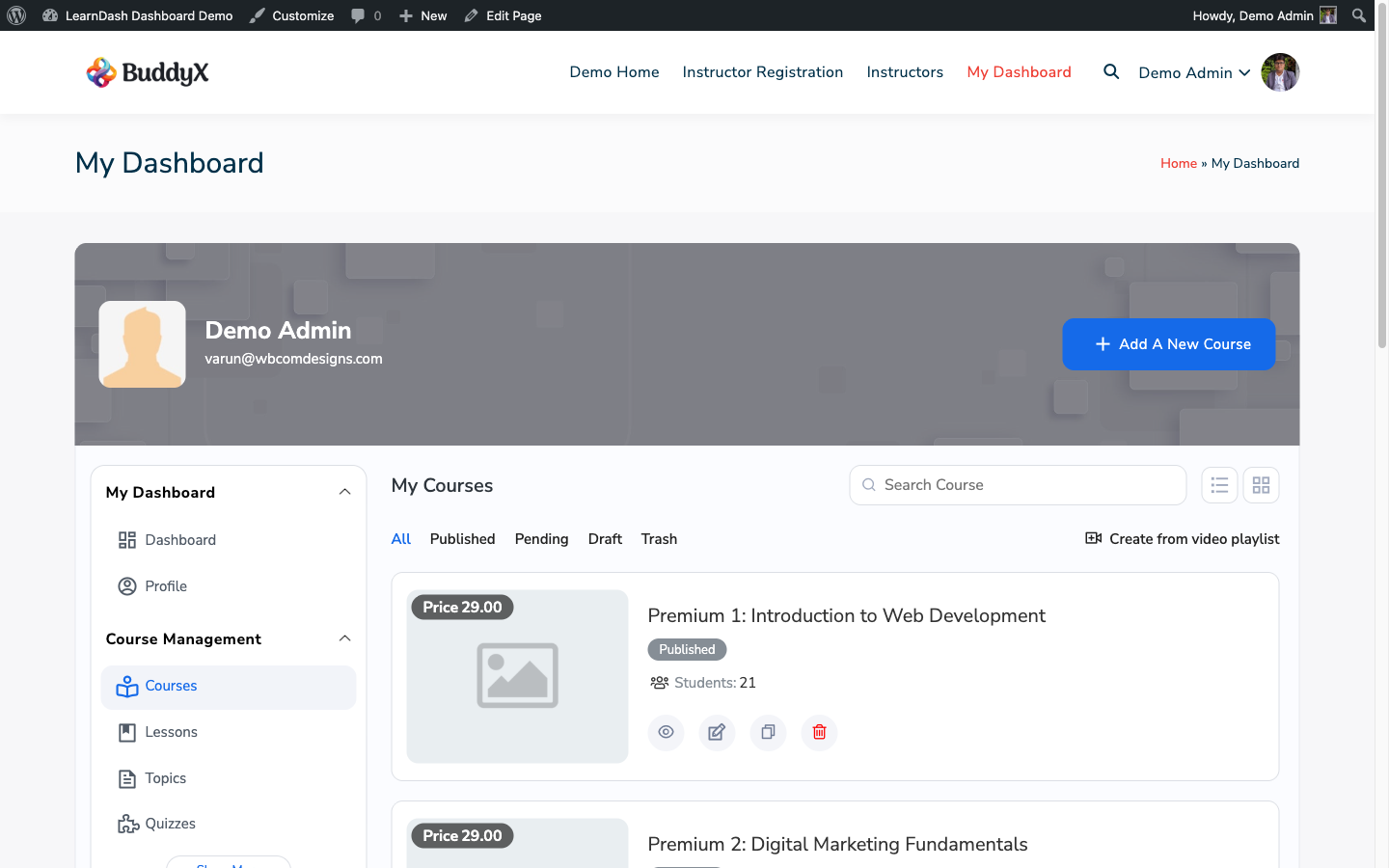
Per-instructor course view
Each instructor sees only their assigned courses and enrolled students. Other instructors' data stays completely separate.
Commission tracking built in
Set a revenue percentage per instructor. Earnings calculate automatically from WooCommerce orders. Payout history is visible to both instructor and admin.
Assignment approval from the front end
Instructors review and approve student assignment submissions directly from their dashboard. No wp-admin needed, no separate review tools to configure.
Dashboard for LearnDash instructor dashboard showing courses, students, and earnings

Instructors manage their full workflow without ever touching wp-admin

Everything your community needs

No extensions to buy. No integrations to configure. It ships with all of this.

Student progress dashboard

Students get a personal learning hub showing enrolled courses, progress by lesson and topic, quiz history, assignment status, and earned certificates in one place.

Front-end course creation

Instructors create courses, add lessons, build topics, write quiz questions, and set up certificates entirely from the front end. No WordPress admin access required at any step.

Instructor management dashboard

Each instructor manages their own courses, students, and earnings from the front end. No wp-admin access required, no permissions to configure.

Insights and reporting

Six visual charts on the Insights tab, plus dedicated reports for Quiz Attempts, Essay Submissions, Assignment Status, Student Details, Time Tracking, and Commission History. Every report exports as CSV.

Groups management

Set seat limits, generate enrollment codes, assign group hierarchy badges, and manage group members from the front end.

Private messaging

Threaded, course-aware messages between students and instructors. Students get answers without leaving your platform.

Bulk management

Enroll or unenroll students in batches, import from CSV, reset progress, and manage subscriptions. Chunked processing handles lists of 500+ without timeouts.

Course cloning

Duplicate any course including all lessons, topics, quizzes, and questions in one click. Launch a new cohort without rebuilding from scratch.

Time tracking

See how long each student spends on course content. Useful for compliance reporting, certification proof, and engagement auditing.

Certificates

Students view and download earned certificates directly from their dashboard. No hunting for email links, no wp-admin required.

Commission tracking

Set a revenue percentage per instructor. Earnings calculate from WooCommerce orders automatically. Full payout history for admin and instructor.

ACF field builder

Add custom fields to courses, lessons, topics, quizzes, and more with a fluent field builder. No separate ACF configuration required.

Uncanny Groups integration

Dedicated module for Uncanny Groups: manage seats, enrollment codes, and group hierarchy without switching tools.

Zoom meeting management

Instructors schedule and manage Zoom meetings tied to their courses directly from the front-end dashboard. Students get one-click join links.

Assignment review and approval

Instructors review student assignment submissions and mark them approved or pending from their front-end workspace. No wp-admin needed.

Course announcements

Instructors post announcements to all enrolled students in a course directly from the front end. No wp-admin, no separate notification plugin.

Profile management

Every user updates their profile, uploads an avatar, and manages custom profile fields from the front end. Fully integrated with ACF custom fields.

A complete platform, not a simple widget

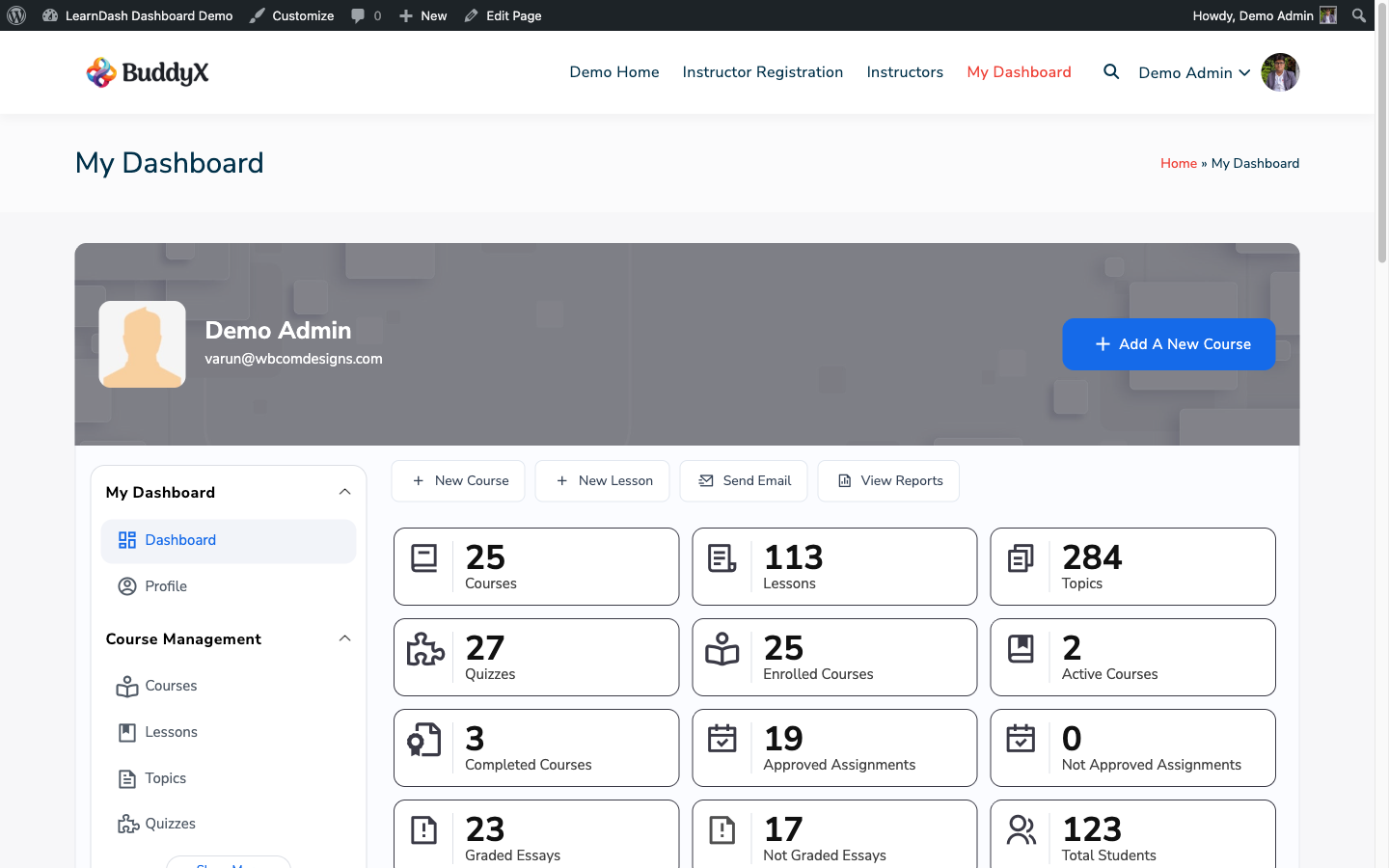
The complete front-end hub: stats, navigation, and everything in one place

Instructors manage courses, enrollments, and cloning without touching wp-admin

Six visual reports replacing ProPanel, with CSV export on every chart

Group management from the front end. No wp-admin, no separate plugin

Bulk enroll hundreds of students at once with CSV upload and filter-based selection

Course-aware messaging keeps student questions tied to the right context

Simple, honest pricing

One-time payment or annual subscription. All features included in every plan — no hidden add-ons.

Personal
1 site
$99/yr
$79 /year 20% off
  • 1 site license
  • 1 year of updates and support
  • All features included
  • Instructor dashboard and commissions
  • Groups, messaging, and bulk tools
Get Personal
Most popular
Developer
5 sites
$199/yr
$159 /year 20% off
  • 5 site licenses
  • 1 year of updates and support
  • All features included
  • Instructor dashboard and commissions
  • Groups, messaging, and bulk tools
  • Priority support
Get Developer
Agency
Unlimited sites
$249/yr
$199 /year 20% off
  • Unlimited site licenses
  • 1 year of updates and support
  • All features included
  • Instructor dashboard and commissions
  • Groups, messaging, and bulk tools
  • White-label ready
  • Priority support
Get Agency

Annual plans renew automatically. Cancel any time before renewal.

30-day money-back guarantee. No questions asked.

Rated 4.7/5 on Trustpilot from 87 reviews

Top notch support! I've been frustrated generally by the slow support for most themes and plugins, but they are helpful and quick to reply. Highly recommend!

Woods

Trustpilot Review

I wanted to build a community website and these guys created the perfect plugins for me. To be honest, I want to buy every single one of their plugins.

Sora Seaton

Trustpilot Review

The template from Wbcom Designs is truly great. Modern, flexible, and easy to use. The support is very helpful and friendly. For questions or problems you receive fast, competent assistance.

Barry Bohme

Trustpilot Review

Common questions

What can students do from the dashboard?
Students get a full personal learning hub: view enrolled courses with progress tracking, browse lessons and topics, see quiz scores and attempt history, submit assignments, download earned certificates, and message instructors directly. Everything is accessible from the front end without any WordPress admin access.
What types of reports does it include?
The Insights tab has six visual charts covering course completion, enrollment trends, time spent, top courses, drop-off rates, and revenue. Beyond that, there are dedicated report pages for Quiz Attempts, Essay Submissions, Assignment Status, Student Details, Time Tracking, and Commission History. Every report exports as CSV.
Does it work with my existing LearnDash setup?
Yes. Dashboard for LearnDash installs as a standard WordPress plugin alongside LearnDash. Your existing courses, students, groups, and progress data stay exactly where they are. No migration, no setup wizard, nothing to move.
What happens to my data if I'm switching from ProPanel?
Nothing changes. ProPanel stores its reporting data separately. Dashboard for LearnDash reads from the same LearnDash database tables: your course progress, quiz results, and enrollment records are intact. You can run both plugins simultaneously during your trial period.
Does it work with Uncanny Groups?
Yes. Dashboard for LearnDash includes a dedicated Uncanny Groups module. You can manage group seats, enrollment codes, and group leader assignments directly from the hub without switching to a separate interface.
Does it replace BuddyPress messaging?
No, and by design. The Private Messages tab handles course-aware messaging between students and instructors. BuddyPress handles broader social messaging. They work together, not against each other, and Dashboard for LearnDash includes a BuddyPress integration module.
Can instructors create courses without WordPress admin access?
Yes, completely. Instructors create courses, add lessons, create topics, build quizzes, write quiz questions, and set up certificates entirely from the front-end dashboard. No wp-admin access at any step. This is what makes Dashboard for LearnDash unique: it's not just a reporting or management tool, it's a full course authoring workspace on the front end.
Can instructors manage their courses without WordPress admin access?
Yes. Each instructor sees only their assigned courses, their enrolled students, and their earnings. No wp-admin access required. Everything is managed from the front-end instructor dashboard, including course creation, assignment approval, Zoom meetings, and course announcements.
What's included in every plan?
All plans include the full feature set: student progress dashboard, instructor workspace, certificate downloads, commission tracking, ACF field builder, all six Insights charts, all reports (quiz, essay, assignment, time tracking, commission), groups management, private messaging, bulk management, course cloning, Zoom integration, assignment review, and course announcements. Nothing is gated by plan tier.
What's the difference between annual and lifetime?
Annual gives you 1 year of updates and support. The plugin keeps working after expiry but won't receive new updates until you renew. Lifetime gives you updates and support permanently with a single payment.
Is it actively maintained?
Yes. v7.5.0 shipped with major new features including bulk management, course cloning, time tracking, private messaging, Zoom integration, and the Uncanny Groups module. Updates are released regularly and distributed through the Wbcom store.

Replace your addon stack and save up to $500/year.

One license. Instant download. Works with any WordPress theme.

Buy Dashboard for LearnDash Read the docs