Wbcom Designs WordPress Wiki Plugin
Wiki Plugin BuddyPress Front-End Editing REST API v1.0.0

Turn your WordPress site into a wiki in 5 minutes.

WB Member Wiki adds full wiki functionality to any WordPress site. Members create and edit pages from the front end, every change is tracked with revision history, and pages connect automatically with [[WikiLink]] syntax. Works standalone or integrates natively with BuddyPress and BuddyBoss. One plugin, zero coding, instant wiki.

Get WB Member Wiki Read the Docs Try Live Demo See All Features
Turn your WordPress site into a wiki in 5 minutes. — product screenshot
87 Five-Star Reviews on TrustpilotWorks With Any ThemeBuddyPress CompatibleWordPress 6.9 TestedPHP 7.4+GPL LicensedNo Coding Required

WordPress has pages, posts, and categories. It does not have a wiki.

WordPress Pages are static and single-author
Pages have no revision comparison, no contributor workflow, no cross-linking syntax, and no way for multiple people to collaborate without wp-admin access. They were designed for About Us and Contact, not collaborative documentation.
Existing wiki plugins are abandoned or bare-bones
Most WordPress wiki plugins on the repository have not been updated in years. Yada Wiki's last update was 2022. Very Simple Knowledge Base has no revision history and no front-end editing. The choices are limited.
MediaWiki requires a separate installation
MediaWiki is powerful but it needs its own server, its own database, its own user accounts, and wikitext markup. Running a MediaWiki instance alongside WordPress means maintaining two separate systems.
SaaS wikis mean another login and another bill
Notion, Confluence, and Slite are all separate platforms. Your team has to context-switch, maintain separate accounts, and pay monthly per-user fees. Documentation lives outside your WordPress ecosystem.
WB Member Wiki adds real wiki functionality - collaborative editing, revision tracking, cross-linking, and permissions - directly to your WordPress site. No separate tools.
The only plugin of its kind

The most complete wiki plugin available for WordPress.

Other WordPress wiki plugins offer basic page creation. WB Member Wiki delivers a full wiki engine: front-end editing, revision diffs, [[WikiLinks]], edit locking, moderation queues, watchlists, Table of Contents, and BuddyPress profile integration. Everything a wiki should be, native on WordPress.

01

Front-end editing with zero wp-admin exposure

Contributors create and edit wiki pages entirely from the front end. The rich text editor supports headings, lists, tables, images, and code blocks. No contributor ever needs to see the WordPress dashboard.

02

Native BuddyPress and BuddyBoss wiki tab

Activate the plugin on a BuddyPress or BuddyBoss site and a Wiki tab appears on every member profile automatically. Community members see each other's contributions without any configuration.

03

Import from MediaWiki, Notion, and Confluence

Migrating from another platform? Upload your export file and pages are created with their hierarchy, categories, and images. Switch to WordPress without losing your existing documentation.

Your WordPress wiki is live in three steps

1
Install and activate the plugin
Upload the WB Member Wiki plugin ZIP to your WordPress site and activate it. Works with any theme. No server configuration, no separate database, no external accounts.
2
Add the shortcode to a page
Create a new WordPress page and drop in [member-wiki-dashboard]. Your wiki dashboard is immediately live - with search, category browsing, and page creation all in one place.
3
Set permissions and start creating
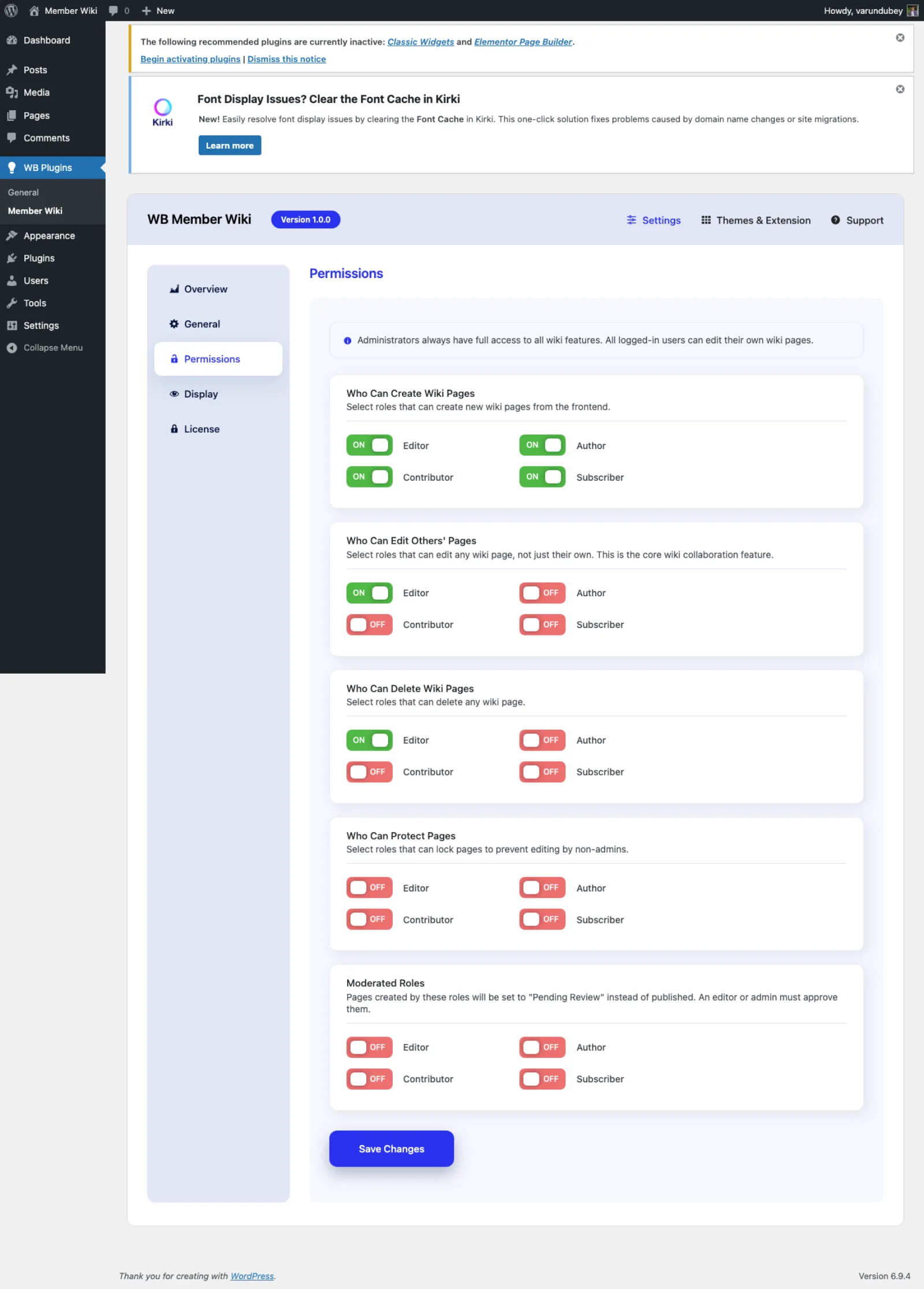
Choose which WordPress roles can create, edit, and manage wiki pages. Members start contributing from the front end. BuddyPress wiki tabs appear automatically if the community plugin is active.

Who it's for

WordPress site owners who need a wiki
Add wiki functionality to your existing site without installing separate software. Same theme, same login, same hosting. One plugin and your wiki is live.
BuddyPress and BuddyBoss community builders
Give your community a collaborative knowledge base with wiki tabs on every member profile. Members contribute pages alongside their activity and connections.
Internal teams running WordPress intranets
Build process documentation, onboarding guides, and team wikis inside your existing WordPress intranet. Front-end editing means contributors never need wp-admin access.
Course creators and educators
Let students build a shared study wiki. Track contributions with revision history. Moderate submissions to maintain quality. A collaborative learning tool on your LMS site.
Open source projects and documentation maintainers
Run your project documentation as a public wiki on WordPress. Community members contribute, you moderate, and revision history tracks every change.
Membership sites looking for sticky features
A member-built wiki is one of the most engaging features you can add. Members contribute knowledge, reference each other's work, and keep coming back to update their pages.

WB Member Wiki vs Yada Wiki vs Very Simple Knowledge Base

Yada Wiki and Very Simple Knowledge Base are the most visible free wiki plugins on the WordPress repository. Here is how WB Member Wiki compares on the features that matter for a real wiki.

Capability
WB Member Wiki
Full Wiki
Yada Wiki
Basic
Very Simple KB
Basic
Front-end page editing (no admin access)
Revision history with visual diff
[[WikiLink]] auto-linking syntax
Role-based create/edit/delete permissions
Moderated review queue
Edit locking (prevents conflicts)
Watchlist with email notifications
Auto-generated Table of Contents
BuddyPress/BuddyBoss profile tab
Import from MediaWiki, Notion, Confluence
Full REST API
Actively maintained (2024+)
Shortcode-based dashboard

Yada Wiki and Very Simple Knowledge Base handle basic page creation, but neither offers the collaborative features that make a wiki useful. WB Member Wiki is the only WordPress wiki plugin with front-end editing, revision diffs, moderation, watchlists, and community platform integration.

Wiki for WordPress

Real wiki features that WordPress Pages were never designed to have

WordPress Pages are static, single-author, and isolated from each other. A wiki needs collaborative editing, version tracking, cross-referencing, and community contribution. WB Member Wiki bridges that gap - every feature designed specifically for multi-author knowledge bases running on WordPress.

Revision comparison with word-level precision
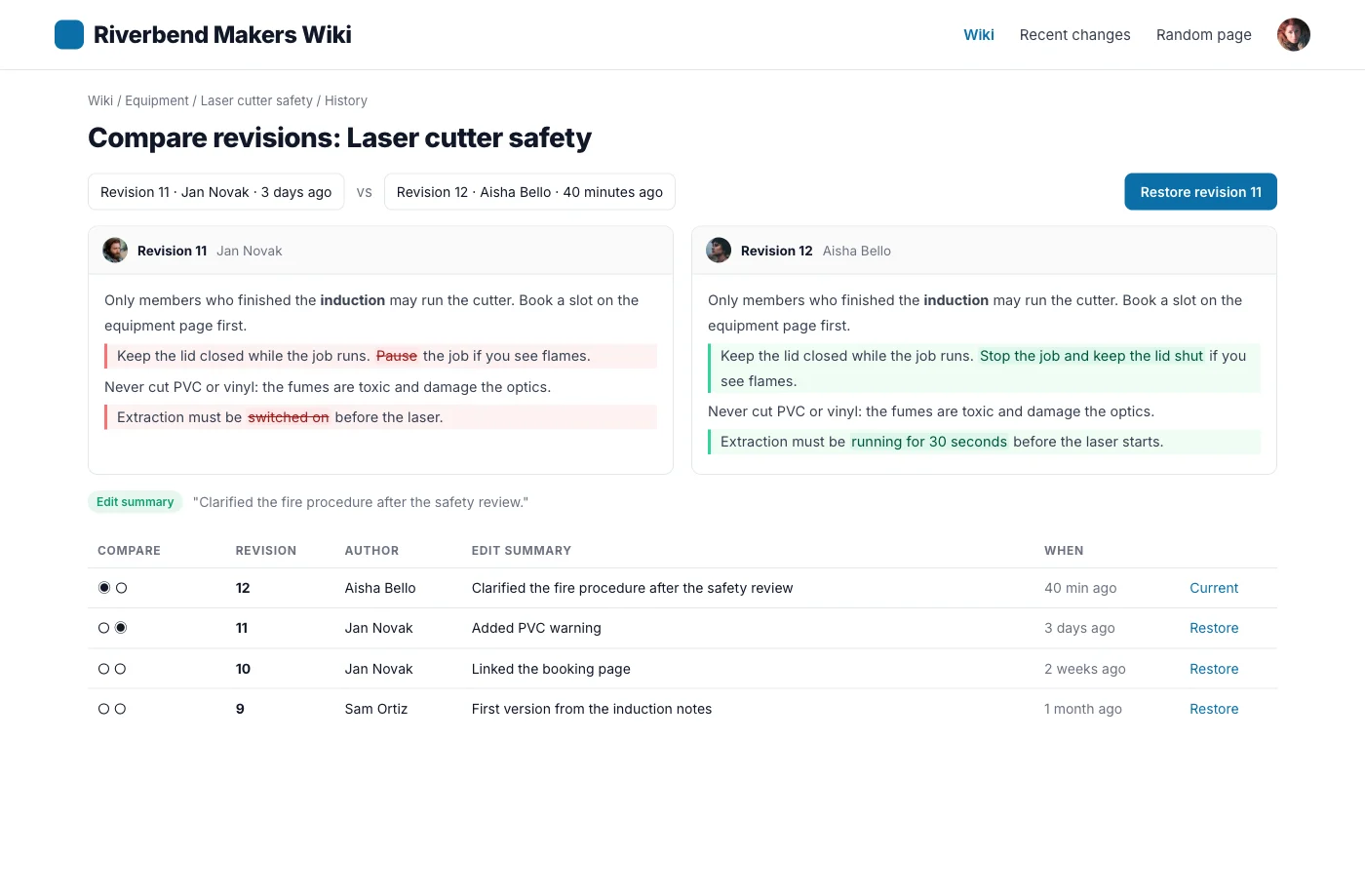
Every save creates a tracked revision. Select any two versions and see exactly what changed - word by word. Restore any previous state with one click. This alone puts WB Member Wiki ahead of every other WordPress wiki plugin.
[[WikiLinks]] that build your content map
Type [[Page Title]] in any wiki page and it becomes an automatic link. If the target page does not exist yet, the link shows in red - a wanted page. Your team always knows what to write next.
Moderation queue for quality control
Enable moderated roles and new pages go into a pending queue instead of publishing immediately. Admins and editors review, approve, or reject submissions. Community contribution without quality risk.
Single wiki page with Table of Contents and WikiLink cross-references

A wiki page with automatic Table of Contents and [[WikiLink]] cross-references - features no other WordPress wiki plugin offers

Everything your community needs

No extensions to buy. No integrations to configure. It ships with all of this.

Front-end page creation and editing

Members create and edit wiki pages from the front end with a rich text editor. Headings, lists, tables, images, and code blocks supported. No wp-admin access required.

Complete revision tracking

Every save creates a versioned snapshot. Compare any two revisions with word-level diff highlighting. Restore previous versions with one click. Full change audit for every page.

[[WikiLink]] automatic cross-references

Type [[Page Title]] to create links between wiki pages automatically. Non-existent targets display as red wanted links - a built-in roadmap of missing content.

Per-role permission controls

Configure create, edit, delete, and protect permissions independently for each WordPress role. Works with any membership plugin that uses standard WordPress roles.

Submission moderation workflow

Mark specific roles as moderated. Their pages enter a pending queue instead of publishing immediately. Admins review and approve before content goes live.

Edit locking to prevent conflicts

When a member opens a page for editing, others see a lock notice showing who is currently editing. No conflicting saves. Lock releases automatically after the session ends.

Collapsible Table of Contents

Pages with three or more headings get an auto-generated, collapsible TOC. Long documentation becomes scannable without any shortcodes or manual table building.

Watchlist with email notifications

Members watch pages they care about. When a watched page changes, they get an email with a direct link to the diff view. Passive awareness of content updates.

BuddyPress, BuddyBoss, and PeepSo wiki tabs

When a community platform plugin is active, a Wiki tab appears on every member profile automatically. Contributions are visible alongside activity and connections.

Wiki search with content gap logging

Full-text search across all wiki pages with category and tag filtering. Zero-result searches are logged in the admin so you can identify and fill content gaps.

Import from three platforms

Migrate existing wikis from MediaWiki (XML), Notion (Markdown ZIP), or Confluence (HTML ZIP). Pages import with their hierarchy, categories, tags, and images.

REST API and 40+ developer hooks

Full REST API for wiki pages and revisions. 40+ actions and filters. Template override system for custom output. Build on top of the wiki engine without modifying plugin files.

Simple, honest pricing

One-time payment or annual subscription. All features included in every plan — no hidden add-ons.

Personal
1 site
$49 /year
  • 1 site license
  • 1 year of updates & support
  • All features included
  • BuddyPress, BuddyBoss & PeepSo integration
  • REST API access
Get Personal
Most popular
Developer
5 sites
$79 /year
  • 5 site licenses
  • 1 year of updates & support
  • All features included
  • BuddyPress, BuddyBoss & PeepSo integration
  • REST API & developer hooks
  • Priority support
Get Developer
Agency
Unlimited sites
$149 /year
  • Unlimited site licenses
  • 1 year of updates & support
  • All features included
  • BuddyPress, BuddyBoss & PeepSo integration
  • REST API & developer hooks
  • White-label ready
  • Priority support
Get Agency

Annual plans renew automatically. Cancel any time before renewal.

30-day money-back guarantee. No questions asked.

Rated 4.7/5 on Trustpilot from 87 reviews

The theme is beautifully designed, and the plugins are user-friendly. Everything works smoothly. What impressed me most is their outstanding customer support: quick, helpful, and always willing to go the extra mile.

S W Malcolm

Trustpilot Review

We use BuddyPress with several plugins from Wbcom Designs, and we are extremely satisfied. The plugins add real value for our community, are updated regularly, and integrate seamlessly.

Peter Gibson

Trustpilot Review

I have learned that if the support is not prompt and effective it is a sign to move on. Tonight, Wbcom has impressed me. Fast, friendly and effective.

Steve Valencia

Trustpilot Review

Common questions

What makes WB Member Wiki different from other WordPress wiki plugins?
Most WordPress wiki plugins only create a custom post type with basic shortcodes. WB Member Wiki includes front-end editing, revision history with visual diffs, [[WikiLink]] syntax, edit locking, moderation queues, watchlist notifications, auto Table of Contents, BuddyPress profile tabs, and a REST API. It is a complete wiki engine, not a page organizer.
Do I need BuddyPress to use WB Member Wiki?
No. WB Member Wiki works completely standalone on any WordPress site. Add the [member-wiki-dashboard] shortcode to any page and the wiki is live. BuddyPress, BuddyBoss, and PeepSo are optional - when active, the plugin adds wiki tabs to member profiles and community integration automatically.
Can visitors read wiki pages without logging in?
Yes. You control visibility settings. Public wikis are readable by anyone. You can also restrict reading to logged-in users for internal or private wikis. Creating and editing always requires authentication with appropriate role permissions.
How does [[WikiLink]] syntax work?
Type [[Page Title]] anywhere in a wiki page and the plugin automatically creates a hyperlink to that page. If the target page exists, the link appears normally. If the page does not exist yet, the link appears in red as a wanted page - signaling to your team that someone should create it.
Can I control which users can create or edit pages?
Yes. The Permissions tab lets you set create, edit, delete, and protect capabilities independently per WordPress role. You can also enable moderated roles where pages go into a review queue before publishing. Works with any membership plugin that uses standard WordPress roles.
Will it work with my existing WordPress theme?
Yes. WB Member Wiki renders inside your theme's page templates and inherits your site's styling. The shortcode-based dashboard, wiki pages, and editing forms all match your existing design. For custom styling, the plugin includes a template override system.
Is there a way to organize wiki pages into categories?
Yes. Wiki pages support categories and tags for organization and filtering. The wiki dashboard includes category browsing and the search supports category filtering. Pages can belong to multiple categories.
Can I migrate my existing wiki from MediaWiki or Notion?
Yes. WB Member Wiki imports MediaWiki XML exports, Notion Markdown ZIPs, and Confluence HTML ZIPs. Pages are created with their original hierarchy, categories, tags, and images. You can migrate your existing content instead of rebuilding from scratch.

Ready to add a real wiki to your WordPress site?

One license. Instant download. Works with any WordPress theme.

Buy WordPress Wiki Plugin Read the docs Try the demo