
- Cost
- Software free; the server time is yours
- Upgrades
- Follow MediaWiki releases, with 1.43 as the long-term support line
- Stack
- PHP 8.3+ and MariaDB, MySQL, PostgreSQL or SQLite
- Extends with
- Extensions, templates and namespaces
- Accounts and data
- Its own user accounts and database
MediaWiki alternative
A wiki your members edit, with no second server to run.
Pages, categories, a contents list and double-bracket links, inside the WordPress you already maintain. Import your MediaWiki XML export and carry on writing in a normal editor.
- 4.8/5 on Trustpilot
- MediaWiki XML Import
- One Login for Site and Wiki
- WordPress 6.9 Tested
- PHP 7.4+
- GPL Licensed
What crosses over
The article text comes across. Be ready to rebuild the rest.
Export your wiki as XML and the importer reads it. It is worth knowing exactly which markup survives that trip, because a MediaWiki page is usually more than prose.
Converted on the way in
- Headings, all levels
- Bold and italic
- External links, with or without a label
- Horizontal rules
- Bulleted and numbered lists, one level deep
- Indented blocks, as preformatted text
Not converted
- Images
- File and Image links are removed rather than fetched. There is no attachment option on the MediaWiki form, unlike the Confluence and Notion ones.
- Tables
- Wikitable markup is not converted and arrives as literal text, so any page built around a table needs rebuilding by hand.
- Templates and references
- Double-brace templates and ref footnotes are stripped out. Whatever they were rendering is gone rather than broken.
- History and hierarchy
- Only the current version of each article comes across, and pages arrive without parents. Talk, Template and Help namespaces are skipped entirely.
The part people assume
Wikitext is a translation, not the editor you get afterwards
The conversion above runs once, while the import is happening. From then on you are writing in the ordinary WordPress editor, so typing three apostrophes around a word gives you three apostrophes around a word.
One piece of wiki syntax does stay live, and it is the one that matters most: double square brackets. [[Style Guide]] links to that page, [[Style Guide|our house style]] labels the link, and a page that does not exist yet renders as a red link that starts creating it. Backlinks are indexed as you save, so every page can show what points at it.
TWO ROUTES
MediaWiki next to WordPress, or a wiki inside WordPress. Both are sound.
- Cost
- $49 / year or $149 lifetime, 1 site
- Upgrades
- Updates from the WordPress Plugins screen
- Stack
- PHP 7.4+ and the WordPress database you already run
- Extends with
- 62 hooks, template overrides, WordPress plugins
- Accounts and data
- WordPress accounts; pages stored as a post type
MEDIAWIKI CONCEPT MAP
Each MediaWiki habit, and where it lives in WB Member Wiki
MediaWiki features from the mediawiki.org help pages, read 2026-09-17. Rows with no direct equivalent are gaps worth knowing before you switch.
History
| In MediaWiki | In WB Member Wiki | Worth knowing |
|---|---|---|
| Page history with diffs |
| Each page keeps 25 revisions by default. Raise the limit in settings. |
| Protected pages |
| Only the person who protected the page and admins can edit it. |
Show the remaining 10 rows across 3 more categories Hide the full comparison
Links and structure
| In MediaWiki | In WB Member Wiki | Worth knowing |
|---|---|---|
| Internal [[links]] and red links |
| The same syntax, typed in the WordPress editor. |
| What links here |
| See every page that points to the one you are reading. |
| Redirects |
| Add ?redirect=no to view the original page. |
| Categories and subpages |
| Imported [[Category:]] tags become Wiki Categories. |
Watching
| In MediaWiki | In WB Member Wiki | Worth knowing |
|---|---|---|
| Recent changes |
| One click from the wiki dashboard. |
| Watchlist |
| Emails link to the page and its history. |
| User contributions |
| On community sites, contributions sit on the member profile. |
Discussion and markup
| In MediaWiki | In WB Member Wiki | Worth knowing |
|---|---|---|
| Talk pages |
| Discussion sits under the page, not on a separate talk page. |
| Wikitext and VisualEditor |
| No wikitext. [[links]] are the only wiki syntax. |
| Templates and namespaces |
| The importer strips MediaWiki templates and imports main namespace pages only. |
FROM MEDIAWIKI
Bring MediaWiki pages across with Special:Export.
The importer reads MediaWiki XML. Check what converts before you switch off the old wiki.
- 01
Back up WordPress
Take a database and files backup first.
- 02
Export from MediaWiki
Use Special:Export to download the pages you want as one XML file.
- 03
Decide on edit history
Tick Import edit history to save older dates, usernames and edit notes as page data. They are not restorable revisions.
- 04
Run the import
Upload the XML on the Import tab and pick an author. The upload field notes a 64 MB limit.
- 05
Fix what did not convert
Templates, references, File links and tables need manual work. Titles that already exist are skipped.
A wiki page
Familiar page anatomy, rendered by your WordPress theme
Edit, History, Watch and Protect sit above the title. Contents, contributors and categories sit beside it, and sub-pages are listed below.
History
Opens the revision list, with compare and restore.
Watch
Adds the page to My Watchlist and its email alerts.
Print
Opens a clean print view of the page.
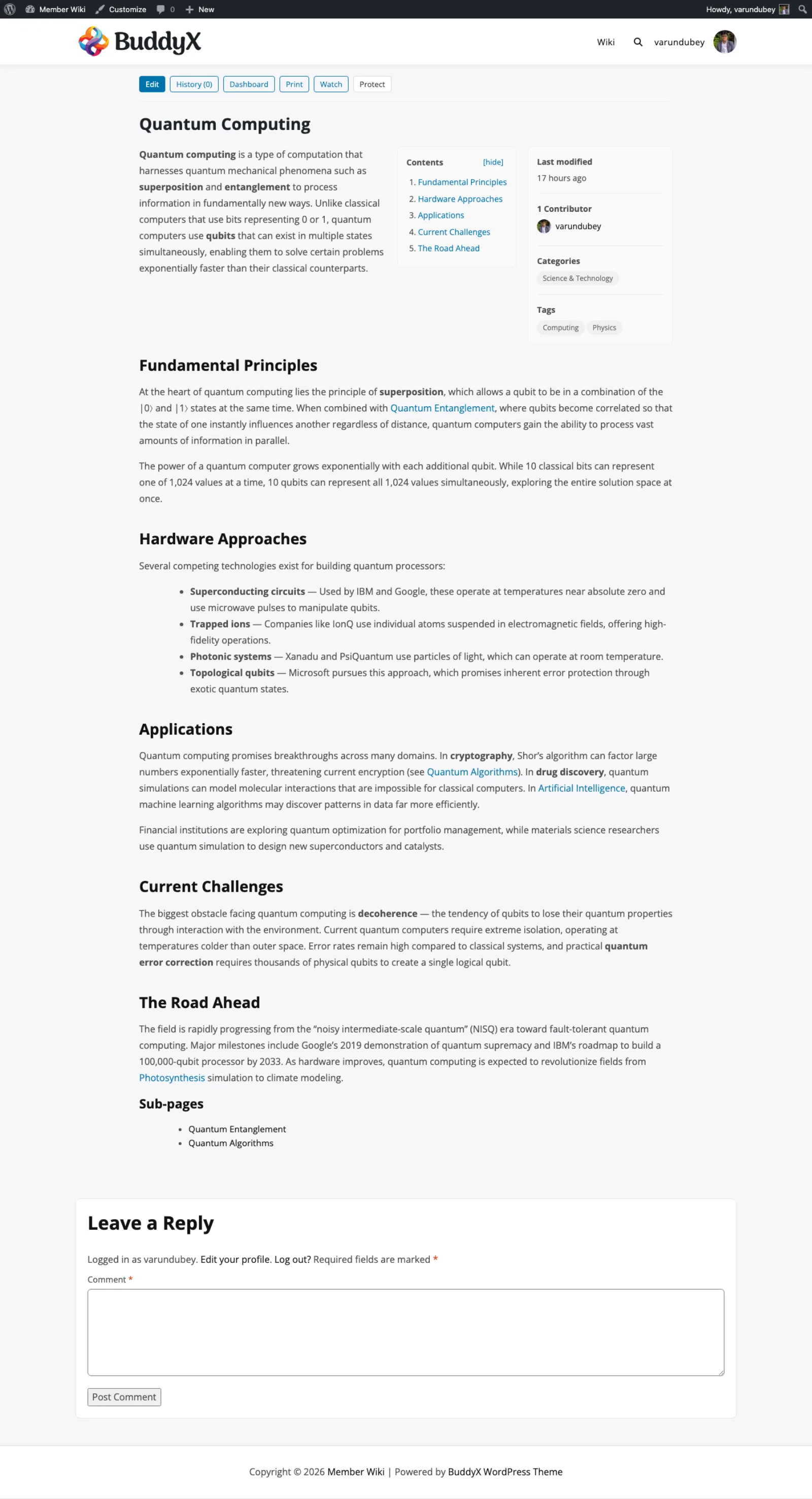
Action buttons above the title, a contents box and sidebar beside it, and sub-pages at the end.
What changes when the wiki lives in WordPress
The practical differences for the admin who used to run two systems.
-
One account for site and wiki
Editors sign in with their WordPress account. There is no second user list to manage.
-
No second install to patch
Update the wiki from the Plugins screen, with the rest of your site.
-
Pages in the WordPress database
Wiki pages are a custom post type, so your WordPress backups include them.
-
Editing rights by role
Create, edit others' pages, delete and protect are set per WordPress role.
-
Approval for new editors
Moderated roles send pages to Pending Review until an editor approves them.
-
Edit locking
Editors see who is working on a page before they start.
-
Search suggestions
Matching pages appear as readers type.
-
REST API and hooks
Wiki pages, categories and tags are in the WordPress REST API, alongside 62 plugin hooks.
Real screens
MediaWiki habits on WordPress screens
The MediaWiki importer takes a Special:Export XML file, with an option to keep edit history as page data.
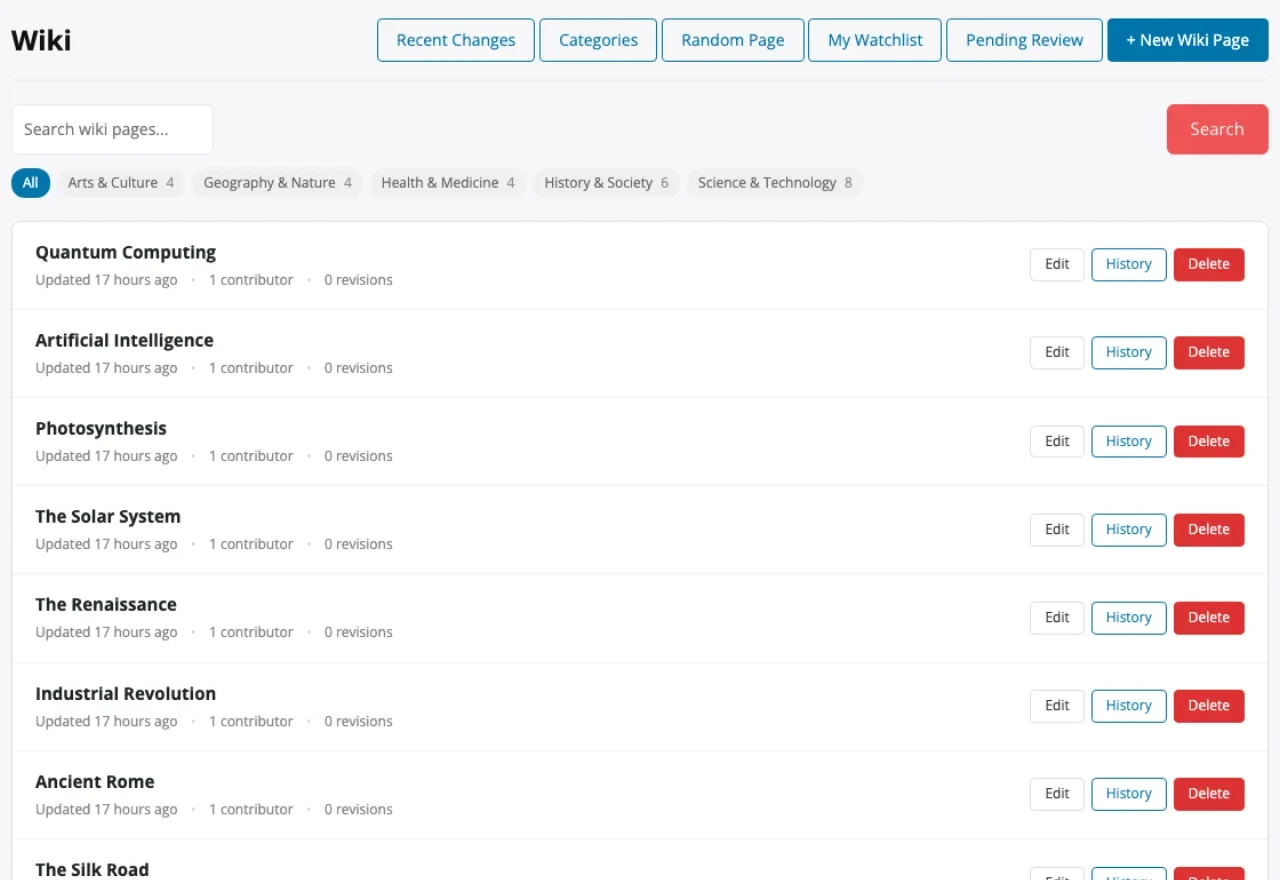
Recent Changes, Categories, Random Page and My Watchlist sit above the page list.
Internal links, sub-pages and a contents box on a finished wiki page.
Rights by role, including moderated roles whose pages need approval.
Rated 4.8/5 on Trustpilot from 96 reviews
I am very pleased with our collaboration! The team always responds quickly to requests and is ready to help. Excellent service, reliable support, and high-quality tools.
Diego
Trustpilot Review
Their BuddyPress and WordPress plugins are reliable, well-coded, and really add value to my site. What impressed me most was the support team.
Natalie Clarke
Trustpilot Review
It has been a very pleasurable experience working with Wbcom Designs. Her team completed every task we requested in a quick and decisive manner. We highly recommend!
Real America's Voice News
Trustpilot Review
No server to run. One license per site count.
Pay once and own it forever, or pick the annual plan. All features included in every plan, no hidden add-ons.
Personal
1 site
$149 one-time
or $49/year
- 1 site license
- Every feature included
- MediaWiki, Notion & Confluence importers
- BuddyPress, BuddyBoss & PeepSo integration
- Updates and support, annual or lifetime
Most popular
Developer
5 sites
$199 one-time
or $79/year
- 5 site licenses
- Updates and support, annual or lifetime
- Priority support
Agency
Unlimited sites
$399 one-time
or $149/year
- Unlimited site licenses
- Updates and support, annual or lifetime
- Priority support
The plugin keeps working. Updates and support stop until you renew.
Annual licenses include a year of updates and support and renew at 30% off. Lifetime licenses are a one-time payment and never expire.
Questions from MediaWiki admins
Can editors keep writing in wikitext?
No. Pages use the classic WordPress editor. [[Page Title]] links work, but templates, tables and other wikitext markup do not.
Does the importer keep full page history?
No. The latest revision becomes the page. With Import edit history ticked, older dates, usernames and edit notes are saved as page data for reference.
What about talk pages and other namespaces?
Only main namespace pages import. Discussion moves to WordPress comments under each page, which you can switch off.
Are images imported?
Not from MediaWiki XML. File and Image links are removed, so upload images again through the Media Library.
Will old MediaWiki URLs redirect?
Not automatically. Wiki page URLs use your WordPress slug, /wiki/ by default. Add redirects at the server or with a redirect plugin.
How do editors see what changed?
Recent Changes lists the latest edits. My Watchlist sends email on changes, and each page's history compares revisions side by side.
Is it free like MediaWiki?
No. It is a paid plugin from $49 a year or $149 lifetime for one site. In exchange, there is no separate MediaWiki install to host and upgrade.
Plugins for knowledge-driven WordPress communities
- Members write it, not just staff The member wiki page Open editing, revisions and an optional review step.
- Answering customers A knowledge base instead The same pages plus a report of every search that found nothing.
- Docs inside a community The 26-plugin bundle Profiles, groups and messaging around the people writing.
Run your wiki where your members already sign in.
One licence covers every feature, and there is no second stack to keep patched. Tiers differ by site count, with a 30-day money-back guarantee.