
$3,300 a year for 16 to 25 users.
Confluence alternative
Team docs on the site you already pay for.
A wiki with page hierarchy, revisions and role permissions, plus an importer that reads a Confluence HTML space export and rebuilds the structure it came from. Licensed per site rather than per person.
- 4.8/5 on Trustpilot
- No Per-User Fees
- Lifetime License Option
- Confluence HTML Import
- 30-Day Money-Back Guarantee
- GPL Licensed
Lifetime license From $149, 1 site
- Per-user fees
- None
- Confluence import
- HTML space export ZIP
- Runs on
- Your WordPress site
- Page privacy
- Public by URL
- Editor
- Classic WordPress editor
Getting your space across
Export the space, upload the zip, keep the shape
Confluence exports a space as HTML. The importer reads that export, and the part that matters is that it does not arrive as a pile of pages.
-
The pages, with their nesting
A second pass reads the export’s own breadcrumbs and rebuilds the parent and child structure, so a space arrives shaped the way your team left it rather than as a flat list.
-
The images and attachments
Files referenced by a page are pulled out of the export and loaded into your media library, with the links rewritten to point at their new home.
-
Into ordinary WordPress pages
What lands is a wiki page like any other: editable by your members, revisioned, searchable, and linkable with double brackets from that moment on.
Plan the run, not just the click
One space at a time, and keep Confluence running
The import happens in a single request with a five minute ceiling and a 64 MB upload limit. That is comfortable for a space and not the way to move an entire instance in one go, so export space by space and let each finish before you start the next.
There is no dry run and no resume, so the sensible order is: import into a staging site first, look at what arrived, then do it for real. Re-running skips pages whose titles already exist rather than merging them, which makes a second attempt safe but not corrective.
Do not switch Confluence off yet
Keep the original running until you have read the imported pages. Everything here is a copy into your own database, so there is no rush and nothing to undo if you decide the shape is wrong.
3-YEAR COST, 25 PEOPLE
Three years of Confluence for 25 people, next to one wiki license.
Confluence annual prices for 16 to 25 users, as listed on atlassian.com on 2026-09-17. WB Member Wiki prices from this store. Hosting is not counted.
$1,700 a year for 16 to 25 users.
One payment for one site. Adding people costs nothing.
Over three years, a Personal lifetime license costs $4,951 less than Confluence Standard for 25 people at list price. This assumes you already host WordPress. Confluence also offers a free plan for up to 10 users.
THREE WAYS TO RUN TEAM DOCS
Confluence Standard, Confluence Premium, or a wiki in WordPress. Each can work.
- Price
- $1,700 / year, billed annually
- Billing
- Or $6.70 per user a month, billed monthly
- Hosting
- Nothing to install or host
- Worth knowing
- Free plan for up to 10 users with 2 GB storage
- Your data
- Content lives in your Atlassian subscription
- Price
- $3,300 / year, billed annually
- Billing
- Or $13.20 per user a month, billed monthly
- Hosting
- Nothing to install or host
- Worth knowing
- The higher paid tier of the same product
- Your data
- Content lives in your Atlassian subscription
- Price
- $49 / year or $149 lifetime, 1 site
- Billing
- Annual renews at 30% off. Lifetime is a one-time payment.
- Hosting
- Your WordPress hosting and database
- Worth knowing
- 62 hooks, template overrides, WordPress REST API
- Your data
- Pages stay in your WordPress database
THE MOVE
Move a Confluence space into WordPress in five steps.
The importer reads Confluence's HTML space export. Keep Confluence running until you have checked the result.
- 01
Back up WordPress
Take a database and files backup before any import.
- 02
Export the space as HTML
In Confluence, open Space Settings, then Export Space, and choose HTML. You get a ZIP file.
- 03
Upload the ZIP
On the plugin's Import tab, choose the Confluence HTML ZIP and the author for imported pages.
- 04
Keep the attachments
Leave the attachments option on to copy images into the Media Library.
- 05
Check pages and hierarchy
Parent pages come from Confluence breadcrumbs. Pages whose titles already exist are skipped.
Settings > Import
The Confluence importer sits next to Notion and MediaWiki
One screen holds all three importers. Each asks for the export file and an author, then runs the import without leaving the page.
Confluence HTML ZIP
Hierarchy is rebuilt from breadcrumbs, and images can be copied into the Media Library.
Notion Markdown ZIP
Folders become parent and child pages, and Notion links become wiki links.
Duplicate titles skipped
Run an import again and pages that already exist are left alone.
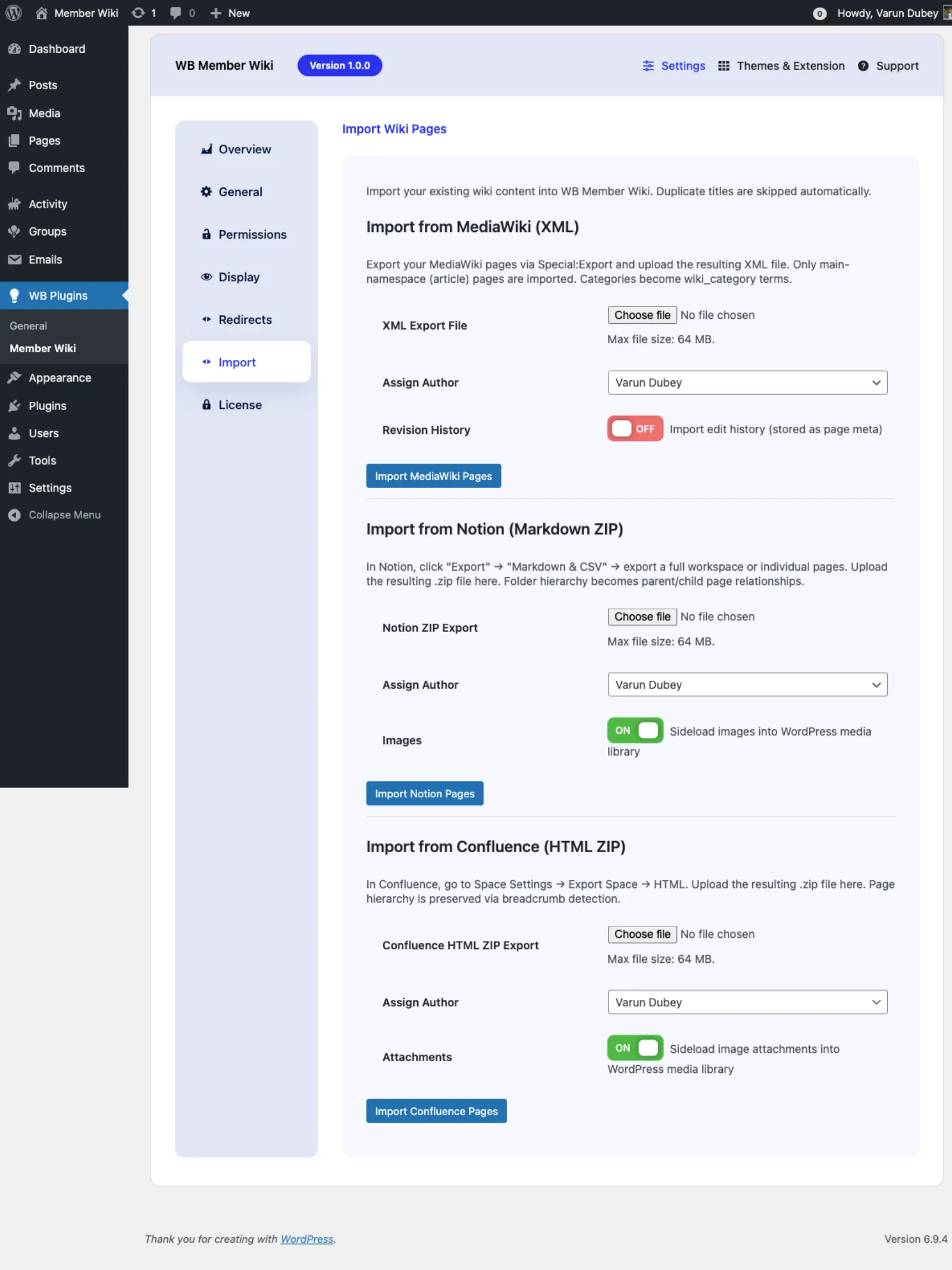
The Import tab: MediaWiki XML, Notion Markdown ZIP and Confluence HTML ZIP, each with an author picker.
What your team keeps after leaving Confluence
The documentation habits teams rely on, and where they live in WB Member Wiki.
-
Page trees
Nest pages under parents. Each page lists its sub-pages and shows breadcrumbs.
-
Page history with restore
Compare two revisions side by side and restore the older one.
-
Edit locking
Teammates see who is editing a page, so two people do not overwrite each other.
-
Watch the pages you own
Get an HTML email when a watched page changes.
-
Permissions by role
Choose who creates, edits others' pages, deletes and protects. Admins always have full access.
-
Recent changes
See the latest edits across every page from the wiki dashboard.
-
Links between pages
[[Page Title]] links pages, and each page lists what links to it.
-
Search with category filters
Suggestions appear as you type, and category chips narrow the list.
Real screens
Team pages after the move
Decide which roles create, edit others' pages, delete, protect or need approval.
A team page with its contents box, contributor, category, tags and sub-pages.
Every page in one list, with category filters and a History link on each row.
Show or hide the contents box, contributors, last modified date, revision count and view count.
Rated 4.8/5 on Trustpilot from 93 reviews
Top notch support! I've been frustrated generally by the slow support for most themes and plugins, but they are helpful and quick to reply. Highly recommend!
Woods
Trustpilot Review
I wanted to build a community website and these guys created the perfect plugins for me. To be honest, I want to buy every single one of their plugins.
Sora Seaton
Trustpilot Review
The template from Wbcom Designs is truly great. Modern, flexible, and easy to use. The support is very helpful and friendly. For questions or problems you receive fast, competent assistance.
Barry Bohme
Trustpilot Review
Priced per site. Add teammates at no cost.
Pay once and own it forever, or pick the annual plan. All features included in every plan, no hidden add-ons.
Personal
1 site
$149 one-time
or $49/year
- 1 site license
- Every feature included
- MediaWiki, Notion & Confluence importers
- BuddyPress, BuddyBoss & PeepSo integration
- Updates and support, annual or lifetime
Most popular
Developer
5 sites
$199 one-time
or $79/year
- 5 site licenses
- Updates and support, annual or lifetime
- Priority support
Agency
Unlimited sites
$399 one-time
or $149/year
- Unlimited site licenses
- Updates and support, annual or lifetime
- Priority support
The plugin keeps working. Updates and support stop until you renew.
Annual licenses include a year of updates and support and renew at 30% off. Lifetime licenses are a one-time payment and never expire.
Questions from teams leaving Confluence
What does the Confluence importer bring across?
Page titles, content, hierarchy from breadcrumbs, links between pages and image attachments. Code blocks arrive as preformatted text.
What does it leave behind?
Labels, comments, page history and original authors are not imported. Every imported page is assigned to the author you pick.
Can we keep internal docs private?
Not fully. You can limit the wiki listing to chosen roles, but published pages open for anyone with the link. For confidential docs, add a membership or site access plugin.
Is the editor like Confluence's editor?
No. Pages use the classic WordPress editor with Visual and Code tabs, tables, media and code blocks. Block editor support is planned but not released.
Does it connect to Jira?
No. There is no Jira integration. Developers can use the WordPress REST API for wiki pages and the plugin's 62 hooks.
What does it cost as the team grows?
Nothing extra. Licenses count sites, not people: $149 lifetime for one site, $199 for five and $399 for unlimited.
How large can the export be?
The upload field notes a 64 MB limit, and your host's upload limits also apply. Try a small space first.
Can we try it without risk?
Every license has a 30-day money-back guarantee. Keep Confluence running while you check the import.
Other plugins for teams working in WordPress
- Members write it, not just staff The member wiki page Open editing, revisions and an optional review step.
- Answering customers A knowledge base instead The same pages plus a report of every search that found nothing.
- Docs inside a community The 26-plugin bundle Profiles, groups and messaging around the people writing.
Move your team docs to the WordPress site you already pay for.
Licensed per site rather than per user, with a 30-day money-back guarantee. Keep Confluence running while you check the import.