Free ad manager

Put ads where they belong, and make affiliate links look like yours.

Eleven places to drop an ad on any WordPress site, five kinds of ad to drop in them, and a link cloaker that turns an affiliate URL into a page on your own domain. Free, with no licence key.
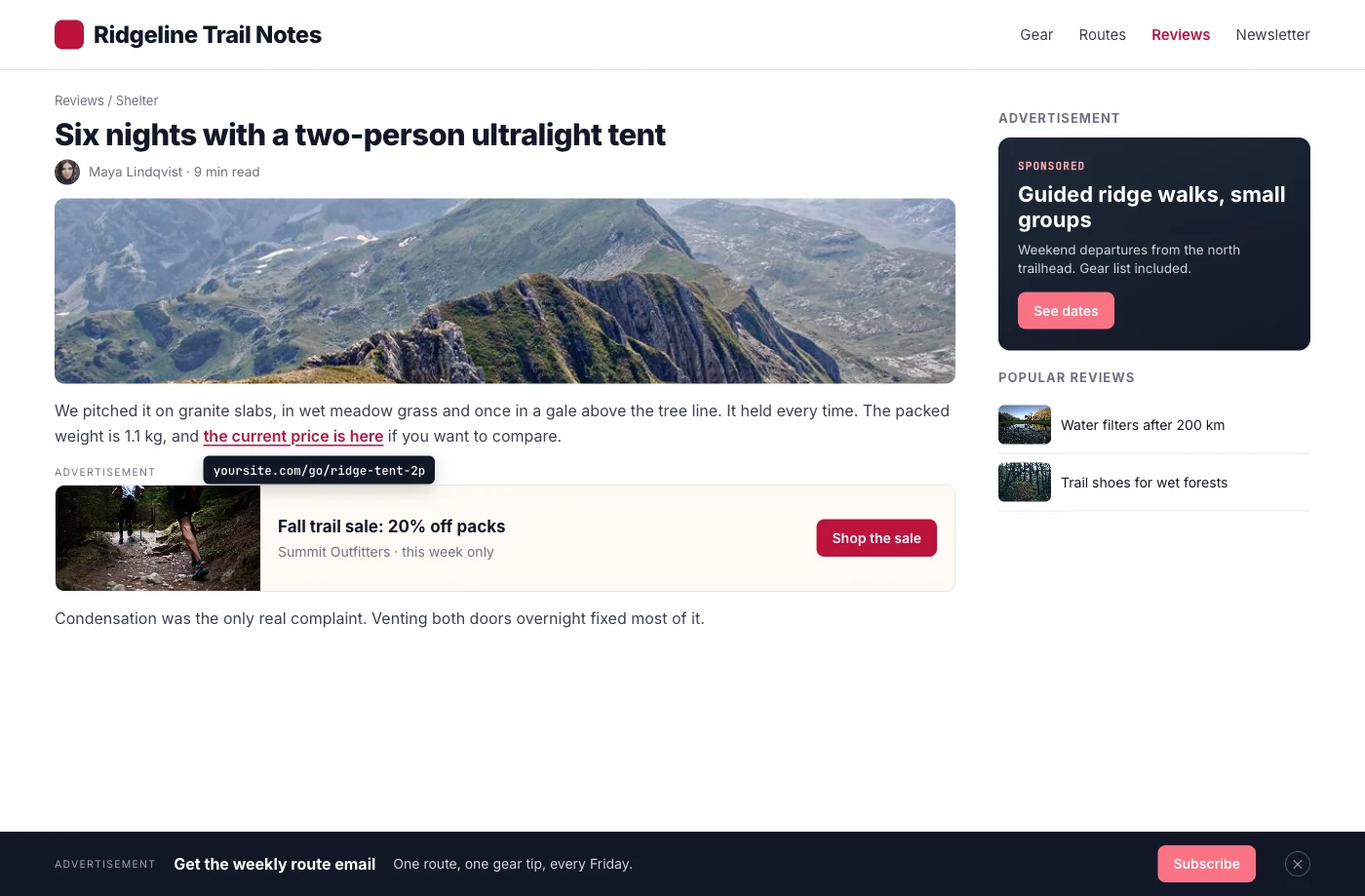
Illustrative mockup of a blog post with an in-content ad, a sidebar ad, a sticky footer bar and a cloaked /go/ link
Illustrative mockup: one post carrying an in-content ad, a sidebar ad, a sticky bar and a cloaked link.
  • 4.8/5 on Trustpilot
  • Free on WordPress.org
  • No license key
  • Ad manager and link cloaker
  • Dark mode and RTL ready
  • GPL Licensed

Where an ad can go

Eleven places on any WordPress site, before you add a thing

Each one is a slot the plugin already knows how to fill. Put several ads in the same slot and one is drawn each time the page builds, weighted by the priority you give it.

  • Around the page

    • Header, above everything
    • Footer
    • Sticky bar
    • Pop-up
  • Inside the writing

    • Top or bottom of the content
    • After a chosen paragraph
    • Around comments
  • Where you place it

    • Any widget area
    • A shortcode, anywhere at all
  • Around a list of posts

    • Before an archive loop
    • After an archive loop

Running a community? BuddyPress adds five more, bbPress one and Jetonomy seven, for twenty-four in total. On a plain WordPress site the number is eleven, and this page would rather you knew that before you installed it.

WHERE ADS CAN GO

Every slot on the page, without editing a template

Choose placements per ad. Community slots appear only when that plugin is active.

In the article

Before or after the post, after paragraph N with a repeat option, and before or after post archives.

4 placements

Attention formats

Sticky corners and bars, and popups that open after a delay, at a scroll percentage or on exit intent.

2 placements

Around the page

Header, footer, comment areas, widget areas and the [wbam_ad] shortcode anywhere a shortcode runs.

5 placements

Community slots

BuddyPress activity and member or group directories, 7 bbPress positions and 7 Jetonomy positions.

Loads when active

Who sees it, and when

Device, login status, role, country and content rules. Dates, weekdays, hours and impression caps.

Per ad

Links and leads

Cloaked /go/ links with click counts, a link partnership form, and email capture leads you can export.

Built in

Your first ad and first cloaked link, step by step

1
Install from WordPress.org
Search for WB Ad Manager under Plugins, Add New. The setup wizard can add sample ads to try.
2
Create an ad
Pick one of five ad types, choose placements, then set targeting, schedule and priority.
3
Cloak a link and tag your ads
Add a /go/ link with its redirect type. Tag ads by sponsor or season to switch groups on and off.
New in 3.1.0: ad tags

Switch off a sponsor's whole set of ads at once

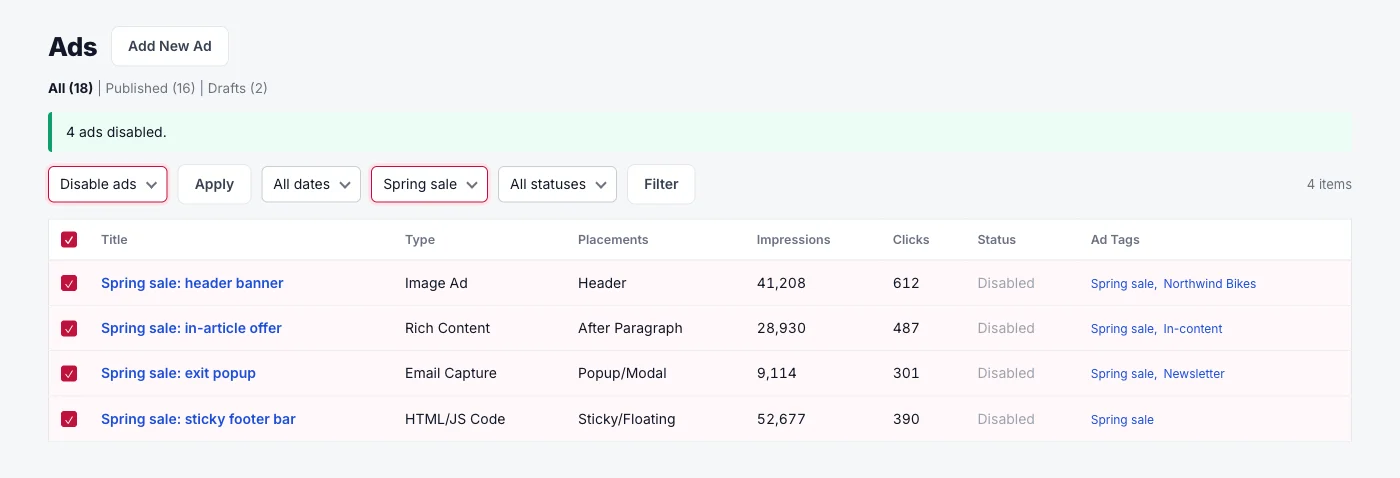
Tag ads by sponsor, season or format. Filter the Ads list by one tag, select the rows, then choose Enable ads or Disable ads.

As many tags as you need
One ad can carry several tags, set in the editor or with Quick Edit and Bulk Edit.
Filter by tag
The All ad tags dropdown narrows the list to one group, next to the status filter.
Organisation only
Tags never change which ads serve. Placements, targeting and rotation still decide delivery.
Illustrative mockup of the Ads list filtered to the Spring sale tag after the Disable ads bulk action

Illustrative mockup: four Spring sale ads disabled together from the tag-filtered Ads list

FREE OR PRO

Free places your ads. Pro lets others pay for them.

Pro installs on top of the free plugin. Every ad, link and setting stays where it is.

WB Ad Manager
Free $0 on WordPress.org
Pro from $59/yr
Ads
5 ad types, 11 placements, community slots
Rotation, targeting, scheduling, caps
Ad tags with bulk enable and disable
CTR comparison with a winner badge
A/B tests with traffic split and Declare Winner
✕
Ad Folders by advertiser, campaign and tag
✕
Links
Cloaked /go/ links with click counts
Link partnership inquiry form
Keyword auto-linking and link scanner
✕
Broken-link health checks and CSV import
✕
Selling ads
Advertiser dashboard on the front end
✕
Credits via WooCommerce, PMPro, MemberPress, Stripe or PayPal
✕
Packages and flat, CPM or CPC campaigns
✕
Classifieds marketplace
✕
Reports
Impressions, clicks and CTR per ad
Email capture leads with CSV export
Revenue dashboard with CSV download
✕

What the free plugin handles on its own

No license key and no limit on ads or links. Pro additions are listed in the table below.

  • Five ad types

    Image, Rich Content, HTML/JS Code, Google AdSense and Email Capture share one placement and targeting engine.

  • Weighted rotation

    Several ads in one slot rotate by priority. A broken creative gives its slot to the next eligible ad.

  • Scheduling and caps

    Start and end dates, days of the week, time of day, per-session limits and a total impression cap.

  • Targeting rules

    Target by device, login status, user role, country, post type, category, tag or page template.

  • Cloaked affiliate links

    Turn long URLs into yoursite.com/go/ links with 301, 302 or 307 redirects and nofollow or sponsored.

  • Link categories and expiry

    Group links, set expiry dates, and send expired links to a 404, the homepage or a custom URL.

  • Google AdSense

    Add your Publisher ID once. The AdSense script loads only on pages that show an AdSense ad.

  • Email capture with CSV export

    Inline subscribe forms. Leads land in an admin list you can export, or delete for GDPR requests.

  • Link partnership inquiries

    A form for paid links, exchanges and sponsored posts, with accept, reject and automatic emails.

  • Creative CTR comparison

    Compare two ads' click-through rates side by side. The winner badge waits for enough data and a 20% lead.

The free plugin in wp-admin

Cloaked links with their destination, /go/ URL, clicks and status

An image ad: banner, link, alt text, priority and sizing in one screen

An HTML/JS Code ad for ad network or custom embed snippets

An Email Capture ad with its headline, button text and success message

The Ads list with type, placement, impressions, clicks and status per ad

Ad Settings: who sees ads, where ads are hidden, and the ad label text

Free forever, with Pro ready when advertisers arrive

Pay once and own it forever, or pick the annual plan. All features included in every plan, no hidden add-ons.

WB Ad Manager Free
Unlimited sites
Free
  • Unlimited sites (no license key)
  • Link cloaker with click tracking
  • 5 ad types, 11 placements (24 with BuddyPress, bbPress and Jetonomy)
  • Weighted rotation, priority, frequency caps
  • Scheduling + device / role / content targeting
  • Geo-targeting by country
  • AdSense support (Auto Ads + manual)
  • BuddyPress, bbPress, and Jetonomy integration
  • Email capture ads
  • Partnership inquiry form + workflow
  • REST API for ads and links
  • Forever free (no feature locks)
Get WB Ad Manager Free
Most popular
Pro Personal
1 site
$199 one-time
or $59/year
  • Everything in Free, plus:
  • 1 site license
  • Advertiser self-serve portal + wallet
  • Classifieds marketplace (frontend submission, featured / urgent)
  • Campaigns, ad packages, membership plans
  • A/B testing with statistics + winner promotion
  • Keyword auto-linking, link scanner, CSV link import
  • Revenue dashboard + geo / device analytics
  • All 5 Credits SDK adapters (WC / Subscriptions / Memberships / PMPro / MemberPress)
  • Updates and priority support, annual or lifetime
  • 30-day money-back guarantee
Get Pro Personal
Pro Professional
5 sites
$299 one-time
or $129/year
  • Everything in Pro Personal
  • 5 site licenses
  • Priority support
  • Updates and support, annual or lifetime
Get Pro Professional
Pro Agency
Unlimited sites
$499 one-time
or $299/year
  • Everything in Pro Personal, plus:
  • Unlimited site licenses
  • Priority email support
  • 30-day money-back guarantee
Get Pro Agency

The plugin keeps working. Updates and support stop until you renew.

Free forever. Annual licenses include a year of updates and support and renew at 30% off. Lifetime licenses are a one-time payment and never expire.

Questions about the free ad manager

Is WB Ad Manager really free?
Yes. The WordPress.org plugin needs no license key and has no limit on ads or links. Pro is a separate add-on for selling ads and running classifieds.
Does it work with BuddyPress, bbPress and Jetonomy?
Yes. Their slots appear only when that plugin is active. You get BuddyPress activity and directory slots, 7 bbPress positions, and 7 Jetonomy positions on Jetonomy 1.3.0 or newer.
Do ad tags change which ads show?
No. Tags only group ads in the admin. Placements, targeting, schedules and rotation still decide what serves.
Can I show ads inside a page builder layout?
Yes, anywhere a shortcode or widget runs. Use [wbam_ad id="123"] for one ad or [wbam_ads ids="1,2,3"] for several.
How does it handle visitor privacy?
IP addresses are anonymized for frequency tracking, and AdSense can wait for consent. You can also opt in to deleting all plugin data on uninstall.
Can I bring links over from another link plugin?
In the free plugin you add links one at a time under Links. CSV import of links and keywords is part of Pro.
What does Pro add?
An advertiser dashboard, credits, packages and campaigns, a classifieds marketplace, A/B tests, Ad Folders, keyword auto-linking and a revenue dashboard.
Where is my ad and click data stored?
In your WordPress database. Ads are a post type, and links, clicks and email captures use the plugin's own tables.

Place your first ad today. Add Pro when advertisers want in.

Placements, ad types, rotation, scheduling, geo targeting and the link cloaker are all in the free plugin, on unlimited sites.