Feature voting for WordPress

Let the people who use it tell you what to build next.

Members post an idea, everyone else votes on it, and the ones who asked get an email the day it moves. Free on your own site, with no seat count and nobody billing you as the board grows.

Under review

Dark mode across the whole dashboard

Reading the reports at night is rough. A dark theme that follows the system setting would help a lot.

176 votes · 8 comments
A request as a member sees it. The board carries the counts, and the item takes the vote.
  • 4.8/5 on Trustpilot
  • Voting in the free plugin
  • Voting with WordPress accounts
  • Voter emails on status change
  • Public roadmap and changelog
  • WordPress 5.8+, PHP 7.4+
Free plugin Voting, statuses, emails
Who votes
Logged-in members
Merge duplicates
Pro
Layouts
1 free, 5 more in Pro
Changelog
Free
Requires
WordPress 5.8+, PHP 7.4+
UPDATED 2026-09-17

Counting what people want

A vote count you would be willing to plan a quarter around

Any plugin can put a number on a card. The question is whether that number survives contact with a keen customer, a bored script and the same idea being asked for twice.

  • One person, one vote, and they can take it back

    A vote is a row belonging to the voter. Voting again updates that row instead of adding another, so nobody accumulates weight on an idea by clicking twice.

  • The total is recounted, never incremented

    After every vote the plugin re-adds the rows and writes the result. The number on the card is not a running tally that can drift away from the votes behind it.

  • Enthusiasm has a ceiling

    Thirty votes a minute and five new suggestions an hour, counted per account. Enough that nobody browsing normally notices, low enough that a script gives up.

  • A vote has a person attached

    Because voting needs an account, every vote is something the plugin can write back to. That is what lets it email exactly the right people when the idea moves.

Then you can actually use it

  • Sort by Top Voted and the argument about what to build next is over in one click.
  • Group by status, category or priority to see whether the loud requests are the ones you already started.
  • Open the item where the vote button, the discussion and the target date sit together.

The one thing that splits a count

Two people ask for the same thing in different words

On the free plugin

You get two items and two counts, and neither looks like the priority it really is. Deleting one takes its votes with it, so the tidy-up costs you the very signal you were collecting.

With Pro

Merge one into the other. The votes move across, anyone who had voted on both is counted once rather than twice, the comments follow, the total is recalculated from the rows, and both items record what happened to them.

BUYER'S GUIDE

Six jobs a feature request board has to do, from idea to release

Check any voting plugin against this list. Here is how Product Roadmap handles each job, and which parts need Pro.

1. Collect ideas

Logged-in users submit a title and description from the board. Guests can submit too with Pro.

Free for members, guests in Pro

2. Keep the board clean

Suggestions wait for approval, and rate limits plus a honeypot stop spam without a captcha.

Approval queue, free

3. Count real demand

One vote per member account, and voting again removes it. Sort by Most Voted to see what leads.

Member voting, free

4. Merge duplicates

Fold a repeat request into the original. Votes and comments move, and double votes are skipped.

Pro

5. Tell voters what changed

When an item changes status, everyone who voted or commented with an account gets an email.

Status-change emails, free

6. Show the plan and the result

A public roadmap shows what is next, and a changelog records what shipped.

Roadmap and changelog, free

CHECKED ON WORDPRESS.ORG, 2026-09-17

Three feature request plugins, compared on the jobs that matter.

Simple Feature Requests Free plugin, Pro sold separately
Free version covers
Voting, comments, fixed statuses
Paid version adds
Kanban roadmap, status emails, guest voting, custom statuses
Guest voting
Pro
Emails to voters
Pro only
Latest version
2.4.9.6, updated about 3 months ago, 100+ installs
IdeaPush Free plugin, Pro sold separately
Free version covers
Up or up and down voting, custom statuses
Paid version adds
Merge duplicates, multiple boards, custom voter emails, reports
Guest voting
Free
Emails to voters
Admin and author emails free, voter emails in Pro
Latest version
8.77, updated about 5 months ago, 700+ installs
Product Roadmap Free plugin, Pro from $59 a year
Free version covers
Voting, suggestions, custom statuses, changelog
Paid version adds
Merge duplicates, guest suggestions, five layouts, analytics
Guest voting
Not yet, members vote
Emails to voters
Status-change emails to voters, free
Latest version
1.7.1, released July 2026
Recommended
Free roadmap view

Votes and plans on one page, before you pay anything

The free Minimal view groups requests into now, next and later, with vote and comment counts on every item. Visitors filter by status and search.

Status chips with counts
One click shows only Planned, In Progress or any status you add.
Sort by what matters
Most Voted, Most Recent, Most Discussed or Highest Priority.
Target dates on items
Show a target date and progress for work already planned.
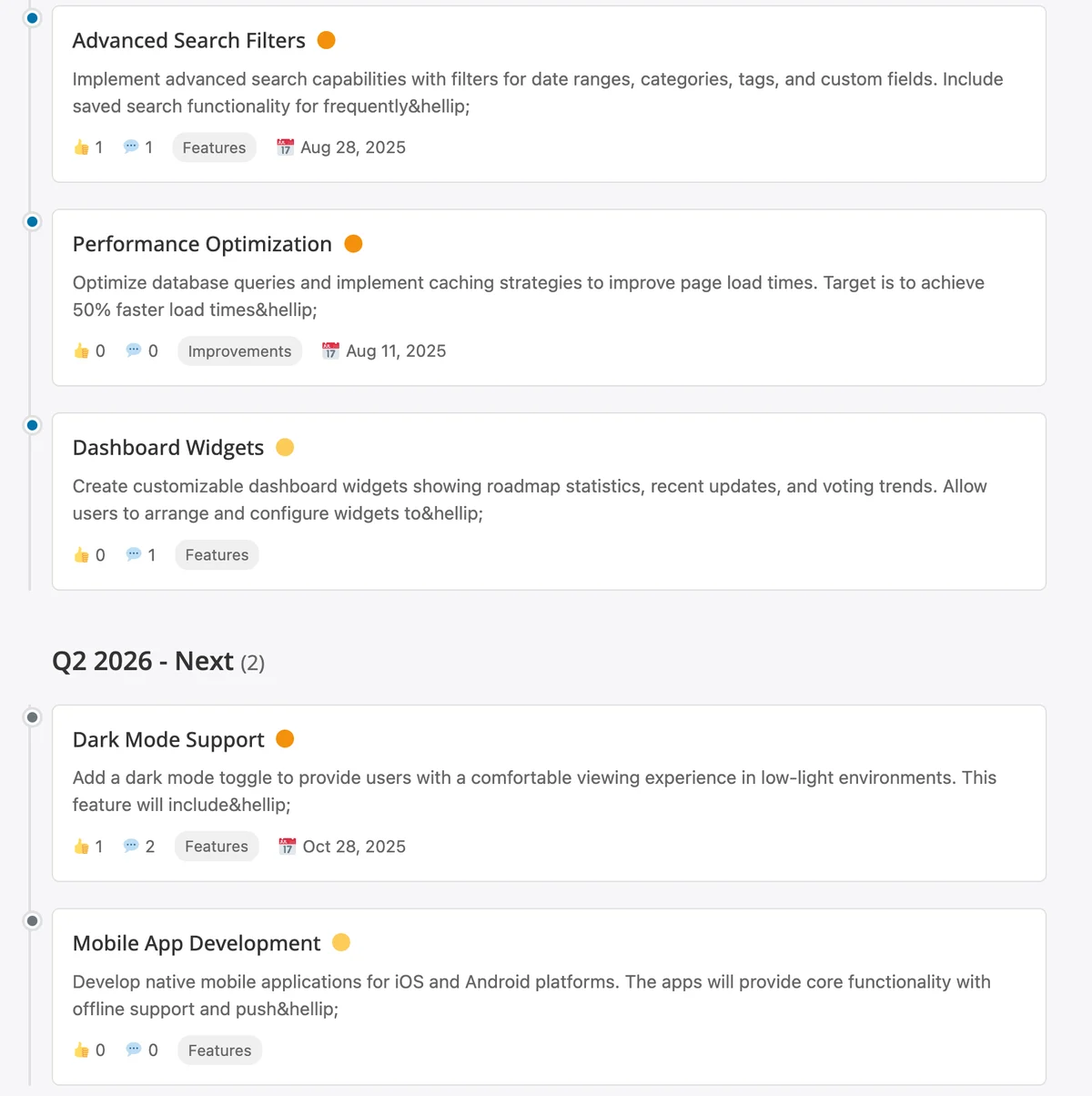
Free Minimal view with items grouped under Q1 2026 Now and Q2 2026 Next, showing votes, comments, categories and target dates

The free Minimal view: requests grouped by quarter with votes, comments and target dates.

Everything around the vote button

Voting works best with the pieces around it. Items marked Pro need Product Roadmap Pro.

  • Toggle votes on and off

    One click votes, a second removes it. Voted items show a clear Voted state.

  • Suggestion form on the board

    Members suggest ideas. Items from users carry a Suggested badge so you can tell them apart.

  • Spam protection without captcha

    Per-user and per-IP rate limits on votes and suggestions, plus a honeypot.

  • Statuses you can rename

    Planned, Under Review, In Progress, On Hold and Completed to start.

  • Emails voters can stop

    Status-change emails include a one-click unsubscribe link.

  • Duplicate merging (Pro)

    Combine repeat requests and keep every vote in one place.

  • Idea Box and Kanban (Pro)

    Plus Timeline, List and Cards layouts for the same requests.

  • Feedback widget (Pro)

    A floating button that collects ideas from any page you choose.

  • Shortcode or block

    Use [roadmap] anywhere. Pro adds a Gutenberg block.

Feature requests from vote to release

Cards layout (Pro) sorted by votes: the most requested features come first.

Choose who can vote and suggest, and whether suggestions need approval.

Kanban layout (Pro): requests move across status columns as work progresses.

Statuses with item counts, plus a notice when suggestions wait for review.

The changelog shows voters which requests shipped, and when.

Rated 4.8/5 on Trustpilot from 96 reviews

I am very pleased with our collaboration! The team always responds quickly to requests and is ready to help. Excellent service, reliable support, and high-quality tools.

Diego

Trustpilot Review

Their BuddyPress and WordPress plugins are reliable, well-coded, and really add value to my site. What impressed me most was the support team.

Natalie Clarke

Trustpilot Review

It has been a very pleasurable experience working with Wbcom Designs. Her team completed every task we requested in a quick and decisive manner. We highly recommend!

Real America's Voice News

Trustpilot Review

Start with free voting, add Pro when the board grows

Pay once and own it forever, or pick the annual plan. All features included in every plan, no hidden add-ons.

Free
Unlimited sites
$0 /year
  • Unlimited sites, no license key
  • Public roadmap (Minimal view)
  • Member voting
  • Suggestions with moderation
  • Five default statuses, add your own
  • Priority, progress, target dates
  • Status-change emails to voters
  • Public changelog
  • REST API and spam checks
Get Free
Pro Personal
1 site
$199 one-time
or $59/year
  • Everything in Free, plus:
  • 1 site license
  • Kanban, Timeline, List, Cards and Idea Box layouts
  • Multiple product roadmaps
  • Analytics dashboard with CSV export
  • Merge duplicates and guest suggestions
  • Webhooks, CSV import, Gutenberg block
  • Updates and support, annual or lifetime
Pro Professional
5 sites
$299 one-time
or $129/year
  • Everything in Pro Personal, plus:
  • 5 site licenses
  • Updates and support, annual or lifetime
Most popular
Pro Agency
Unlimited sites
$499 one-time
or $299/year
  • Everything in Pro Personal, plus:
  • Unlimited site licenses
  • Priority support
  • Updates and support, annual or lifetime

The plugin keeps working. Updates and support stop until you renew.

Free forever. Annual licenses include a year of updates and support and renew at 30% off. Lifetime licenses are a one-time payment and never expire.

Choosing a feature voting plugin

Is voting included in the free plugin?
Yes. Voting, suggestions with moderation, statuses, comments, status-change emails, the Minimal roadmap view and the changelog are all free. Download it from the Product Roadmap page in this store.
Can people vote without registering?
Not yet. The board asks visitors to log in before they vote or comment. Pro lets logged-out visitors submit ideas as guest suggestions. If anonymous voting is essential, IdeaPush lists guest voting in its free version.
Can users downvote?
No. Product Roadmap uses upvotes only. Voting again removes the vote.
How do I handle duplicate requests?
In Pro, open the duplicate and merge it into the original. Votes and comments move over, votes from the same person are not counted twice, and the duplicate goes to the trash.
Will voters know when their request ships?
Yes. Voters and commenters get an email when the item's status changes, with a one-click unsubscribe link.
Can I run separate boards for different products?
Yes, with Pro. Each product has its own roadmap and shortcode. The free plugin runs one roadmap.
Does it work with my theme?
The board picks up your theme's accent colour and follows its dark mode toggle. It renders from a shortcode, so it works in the block editor and page builders.

Add a vote button to your roadmap today.

Voting, suggestions, statuses and the emails to voters are all in the free plugin, on unlimited sites, with no licence key.