Wbcom Designs WordPress Media Gallery Plugin
Media Gallery Member Uploads WordPress Any Theme v1.0.0

Your media gallery should be a community, not a slideshow.

Static gallery plugins display what the admin uploads. WPMediaVerse is a media platform where members contribute images, videos, and audio. Albums, collections, likes, comments, and activity feeds make your gallery a living part of your site. Works with any WordPress theme. Built on custom database tables so performance scales with your content. Free forever.

Download Free Read the Docs Try Live Demo See WPMediaVerse Pro
Your media gallery should be a community, not a slideshow. — product screenshot
87 Five-Star Reviews on TrustpilotWordPress 6.9 TestedPHP 7.4+Custom DB TablesGPL LicensedWorks With Any ThemeImages + Video + Audio

Traditional gallery plugins hit a wall when your site grows beyond admin-only content.

NextGEN Gallery is admin-only
One of the oldest gallery plugins on WordPress. Powerful for photographers managing their own galleries, but no front-end uploads, no member profiles, no social layer. Members cannot contribute.
Modula is beautiful but static
Gorgeous grid layouts with lightbox effects. But it is a display tool. No member uploads, no comments, no albums that users create. Your gallery is a curated showcase, not a community.
Image-only plugins ignore video and audio
Most gallery plugins handle images exclusively. If your community shares video tutorials, podcast episodes, or music tracks alongside photos, you need separate tools with separate interfaces.
Post-meta storage degrades at scale
Gallery plugins that store data as WordPress attachments or post meta slow down as your library grows. Queries against wp_posts and wp_postmeta become expensive past a few thousand items.
WPMediaVerse is a media platform, not just a gallery. Members upload all media types, engage with social features, and the custom database architecture scales without degradation.
The only plugin of its kind

The only WordPress media gallery where members contribute images, video, and audio

Front-end uploads, albums, social features, explore feeds, and custom database tables. All free.

01

Three media types in one gallery system

Images, video, and audio in a unified feed. Members filter by type. Collections can mix formats or be type-specific. No separate plugins for each media format.

02

Members are contributors, not just viewers

Front-end drag-and-drop uploads for any registered user. Members create their own albums, set privacy per upload, and manage their media library from their profile.

03

Social features that keep galleries active

Likes, emoji reactions, threaded comments, favorites, bookmarks, and follows. Activity feeds surface new uploads. Your gallery stays active between admin updates.

Turn your WordPress site into a media platform in under 10 minutes

1
Install WPMediaVerse
Upload the plugin or install from WordPress.org. The setup wizard creates your media pages, sets upload limits, and configures privacy defaults.
2
Configure who can upload
Choose which WordPress roles can upload media, create albums, and comment. Enable AI moderation to automatically review uploads before they go public.
3
Your gallery becomes a living media community
Members upload images, videos, and audio. They create albums, browse the explore feed, react to content, and follow other contributors. Activity feeds keep the community active.

Who it's for

Community sites with user-generated content
Members upload photos and videos directly. No admin bottleneck. Albums, comments, and activity feeds make the gallery a community hub.
Churches and religious organizations
Congregation members share event photos, sermon recordings, and music performances. Privacy controls keep content visible only to members.
Schools and educational platforms
Students submit multimedia projects. Instructors comment with feedback. Class galleries organized by course, semester, or assignment.
Nonprofits and volunteer organizations
Volunteers upload photos from events and fieldwork. Activity feeds share new content with the community. No technical skills needed to contribute.
Hobbyist communities and fan sites
Members share artwork, cosplay photos, music covers, and video reviews. Social features keep engagement high between meetups and events.
WordPress developers and agencies
Drop a full media platform into any client site. Works with any theme. REST API supports custom frontends. 13 Gutenberg blocks for page building.

Gallery plugins were not designed for community-contributed media

NextGEN is built for professional photographers uploading their own work. Modula is built for beautiful static displays. WPMediaVerse is built for communities where members contribute media and engage with it.

Capability
WPMediaVerse
WordPress
NextGEN Gallery
WordPress
Modula
WordPress
Front-end member uploads
Video and audio support
Member-created albums
Likes, comments, and reactions
Activity feeds
Explore page with filters
Follow/unfollow system
Custom database tables
Privacy controls per upload
AI content moderation
BuddyPress integration
REST API
Free version with full features

WPMediaVerse is the only free WordPress media gallery with member uploads, social features, mixed media types, and custom database tables. Your gallery becomes a community.

Mixed media gallery

Images, video, and audio in one unified gallery platform

Traditional gallery plugins handle images only. If your community shares video tutorials, podcast clips, or music tracks alongside photos, you need a platform that treats all media types as first-class citizens. WPMediaVerse displays images, videos, and audio files in the same feeds, albums, and explore pages. Members filter by type when browsing. Collections can mix formats or focus on one. No separate plugins, no separate interfaces.

Unified feed with type filtering
The explore page and activity feeds show all media types together. Visitors filter by images, video, or audio to focus on what they want. Mixed collections feel natural.
Smart collections auto-curate by type
Create collections that auto-populate based on media type, tag, creator, or date range. A 'Latest Videos' collection updates itself without manual curation.
Lightbox adapts to media type
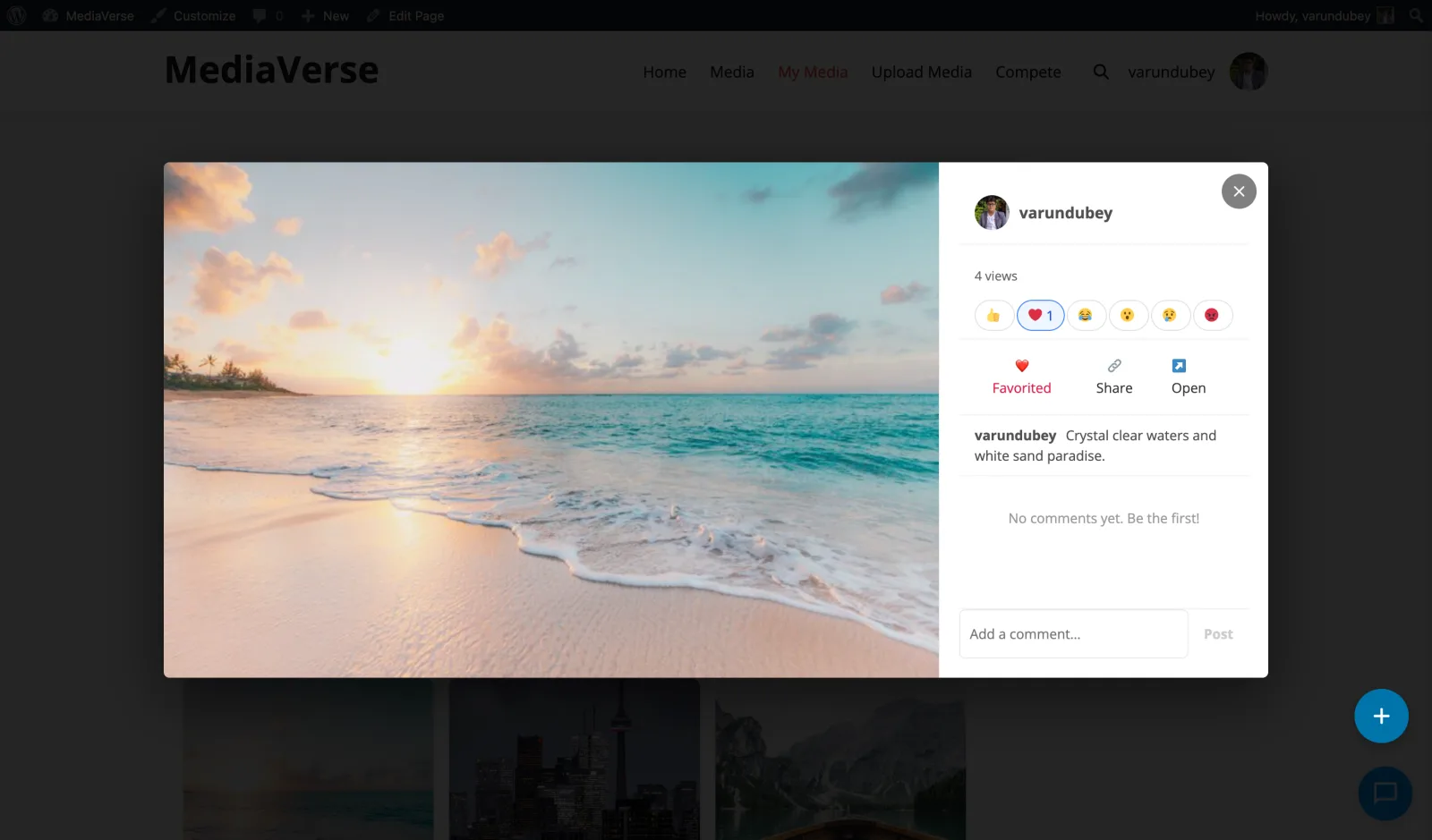
Images open in a full-screen lightbox with gallery navigation. Videos play inline with native controls. Audio files show a waveform player. One consistent UI, three media experiences.
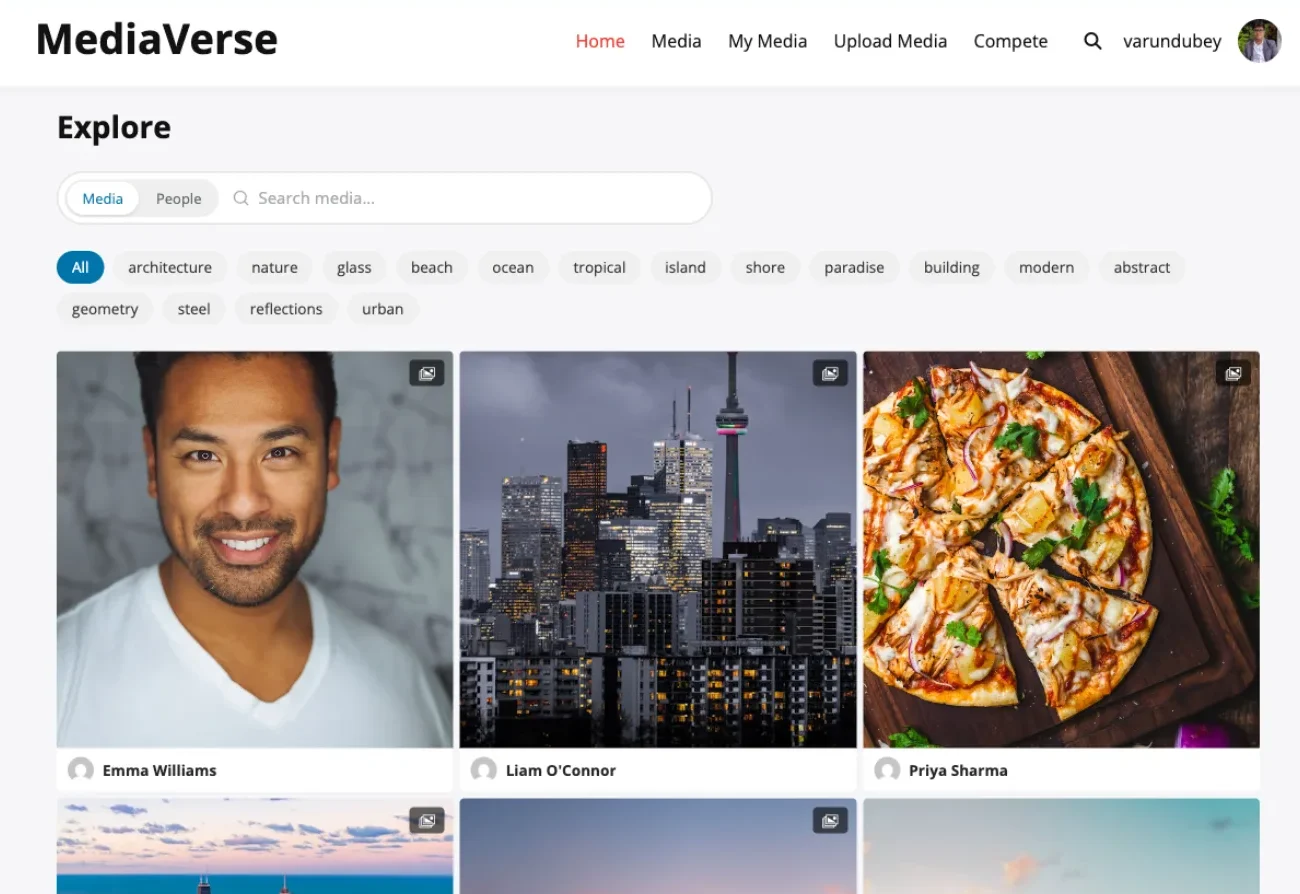
Explore feed showing mixed media types in a filterable grid

The explore feed shows images, videos, and audio in one grid with type filtering and tag navigation.

Everything your community needs

No extensions to buy. No integrations to configure. It ships with all of this.

Front-end drag-and-drop uploads

Members upload images, videos, and audio without accessing wp-admin. MIME validation, EXIF stripping, duplicate detection, and automatic thumbnail generation.

Albums and smart collections

Members create albums with cover images and descriptions. Smart collections auto-curate based on tags, media type, creator, or date range. Tag-based smart collections auto-organize media as it is uploaded.

Reactions, comments, and favorites

Emoji reactions, threaded comments, and favorites on every upload. Members engage with content and provide feedback to contributors.

Explore page with category filtering

A public explore feed shows all community media. Filter by tag, media type, contributor, or date. Built-in search covers titles, descriptions, and tags.

Activity feeds track everything

New uploads, comments, reactions, and album creations appear in the activity feed. Members see what is happening across the community at a glance.

Six privacy levels

Public, members-only, friends-only, group-restricted, private, or custom rules. Contributors control who sees each piece of content they upload.

AI moderation out of the box

OpenAI Vision scans uploads automatically. Flag or reject inappropriate content before it appears publicly. No Pro license required for AI moderation.

Follow system and personal feeds

Members follow contributors they enjoy. Personal feeds show uploads from followed users. A social graph that keeps members returning to your gallery.

13 Gutenberg blocks

Media grid, lightbox, upload button, album viewer, explore feed, story viewer, and more. Build gallery pages visually without shortcodes.

BuddyPress integration (optional)

If BuddyPress is active, media tabs appear on profiles and groups. Activity feed uploads integrate seamlessly. Works perfectly without BuddyPress too.

80+ REST API endpoints

Full API coverage across 17 controllers. Build custom gallery frontends, mobile apps, or headless media platforms.

Works with any WordPress theme

No special theme required. Templates are overridable from your theme directory. Gutenberg blocks render correctly in any theme with standard block support.

A complete platform, not a simple widget

Explore page with community uploads, filters, and type navigation

Full-screen lightbox with reactions, threaded comments, and navigation

Admin dashboard with upload statistics and AI moderation queue

Simple, honest pricing

One-time payment or annual subscription. All features included in every plan — no hidden add-ons.

WPMediaVerse Free
Unlimited sites
Free
  • Unlimited sites, no license key
  • Images, video, and audio uploads
  • Albums, collections, and explore feed
  • AI moderation via OpenAI Vision
  • Social features: reactions, comments, follows, DMs
  • BuddyPress integration
  • 80+ REST API endpoints
  • 13 Gutenberg blocks
  • Forever free, no feature locks
Get WPMediaVerse Free
Most popular
Pro Personal
1 site
$69/yr
$48 /year 30% off
  • Everything in Free, plus:
  • 1 site license
  • 5 layout modes (Instagram, Pinterest, Dribbble, Flickr)
  • Photo challenges, battles & tournaments
  • Cloud storage (S3 + BunnyCDN)
  • Video transcoding with HLS
  • Auto-captions via Whisper AI
  • Per-user storage quotas
  • 1 year of updates & support
Get Pro Personal
Pro Agency
Unlimited sites
$199/yr
$139 /year 30% off
  • Everything in Personal, plus:
  • Unlimited site licenses
  • Migration importers (rtMedia, MediaPress, BuddyBoss)
  • Google Vision + AWS Rekognition
  • Watermarking
  • Client site deployment
  • Priority email support
  • 30-day money-back guarantee
Get Pro Agency

Annual plans renew automatically. Cancel any time before renewal.

30-day money-back guarantee. No questions asked.

Rated 4.7/5 on Trustpilot from 87 reviews

The theme is beautifully designed, and the plugins are user-friendly. Everything works smoothly. What impressed me most is their outstanding customer support: quick, helpful, and always willing to go the extra mile.

S W Malcolm

Trustpilot - 5 stars

We use BuddyPress with several plugins from Wbcom Designs, and we are extremely satisfied. The plugins add real value for our community, are updated regularly, and integrate seamlessly.

Peter Gibson

Trustpilot - 5 stars

I have learned that if the support is not prompt and effective it is a sign to move on. Tonight, Wbcom has impressed me. Fast, friendly and effective.

Steve Valencia

Trustpilot - 5 stars

Common questions

How is this different from a regular WordPress gallery plugin?
Traditional gallery plugins like NextGEN and Modula display media that the admin uploads from wp-admin. WPMediaVerse is a platform where registered members upload their own images, videos, and audio from the front end. It includes albums, social features, activity feeds, and an explore page. It is a media community, not a static gallery.
Does it work with my existing WordPress theme?
Yes. WPMediaVerse works with any WordPress theme that supports standard block editor features. No special theme required. All templates are overridable from your theme directory for custom styling.
Can non-admin users upload media?
Yes. You configure which WordPress roles can upload media, create albums, and comment. Members upload from the front end using a drag-and-drop interface. They never need wp-admin access.
Does it handle video and audio, or just images?
All three. Images, video, and audio files are supported in a unified system. Members upload any type, organize them into mixed or type-specific albums, and the explore feed filters by media type.
Will it slow down my site if members upload a lot of content?
No. WPMediaVerse uses three custom MySQL tables for media data, completely separate from the wp_posts table that stores your pages and posts. Tested with 100,000+ uploads without query degradation.
Can I moderate uploads before they go public?
Yes. AI moderation via OpenAI Vision scans every upload automatically and flags inappropriate content. You can also enable manual moderation where uploads require admin approval before publishing.
Do I need BuddyPress?
No. WPMediaVerse is a standalone media platform with its own pages, profiles, uploads, and social features. BuddyPress is optional. If it is active, profile tabs and group media tabs activate automatically.
Can I use this alongside my existing gallery plugin?
Yes. WPMediaVerse does not interfere with other gallery plugins. It uses its own database tables, pages, and upload directory. You can run both side by side during a migration or permanently.

Ready to upgrade from a static gallery to a living media platform?

One license. Instant download. Works with any WordPress theme.

Buy WordPress Media Gallery Plugin Read the docs Try the demo