
- Price
- Quote after a demo, no public price list
- Priced by
- Feedback volume, tools and integrations, never by seat
- Where it runs
- Hosted by UserVoice
- Getting set up
- Expert onboarding assistance
- Trying it
- Free trial after booking a demo
UserVoice alternative
Customer feedback you moderate, on a domain you own.
UserVoice publishes no plan prices and quotes you after a call. This is a plugin with the price on the page, where every suggestion lands unpublished in your own database until you approve it.
- 4.8/5 on Trustpilot
- Published prices, no demo call
- Moderation queue for every idea
- Status emails to voters
- Role-based permissions
- 30-day money-back guarantee
Price Free, Pro from $59/yr
- Sales call
- Not needed
- Moderation
- Approval queue
- Sign-in
- WordPress accounts
- Voter updates
- Status-change emails
- Private boards
- Not available
Before you can compare
Their price is a conversation. This one is on the page.
UserVoice publishes no plan prices, so the two cannot be put in a table. What can be compared is how long it takes to find out what you would pay, and what the meter turns on once you do.
Finding out what UserVoice costs
-
Read the pricing page
It describes the model and lists what is included. It carries no figure.
-
Talk to an expert
The only call to action on the page. A price comes back after the conversation.
-
Be quoted on volume
Their stated model: feedback volume, the tools you use and the integrations you connect, never seats.
Finding out what this costs
-
Read the price
It is on this page, and further down it is next to a Buy button.
-
Install the free one first
Voting, suggestions, statuses and voter emails cost nothing while you decide.
Quote-on-request is not a trick. It suits a large rollout, and pricing that never counts seats is genuinely kinder when support, success and product all need in. It just cannot be compared from the outside.
And where the feedback ends up
Moderated, on hardware you already pay for
- It lands unpublished
- A suggestion arrives as pending and waits for you. Moderation is the shipped default rather than a plan feature.
- It lands in your database
- Items, statuses and votes are ordinary WordPress rows on your own server. No copy of your customers’ words sits anywhere else.
- It lands on your domain
- The board is a page on your site, under your privacy policy and your terms, and it is your support team reading it.
What you would be giving up is real: UserVoice lists customer segmentation, rich taxonomy, advanced filtering, a communications suite, security and compliance work and guided onboarding. If you need a vendor to answer a security questionnaire, this plugin is not that.
USERVOICE PRICING PAGE READ 2026-09-18
A quote-based platform, or a plugin with a price on the page.
- Price
- $59 a year or $199 once for 1 site, free plugin available
- Priced by
- Number of sites
- Where it runs
- Your WordPress site and database
- Getting set up
- Setup wizard with optional demo content
- Trying it
- Live sandbox, no call needed
Four steps to a moderated feedback portal your team controls
1
Set the rules
Choose who can vote and who can suggest, and whether suggestions need approval first.
2
Assign your team
Editors can edit and delete items by default. Capabilities map to WordPress roles.
3
Publish the board
Add [roadmap] to a page. Customers sign in with their account on your site.
4
Keep voters informed
Move an item to a new status and voters and commenters get an email.
Control who takes part
Permissions and moderation set in one screen
Larger feedback programs need rules. Decide who votes, who suggests and whether anything goes live without review.
Who can suggest
Members suggest from the board. Pro adds a separate queue for logged-out visitors.
Approval before publishing
Suggestions wait as pending until someone approves them. Auto-approve is off unless you switch it on.
Spam checks
Rate limits per user or IP and a honeypot on the suggestion form, with no captcha.
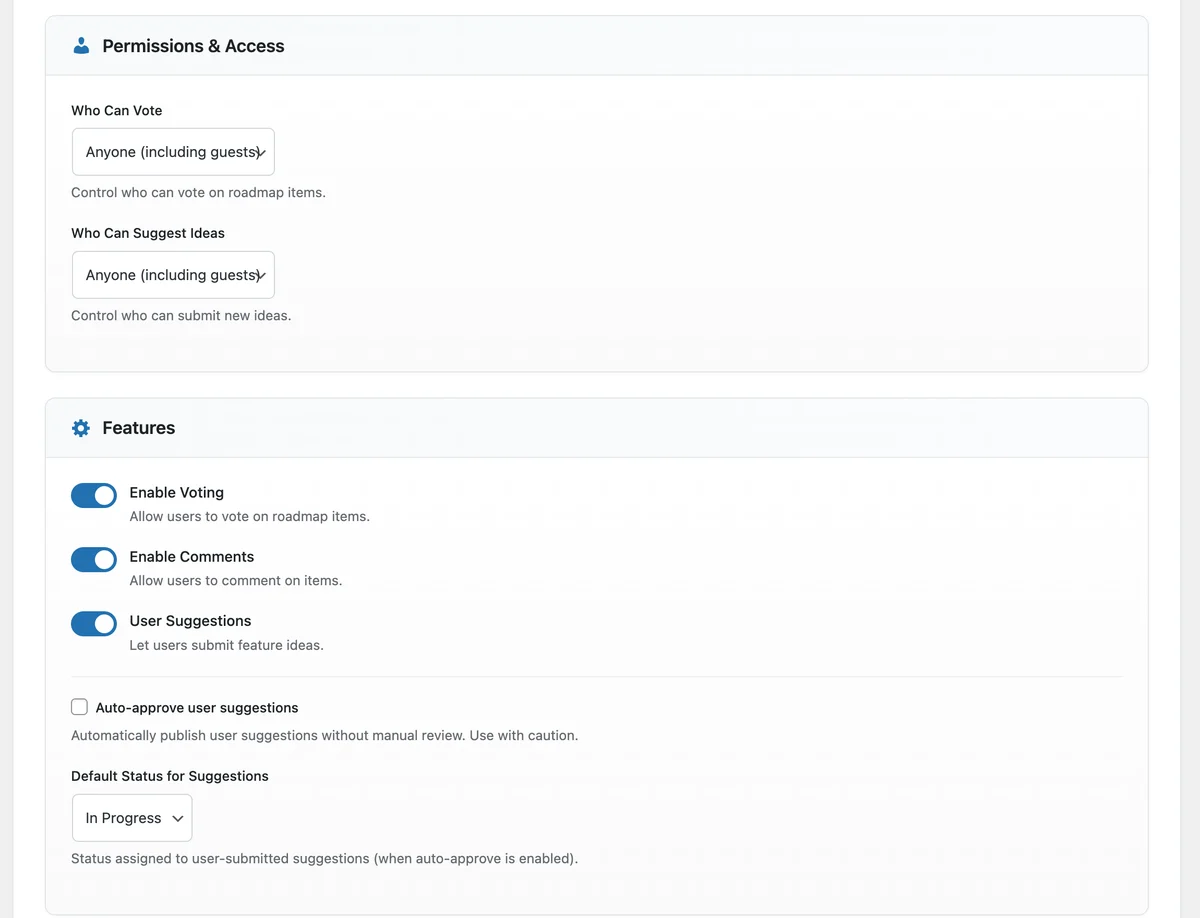
Permissions and feature toggles, including the auto-approve switch for suggestions.
Feedback operations for a support or product team
The controls a team needs to run feedback at volume. Items marked Pro need Product Roadmap Pro.
-
Approval queue for suggestions
New ideas stay pending until approved, and your team gets an email for each one.
-
Guest suggestion queue (Pro)
Logged-out visitors can submit ideas into a separate queue you approve or reject.
-
Merge duplicates (Pro)
Fold a duplicate into the original. Votes and comments move with it.
-
Statuses you define
Start with Planned, Under Review, In Progress, On Hold and Completed, then add your own.
-
Voter emails with unsubscribe
Status changes reach voters and commenters, with a one-click unsubscribe link.
-
Role-based capabilities
Separate capabilities for voting, suggesting, editing, deleting, settings and analytics.
-
Feedback widget (Pro)
A floating feedback button on the pages you choose, in your colour.
-
Analytics and CSV export (Pro)
Votes, comments, views and status changes, with popular items and recent activity.
-
Signed webhooks (Pro)
Send feedback events to your help desk or CRM automation, signed with HMAC-SHA256.
On screen
The moderation side, screen by screen
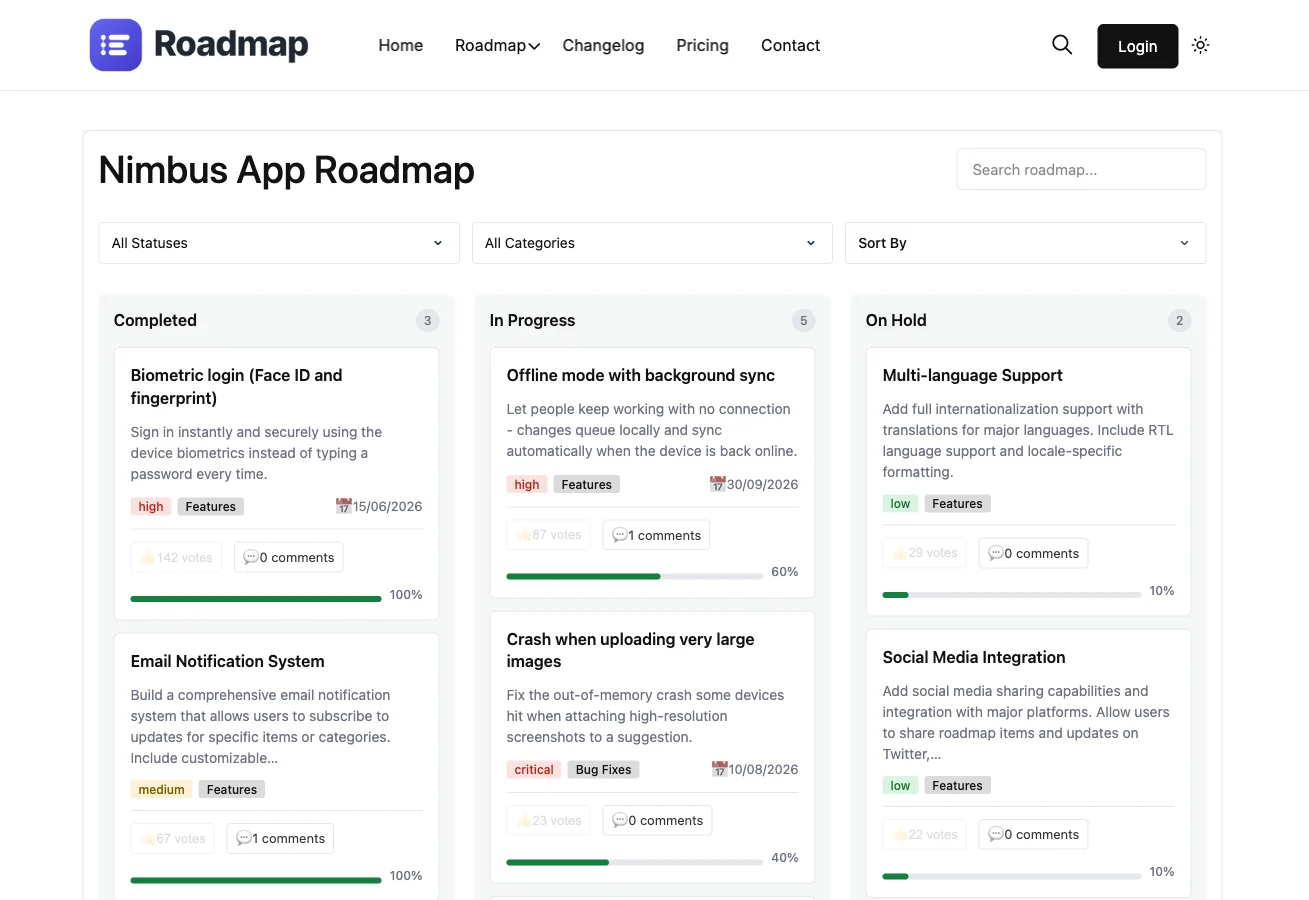
Statuses with item counts, and an alert when submissions wait for review.
Analytics (Pro): popular items and recent votes and comments, exportable to CSV.
Cards layout (Pro): customers see status, priority and progress on each request.
A public changelog shows customers what their feedback turned into.
Timeline layout (Pro) for sharing what comes next.
Rated 4.8/5 on Trustpilot from 96 reviews
I am very pleased with our collaboration! The team always responds quickly to requests and is ready to help. Excellent service, reliable support, and high-quality tools.
Diego
Trustpilot Review
Their BuddyPress and WordPress plugins are reliable, well-coded, and really add value to my site. What impressed me most was the support team.
Natalie Clarke
Trustpilot Review
It has been a very pleasurable experience working with Wbcom Designs. Her team completed every task we requested in a quick and decisive manner. We highly recommend!
Real America's Voice News
Trustpilot Review
Prices on the page, no quote to request
Pay once and own it forever, or pick the annual plan. All features included in every plan, no hidden add-ons.
Personal
1 site
$199 one-time
or $59/year
- 1 site license
- Every Pro feature included
- Kanban, Timeline, List, Cards and Idea Box layouts
- Multiple product roadmaps
- Analytics dashboard with CSV export
- Merge duplicates, guest suggestions, feedback widget
- Webhooks, CSV import, Gutenberg block
- Updates and support, annual or lifetime
Most popular
Developer
5 sites
$299 one-time
or $129/year
- 5 site licenses
- Updates and support, annual or lifetime
- Priority support
Agency
Unlimited sites
$499 one-time
or $299/year
- Unlimited site licenses
- Updates and support, annual or lifetime
- Priority support
The plugin keeps working. Updates and support stop until you renew.
Annual licenses include a year of updates and support and renew at 30% off. Lifetime licenses are a one-time payment and never expire.
What larger teams check before leaving UserVoice
How much does UserVoice cost?
UserVoice does not list prices publicly. On 2026-09-18 its pricing page said plans depend on feedback volume, tools and integrations, and asked buyers to book a demo.
Does it support single sign-on?
Customers sign in with their account on your WordPress site, so any login method your site already uses carries over. There is no built-in SAML connector.
Can we review feedback before it goes public?
Yes. Suggestions stay pending until approved unless you turn on auto-approve. Pro adds a separate queue for guest suggestions.
Can we control what each team member can do?
Yes. Voting, suggesting, editing, deleting, settings and analytics are separate capabilities mapped to WordPress roles.
Will it handle a large board?
Votes live in an indexed database table, a Load more button pages through big boards, and votes and suggestions are rate limited.
Can boards be private or limited to certain customers?
Not yet. Boards are public pages. If you need gated boards today, factor that in.
Is there a long contract?
No. Pick an annual license or a one-time lifetime payment. Every Pro purchase has a 30-day money-back guarantee.
Plugins for running a customer community
- Not ready to pay yet Start on the free plugin Voting, suggestions, statuses and voter emails, with no licence key.
- Comparing Canny too The Canny comparison Published prices on both sides, and a bill that counts tracked users.
- Moderating more than feedback Community moderation Reports, a queue and actions across the rest of what members post.
Run your feedback program on your own site, at a price you can see.
One licence covers every Pro feature and any amount of feedback. Tiers differ by how many sites they cover, with a 30-day money-back guarantee.