
WordPress5 platforms3 Gutenberg blocksREST API v1.1.0

WORDPRESS

One player for every video. See exactly what gets watched.

MediaShield gives WordPress one consistent player for self-hosted files, YouTube, Vimeo, Wistia, and Bunny, then tracks watch time, completion, and milestones for every member. Access control and dynamic watermarking are built in. Videos stream from their CDN while MediaShield owns the player and the engagement data. Free forever.

  • 5.0/5 from 210 Reviews
  • 30-Day Money-Back Guarantee
  • Priority Support
  • Works With Any Theme
  • GPL Licensed

The problem

You publish video to members but cannot see who watched, how far they got, or where they dropped off.

  1. Anyone can share your course videos

    Members hand the URL to friends. WordPress has no watermark, no stream limit, and no way to trace a leak back to a person.

  2. One login, unlimited devices

    A single paid account streams on a dozen screens at once and you never see it happening.

  3. No idea who watched what

    You cannot tell which lessons get finished, where viewers drop off, or who reached the end.

  4. Source URLs sit in the page source

    Right-click and view source exposes the raw video file. Anyone can grab and redistribute it.

MediaShield adds all four to your existing WordPress videos. Free, self-hosted, no monthly fee.

The only plugin of its kind

A unified video player with member-level watch analytics, inside WordPress

No web software can stop a determined screen recording. MediaShield is built around what actually works: make every leak traceable, limit account sharing, and gate access, all on your own server with no per-view fees.

01

Every frame carries the viewer's identity

A dynamic watermark shows the viewer's name and IP address, moves position on a timer, stays visible in fullscreen, and re-renders if the page is tampered with. A leaked recording traces straight back to the account that made it.

02

Streams stay on the platform's CDN

Point MediaShield at YouTube, Vimeo, Wistia, Bunny, or a self-hosted file. The video keeps streaming from its source while MediaShield wraps the player with protection. No video files copied onto your server.

03

Signed sessions, no database hit per check

Watch sessions use HMAC tokens so access checks validate without a database lookup. Heartbeats track watch time and progress, and concurrent stream limits stop one login from playing on every device at once.

Protecting your first video takes under 5 minutes

1
Install and run the wizard
Upload the plugin zip and activate. A 4-step setup wizard configures your watermark, protection level, and first video. No external accounts, no API keys.
2
Add a video by URL
Paste a YouTube, Vimeo, Wistia, or Bunny link, or upload a file. MediaShield detects the platform, pulls the thumbnail, and wraps it in a protected player automatically.
3
Embed it anywhere
Drop the block or shortcode into any page, course lesson, or page-builder layout. The watermark, access gate, and tracking go live the moment a member presses play.

Who it's for

Online course creators
Watermark every lesson with the student's name and IP so paid course content cannot be shared anonymously, and see exactly which lessons get finished
Membership site owners
Gate videos behind login and roles, cap how many devices one account streams on, and stop a single subscription from serving a whole group
Coaches and creators
Keep premium recordings on YouTube or Vimeo unlisted while MediaShield wraps the player so the source URL never sits exposed in your page source
WordPress developers and agencies
A REST API, template overrides, and access-control filters let you build custom access logic and player experiences for clients without forking the plugin
Training and internal video teams
Run a private video library on your own server with traceable watermarks and watch reporting, with no per-stream cost as the team grows
And many more
If your members and conversations live on WordPress, MediaShield fits. Start free, then scale when you are ready.
See the full feature list

Most video options either ignore protection or charge per stream

Presto Player is a polished player but adds no watermark, stream limit, or leak tracing. VdoCipher offers real DRM but bills per gigabyte streamed and locks your library into its service. MediaShield gives you traceable protection, access control, and analytics inside WordPress with no per-view fee.

Capability
MediaShield
Free
Presto Player
Player
VdoCipher
Per-stream SaaS
Self-hosted on your WordPress site
No per-stream or per-gigabyte fee
Dynamic watermark (name + IP)
Traces leaks back to the viewer
Concurrent stream limiting
HMAC session tokens (no DB lookup) Partial
Right-click and devtools blocking
Works with YouTube, Vimeo, Wistia, Bunny
Per-viewer watch analytics + milestones Partial
Role-based per-video access control Partial
Gutenberg blocks + shortcodes Partial
REST API for custom builds Partial
GDPR export and erase built in PartialPartial
You own the data, nothing leaves your server

Choose MediaShield if you want traceable video protection and watch analytics inside WordPress, with no per-stream billing and no library lock-in. Start free, keep your videos on the platform you already use.

Watch analytics

See who watched, how far they got, and who reached the end

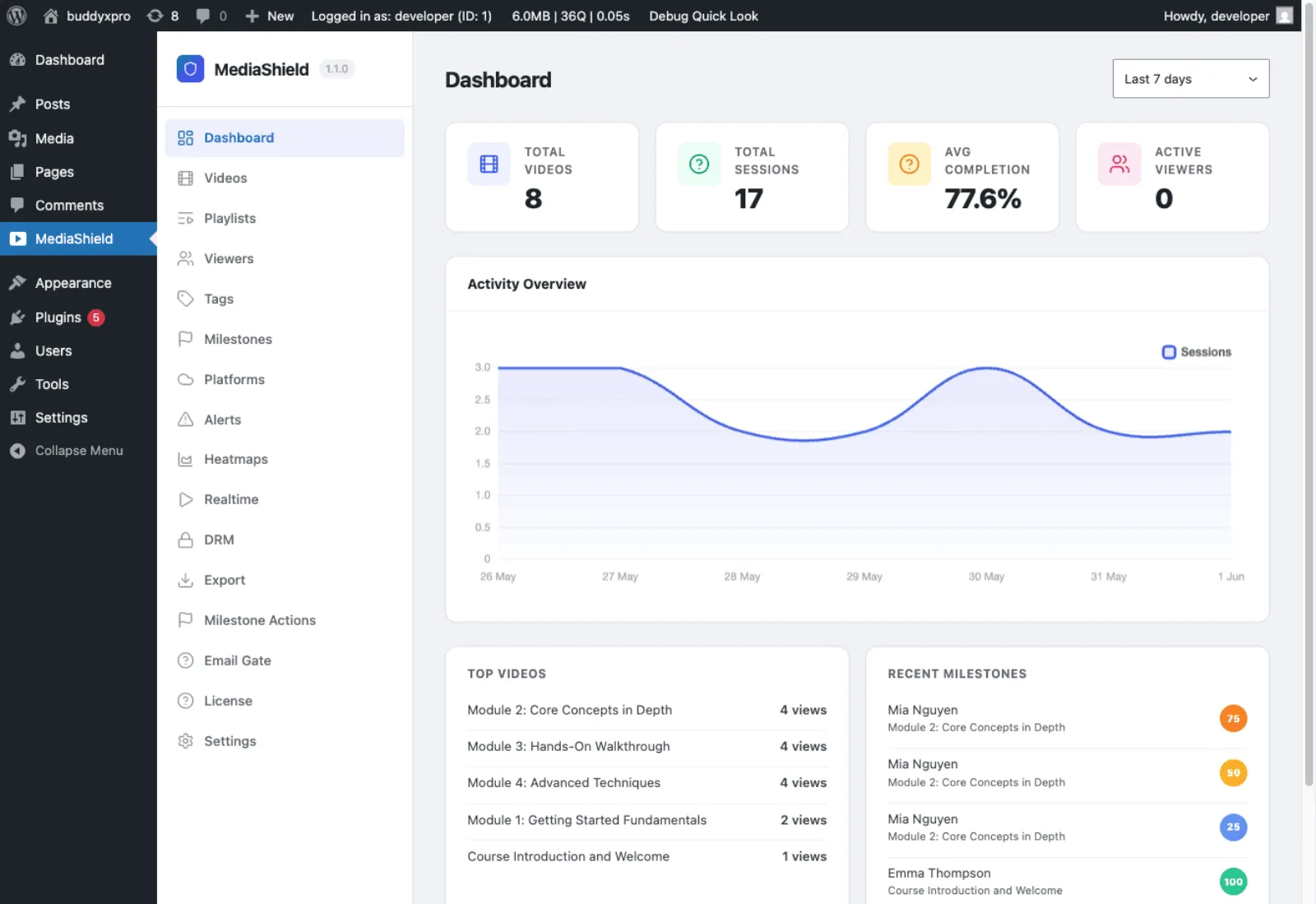
MediaShield tracks every watch session with a heartbeat every 30 seconds: total watch time, furthest position, completion percentage, device, and browser. The dashboard rolls it up into total views, sessions, average completion, top videos, and recent milestones. You finally know which lessons land and which ones lose people.
Per-video and per-viewer stats
Drill into any video to see who watched it and how far each person got, or open a viewer to see their full watch history across your library.
Completion milestones at 25, 50, 75, 100%
MediaShield records each milestone a viewer reaches and can assign a tag at any threshold, ready to hook into your LMS or CRM.
No external analytics service
Every session lives in your own WordPress database. Nothing is sent to a third party, and there is no monthly analytics bill.
MediaShield analytics dashboard showing total videos, sessions, average completion, top videos, and recent milestones

The dashboard rolls every watch session into views, completion rate, top videos, and recent milestones for a real demo course

Everything your community needs

No extensions to buy. No integrations to configure. It ships with all of this.

Five player platforms, one plugin

Protect self-hosted MP4, WebM, MOV, and M4V files plus YouTube, Vimeo, Wistia, and Bunny embeds. Paste a URL and MediaShield auto-detects the platform and pulls the thumbnail.

Watch analytics and milestones

Track total watch time, furthest position, and completion percentage per session. Record 25, 50, 75, and 100% milestones and assign a tag at any threshold for LMS or CRM follow-up.

Playlists with autoplay and countdown

Group videos into a playlist with autoplay, a countdown between videos, loop, and shuffle. Drop the playlist block or shortcode onto any page.

Sticky player and end-screen CTA

Keep the player floating as viewers scroll, add keyboard shortcuts and speed control on self-hosted and Bunny video, and show a customizable call to action when a video ends.

Login and role-based access control

Require login to watch, restrict any video to specific roles, and whitelist the domains allowed to embed your player. Override the entire access decision with a developer filter when you need custom rules.

HMAC session tokens and stream limits

Watch sessions use signed HMAC tokens, so access checks validate without a database query. Cap how many devices a single account can stream on at once and revoke a user's active sessions in one click.

Dynamic watermark on every frame

Overlay the viewer's display name and IP address on the video, moving position on a timer and staying visible in fullscreen. Adjust opacity, color, and swap interval. If content leaks, you know who leaked it.

Right-click and devtools protection

Disable the right-click menu, hide the source URL, and optionally pause playback when browser developer tools open. Detection is disabled on small screens to avoid false positives on mobile.

Gutenberg blocks and shortcodes

Video, Playlist, and My Videos blocks plus the [mediashield], [mediashield_playlist], and [mediashield_my_videos] shortcodes. Assets load only on pages that actually contain a video.

REST API and template overrides

A 23-endpoint REST API covers sessions, analytics, playlists, tags, and settings. Override any template from your theme and react to 31 actions and filters to extend the plugin.

GDPR export, erase, and clean uninstall

MediaShield registers with WordPress privacy tools to export and anonymize watch data on request. Uninstall cleanly removes every table, option, and capability when you choose to remove it.

A complete platform, not a simple widget

Dashboard with total videos, sessions, average completion, an activity chart, top videos, and recent milestones

Manage every protected video, its platform, protection level, and per-video access role from one list

The frontend player with the dynamic watermark visible and the Protected by MediaShield badge during playback

Per-viewer engagement with watch time and completion, so you can see exactly who watched what

Configure 25, 50, 75, and 100% completion milestones and assign a tag at each threshold

Settings for watermark, protection, player behavior, and access control, with auto-save as you edit

Simple, honest pricing

One-time payment or annual subscription. All features included in every plan, no hidden add-ons.

MediaShield Free
Unlimited sites
Free
  • Unlimited sites, no license key
  • Dynamic watermark (name + IP)
  • 5 player platforms
  • HMAC sessions + stream limits
  • Login and role-based access
  • Watch analytics + milestones
  • Playlists, blocks, shortcodes
  • 23-endpoint REST API
  • GDPR tools + clean uninstall
Get MediaShield Free
Most popular
Pro Personal
1 site
$59/yr
$41 /year 30% off
  • Everything in Free, plus:
  • 1 site license
  • ClearKey and Bunny DRM
  • Platform browse + bulk import
  • Heatmaps + realtime analytics
  • Email gate + webhook
  • LMS auto-completion adapters
  • Suspicious activity alerts
  • 1 year of updates and support
Get Pro Personal
Pro Agency
Unlimited sites
$299/yr
$209 /year 30% off
  • Everything in Pro, plus:
  • Unlimited site licenses
  • All DRM and platform features
  • CSV and PDF export
  • Weekly digest email
  • Client site deployment
  • Priority email support
Get Pro Agency

Free forever, no credit card required. Pro plans renew annually. Cancel any time before renewal.

30-day money-back guarantee. No questions asked.

Rated 5.0/5 from 210 reviews on Wbcom Designs

Top notch support! I've been frustrated generally by the slow support for most plugins, but they are helpful and quick to reply. Highly recommend!

Woods

Verified Review

I wanted to build a community website and these guys created the perfect plugins for me. To be honest, I want to buy every single one of their plugins.

Sora Seaton

Verified Review

The plugins from Wbcom Designs are modern, flexible, and easy to use. The support is very helpful and friendly, with fast and competent assistance.

Barry Bohme

Verified Review

Common questions

Can MediaShield stop people from screen recording my videos?
No web software can block screen recording, and MediaShield is honest about that. What it does is make every recording traceable. The dynamic watermark shows the viewer's name and IP address on every frame, so any leaked copy points straight back to the account that made it. Combined with stream limits and access control, that removes most casual sharing.
Which video platforms does it support?
Five out of the box: self-hosted files (MP4, WebM, MOV, M4V), YouTube, Vimeo, Bunny Stream, and Wistia. The free plugin detects and protects embeds from all five. Your video keeps streaming from its own CDN while MediaShield wraps the player, so no video files are copied onto your server.
Does it work with LMS and page builders?
Yes. MediaShield works alongside LearnDash, LifterLMS, Tutor LMS, Sensei, and others, and you embed videos in any lesson with the block or shortcode. It detects and wraps videos inserted through Elementor, Divi, Beaver Builder, and WPBakery. If your builder renders video via JavaScript after load, use the block or shortcode directly instead of pasting a raw URL.
Will it slow down my site?
No. MediaShield only loads its CSS and JavaScript on pages that contain a video. Access checks use signed HMAC tokens, so your site does not run a database query on every check. Pages without video have zero performance impact.
What happens after I install the free plugin?
A 4-step setup wizard runs on activation to configure your watermark, protection level, and first video. After that you add videos by pasting a URL or uploading a file, then embed them with a block or shortcode. There is no license key and no account required for the free plugin.
Is the free version limited?
No. The free plugin is a complete protection layer: dynamic watermark, five platforms, HMAC sessions, stream limits, access control, analytics, milestones, playlists, a REST API, and GDPR tools. It works on unlimited sites with no license key. Pro adds DRM, multi-platform import, advanced analytics, an email gate, and LMS auto-completion for teams that need them.
What does MediaShield Pro add?
Pro adds ClearKey and Bunny DRM encryption, browse-and-bulk-import from Bunny, YouTube, Vimeo, and Wistia, playback heatmaps, a realtime viewer dashboard, an email-capture gate with webhook, LMS auto-completion adapters for LearnDash, Tutor, and LifterLMS, suspicious activity detection and alerts, CSV and PDF export, a weekly digest email, and PWA offline playback. Pro starts at $59/year for 1 site. See the full comparison at /mediashield-pro/.
Who owns the data?
You do. Every watch session, milestone, and tag lives in your own WordPress database. Nothing is sent to Wbcom Designs servers, and there is no telemetry. MediaShield registers with WordPress privacy tools so you can export or erase a user's data on request, and a clean uninstall removes every table, option, and capability if you remove the plugin.
What are the server requirements?
WordPress 6.5 or later and PHP 8.1 or later. No external services are required for the free plugin. It runs on shared hosting, managed WordPress hosting, VPS, and dedicated servers. If you use a caching plugin, exclude /wp-json/mediashield/ from the cache so session checks work correctly.

Ready to protect your WordPress videos?

One license. Instant download. Works with any WordPress theme.

Buy MediaShield Read the docs Try the demo