
Instagram-style feed
Your community's photo feed, on a site you run.
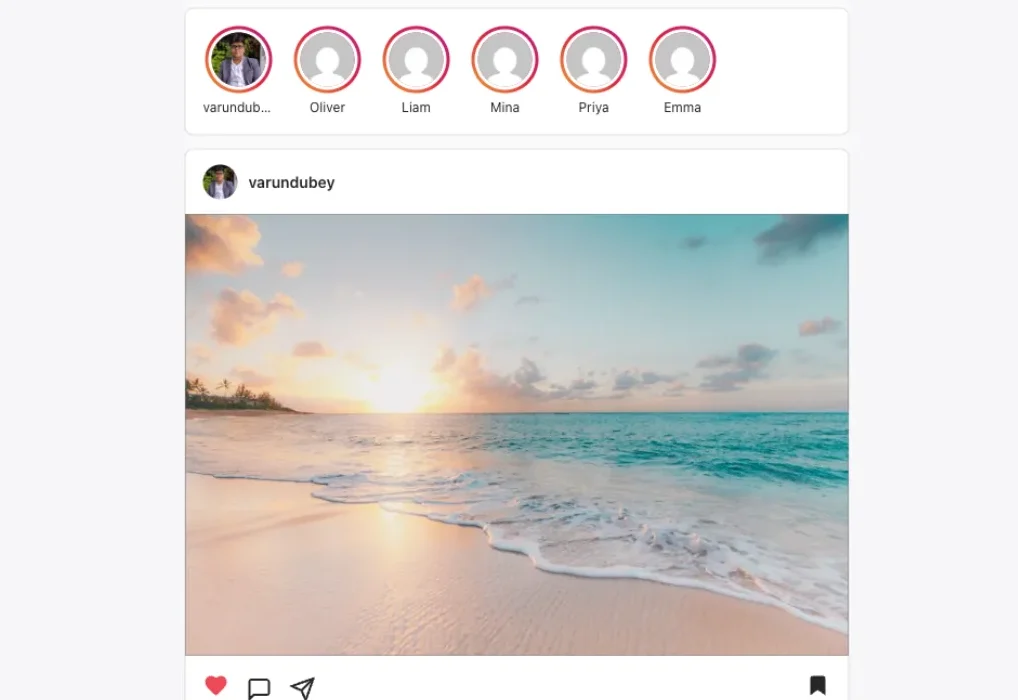
Members post, follow each other, react and message, all with one WordPress login. Pro adds the Instagram layout: a stories bar, double-tap likes and stories that clear themselves after a day.
- 4.8/5 on Trustpilot
- Free Forever
- Follows and Suggestions
- 6 Emoji Reactions
- Direct Messages
- Stories (Pro)
- GPL Licensed
Why build your own
Your members already post photos.
The question is where.
-
The conversation happens somewhere else
When members share on a large social app, the likes, follows and comments build that app's audience instead of your community.
-
You do not set the rules
On a platform you do not run, you cannot pick the layout or privacy levels. You also cannot decide when a reported post comes down.
-
The best photos are scattered
Work spread across personal accounts is hard to gather into one place your members can browse and search.
-
A plain gallery feels quiet
A gallery plugin shows photos. Without follows, reactions and messages, members have little reason to come back.
MediaVerse puts the social feed on your own WordPress site, with the rules set by you.
The feed, part by part
Two screens do most of the work
A social site is a post page and a profile, repeated. Here is what sits on each one, and why.
A post
What one post carries
Every upload gets its own page. The parts are the same whether a member posted a photo, a video or an audio file.
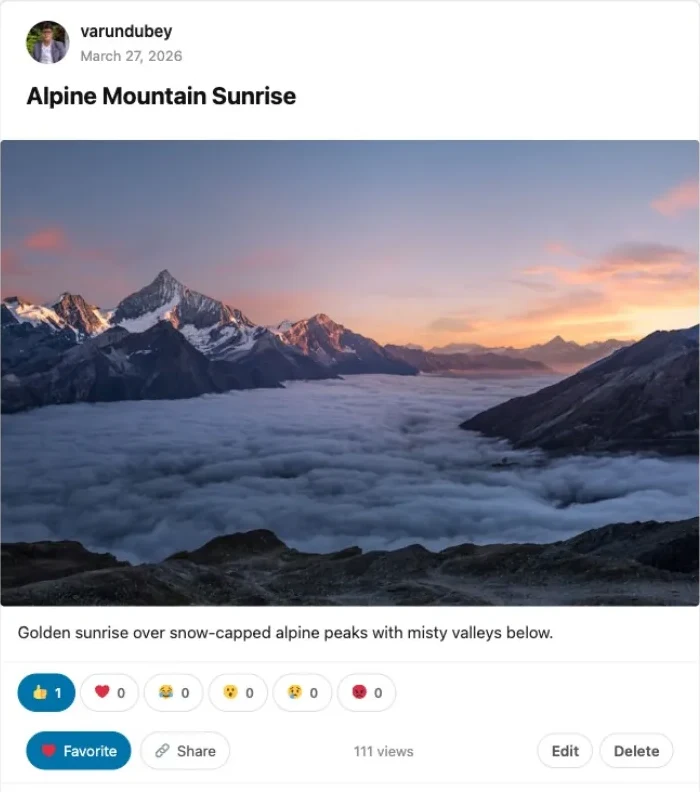
- Who posted it, and when Avatar and name link to the profile. A video shows its length here, a photo its dimensions, and anyone can follow from this row.
- The title Set by the member at upload, and editable later without leaving the page.
- The file, or a locked notice A viewer who is not allowed to see this item gets a privacy notice in place of the file, not a broken image.
- The description Optional. Members write it at upload and can rewrite it any time.
- Six reactions, each with a count Like, love, haha, wow, sad and angry. One tap switches a member from one to another.
- Favourite, share, views, and the owner buttons Favourites are private to the member who saved it. Edit and Delete only appear for the person who posted.
A profile
What a member profile shows
The page a member sends people to. It is a WordPress page, so it carries your theme, your header and your menu.
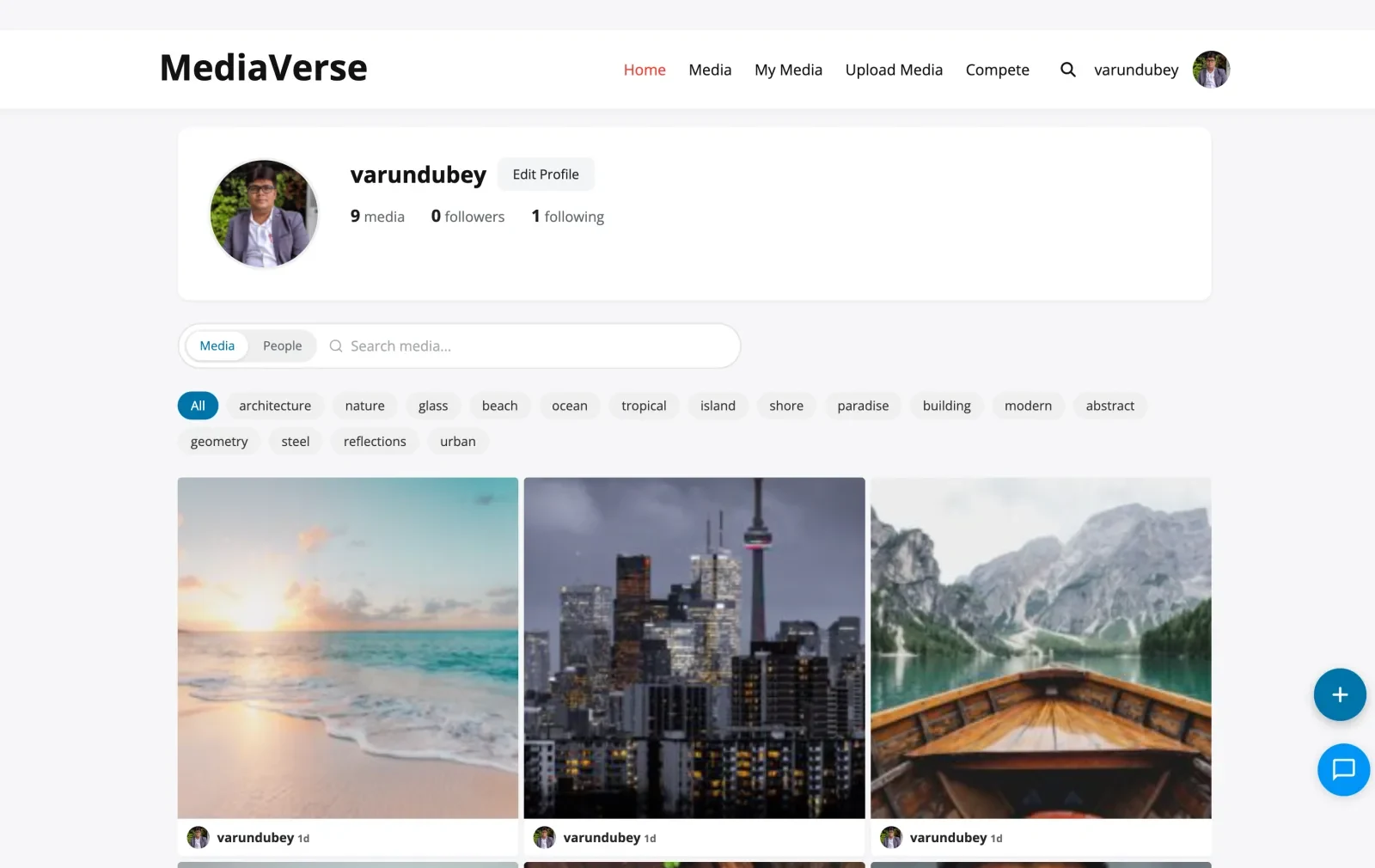
- Avatar Uploaded on the front end, with Gravatar as the fallback. With BuddyPress or BuddyNext running, this links to their profile instead.
- Name, and what a visitor can do next The member sees Edit Profile here. Everyone else sees follow and message actions.
- The media count is counted for the viewer A visitor is shown the number of items they can actually open, not the member’s private total. The number and the grid always agree.
- Followers and following open a list Both are buttons, not labels. They open the list of people, reachable from the keyboard.
- Search across Media or People One bar with two modes, so a member looks for a photo or a person without changing pages.
- Tag chips filter the grid Drawn from the tags members actually used. The same chips sit above the free grid and every Pro layout.
Your house, your rules
A public feed needs a moderator, so here are the controls
Each one with the state it ships in, because a control you have to build is not the same as a control you have.
-
On by default
Members report what they see
Report sits on media and on people. Three reports hide an item until someone reviews it, and the same member cannot report the same thing twice.
Change the number, or set it to zero to stop auto-hiding. Turning reporting off removes the control and refuses incoming reports.
-
You choose
Publish your rules beside the button
A community guidelines link and an abuse contact address are settings, shown next to the Report control and carried into the app.
People report better when they can see what the rules actually are.
-
Off by default
Hold uploads until you approve them
Held uploads land in the moderation queue as pending and stay off the feed until a moderator clears them.
This one is a filter today, not a checkbox, so it takes a line of code to switch on.
-
Off by default
Let a model take the first look
Optional checks can flag media before a person sees it. Descriptions and tags are the on-by-default parts; automatic moderation is not.
A monthly budget caps what the checks can spend, and nothing calls out until you switch one on.
-
Per member
Blocks work in both directions
Block someone and neither of you turns up in the other’s listings, counts or media.
Checked in either direction, so one block is enough.
-
Reversible
Suspend without deleting anyone
A suspended member keeps their account and everything they posted and can still read. They cannot post, comment, react or message.
Enforced on every write, including a phone app signed in with an Application Password.
FEED FEATURES, FREE AND PRO
The social layer is free. The Instagram look is Pro.
Follows, reactions, comments and messages ship in the free plugin. Pro changes how the feed looks and adds stories.
Everything behind a social photo feed
Free unless marked Pro. Members use one WordPress login for posting, following and messaging.
-
Front-end posting
Members post photos and video with a title, description, tags and privacy, without touching wp-admin.
-
Follows and suggestions
Members follow people they enjoy. Suggestions draw on a shared pool and each member's interests.
-
Six reactions and comments
Like, love, haha, wow, sad and angry, plus comments members can edit for a short window.
-
In-app notifications
Members hear about reactions, comments and mentions. BuddyPress notifications join in when it is active.
-
Direct messages
One-to-one and group conversations with photos, voice messages, reactions and unsend.
-
Privacy on every post
Public, members only, friends, only me and more. Private posts never appear in the activity feed.
-
Reports, blocks and suspensions
Posts hide after three reports. A suspended member cannot post, comment or upload until you lift it.
-
24-hour stories (Pro)
Members share a post as a story that expires after a day, and see who viewed it.
-
Boosts and streaks (Pro)
Members spend points to boost a post in the explore feed, and daily upload streaks reward regular posting.
-
A REST API for an app
Application Passwords and an app config endpoint let a developer build a native app on the same data.
The feed, messages and people, as members see them
The explore page with the messages panel open beside member photos.
A single post with reaction counts, favourite, share and 111 views.
Instagram layout (Pro): the stories bar above a post with like, comment, share and save.
The members directory, with Add Friend buttons from BuddyPress running alongside.
Start the feed free. Add stories with Pro.
Pay once and own it forever, or pick the annual plan. All features included in every plan, no hidden add-ons.
- Unlimited sites, no license key
- Photo, video and audio uploads
- Albums, smart collections and explore feed
- Lightbox, reactions, comments and follows
- Direct messages with media and voice
- Moderation queue, reports and OpenAI checks
- BuddyPress activity, profile and group media
- 9 blocks, 14 shortcodes and a REST API
- Forever free, no feature locks
- Everything in Free, plus:
- 1 site license
- Instagram, Pinterest, Flickr and Dribbble layouts
- Stories, boosts and upload streaks
- Photo challenges, battles and tournaments
- Cloud storage: S3, BunnyCDN, R2, Spaces
- Watermarking
- Flickr connector and rtMedia, MediaPress, BuddyBoss importers
- Member document drive
- Updates and support, annual or lifetime
- Everything in Pro Personal
- 5 site licenses
- Priority support
- Updates and support, annual or lifetime
- Everything in Personal, plus:
- Unlimited site licenses
- Priority email support
- 30-day money-back guarantee
The plugin keeps working. Updates and support stop until you renew.
Free forever. Annual licenses include a year of updates and support and renew at 30% off. Lifetime licenses are a one-time payment and never expire.
Building your own photo feed: common questions
Is this a theme or a plugin?
Does it look like Instagram straight away?
Does it connect to Instagram?
Do stories disappear?
Can members message each other?
How do I keep the feed safe?
Is there a mobile app?
Do I need BuddyPress?
Plugins that round out a social site
- Want the whole plugin MediaVerse free Uploads, albums, privacy, reactions, follows and messages on unlimited sites.
- Want the Instagram look MediaVerse Pro The Instagram layout with stories and double-tap likes, plus three more layouts.
- Building the whole community The 26-plugin community bundle Profiles, moderation, polls and privacy around the feed.
Start a photo feed your members can call their own.
The feed, profiles, follows and messages are free on unlimited sites. Stories and the Instagram layout are Pro.