Wbcom Designs WordPress Q&A Plugin
Q&A Plugin Free Plugin REST API Schema.org QAPage v1.1.0

Add a community-driven Q&A system to your WordPress site.

Most Q&A plugins for WordPress are abandoned, limited, or just forums with an upvote button. Jetonomy has a purpose-built Q&A mode where users post questions, the community answers, the best responses rise to the top through voting, and the question author marks an accepted answer. Trust levels gate who can answer and moderate. Schema.org QAPage markup feeds answers directly into Google. Free forever.

Download Free Read the Docs Try Live Demo See Jetonomy Pro
Add a community-driven Q&A system to your WordPress site. — product screenshot
87 Five-Star Reviews on TrustpilotFree ForeverAccepted AnswersAnswer VotingTrust LevelsQAPage SchemaGPL Licensed

WordPress Q&A plugins are either dead projects or stripped-down forums.

DW Question Answer has not been updated in years
Once the most popular WordPress Q&A plugin, DW Question Answer stopped receiving updates. Security patches are missing, compatibility with current WordPress versions is uncertain, and the developer has moved on.
CM Answers locks core features behind a paywall
The free version of CM Answers is too limited to run a real Q&A community. Voting, notifications, and moderation tools are gated behind premium tiers. You are evaluating a demo, not using a product.
Generic forum plugins lack a real Q&A workflow
bbPress and most forum plugins treat every thread the same. There is no accepted answer, no answer sorting by votes, no QAPage structured data, and no way to distinguish a resolved question from an open one.
Embedding external Q&A tools creates a disconnected experience
Embedding AnswerHub, Tribe, or a Discourse instance means your Q&A lives outside WordPress. Separate logins, no shared user base, no theme integration, and another monthly bill.
Jetonomy is a single free plugin with a native Q&A mode built into WordPress. Questions, answers, voting, accepted answers, and trust-based moderation - all in one install.
The only plugin of its kind

The only WordPress Q&A plugin with trust levels, accepted answers, and structured data in one free package.

Other Q&A plugins bolt a voting button onto a basic forum. Jetonomy was built with a dedicated Q&A workflow from the ground up. Three design decisions make it different from every alternative.

01

A real Q&A workflow, not a forum with upvotes

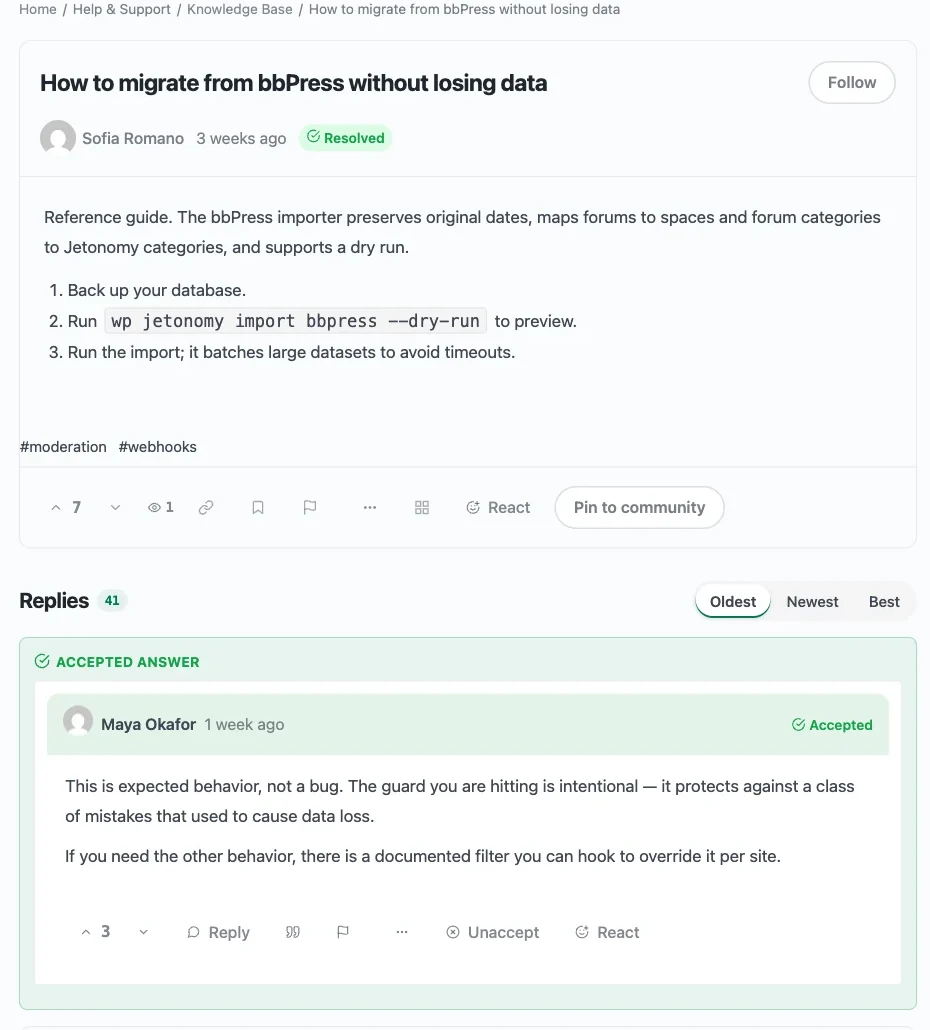
Questions and answers are separate content types with distinct roles. The question author or a moderator marks the definitive answer as accepted. Accepted answers are pinned to the top of the thread and highlighted visually. Open questions are clearly distinguished from resolved ones.

02

Trust levels that control who can answer and moderate

New accounts are rate-limited and cannot post links. As members provide quality answers that earn upvotes, they progress through 6 trust levels and gain abilities like editing others' answers, closing duplicate questions, and moderating content. Answer quality improves organically.

03

QAPage structured data that feeds answers into Google

Every resolved Q&A thread outputs Schema.org QAPage markup with the accepted answer. Google can display your answers directly in search results as rich snippets. No SEO plugin configuration needed - the markup is automatic.

Your WordPress Q&A community is live in under 5 minutes

1
Install Jetonomy and run the setup wizard
Upload the plugin zip or install from your Wbcom Designs account. The setup wizard walks you through creating your first Q&A space, setting permissions, and configuring anti-spam rules. Demo content is seeded so you can see Q&A working immediately.
2
Members post questions, the community answers
Users submit questions with tags for categorization. Community members post answers. Other members upvote or downvote each answer. The best responses rise to the top automatically.
3
Accepted answers build a searchable knowledge base
Question authors mark the best answer as accepted. Resolved questions are visually distinguished from open ones. Over time, your Q&A space becomes a self-service knowledge base that search engines index with rich snippet markup.

Who it's for

Product teams running internal knowledge bases
Replace scattered Slack threads and shared docs with a structured Q&A space. Team members post questions, subject experts answer, and the best answers are permanently findable through search and tags.
Customer support teams deflecting repetitive tickets
Let customers ask questions publicly. When someone answers, every future customer with the same question finds the resolution through search instead of opening a ticket. Accepted answers make the right solution obvious.
Course creators building student Q&A alongside lessons
Students ask questions about course material, classmates and TAs answer, and the instructor marks the definitive answer. The Q&A space becomes supplementary documentation that grows with every cohort.
Developer communities running technical Q&A
Code questions, configuration problems, and troubleshooting threads with voted answers. Trust levels ensure that new members earn answer credibility over time, while experienced members can edit and moderate content.
Membership sites adding value through community Q&A
Gate Q&A spaces by membership level. Free members see public questions, paid members access exclusive Q&A with experts. MemberPress and Paid Memberships Pro integration is included free.
Open source projects centralizing community support
Move support questions from GitHub Issues and Discord into a searchable Q&A space on your project site. Contributors answer, the community votes, and accepted answers reduce duplicate questions.

How Jetonomy compares to the WordPress Q&A plugins people actually search for

DW Question Answer was the go-to Q&A plugin for years but development has stopped. CM Answers exists but locks essential features behind paid tiers. Jetonomy offers everything both promise and more, free forever.

Capability
Jetonomy
Free
DW Question Answer
Abandoned
CM Answers
Freemium
Actively maintained (2025+)
Accepted answers with visual highlight Pro only
Answer voting (upvote and downvote) Pro only
Trust levels with auto-promotion
Rate limiting for new accounts
QAPage Schema.org structured data
Run Q&A alongside forums and idea boards
Dedicated database tables (not wp_posts)
REST API for Q&A data
Tag-based question categorization
Email notifications on new answers Pro onlyPro only
Full-text search across questions and answers BasicBasic
CSS custom properties (adapts to any theme)
Free without feature locks

Choose Jetonomy if you want a Q&A system that is actively maintained, free without feature locks, and backed by trust-based moderation that improves answer quality over time.

Q&A Mode

Questions get definitive answers, not endless threads

Jetonomy's Q&A mode separates questions from answers and treats them differently than regular forum posts. Every question has a clear status: open or resolved. Answers are sorted by community votes so the most helpful response appears first. The question author or a moderator marks the definitive answer as accepted, pinning it to the top with a visual highlight. This is not a forum with an upvote button. It is a structured Q&A workflow.

Accepted answers pinned and highlighted
The accepted answer appears at the top of every resolved question with a distinct visual indicator. Visitors see the best answer immediately without scrolling through discussion.
Vote-sorted answers surface expertise
Community upvotes push the most helpful answers toward the top. Combined with trust levels, this means experienced members' answers carry more weight and visibility.
Open vs. resolved question status
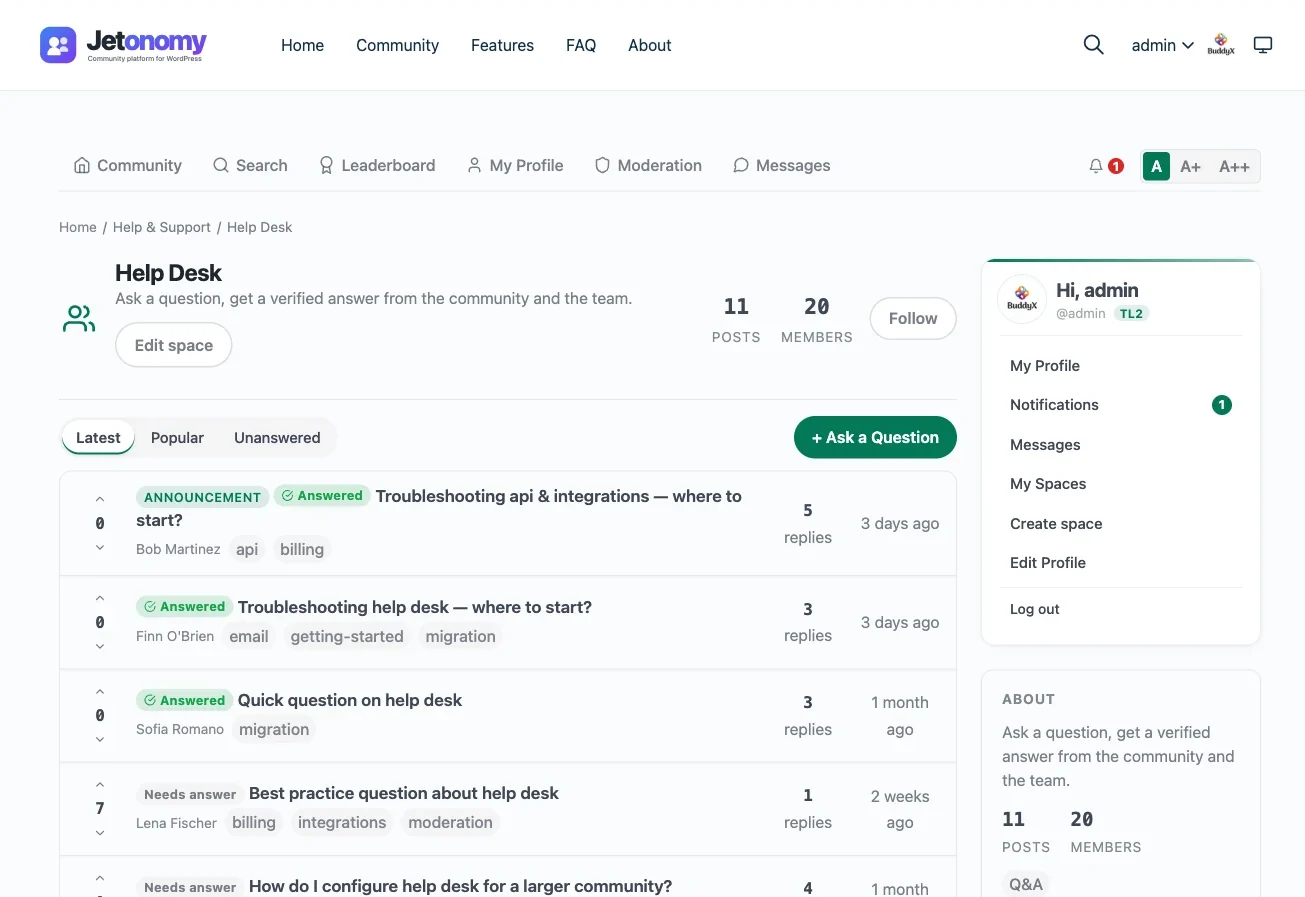
Unanswered and unresolved questions are clearly marked, making it easy for community members to find questions that still need help. Browse by Latest, Popular, or Unanswered.
Q&A thread with accepted answer highlighted, vote counts, and trust level badges

Resolved Q&A thread - accepted answer pinned at top, community votes on every response, trust level badges

Everything your community needs

No extensions to buy. No integrations to configure. It ships with all of this.

Dedicated Q&A spaces with question and answer separation

Q&A spaces treat questions and answers as distinct content types. Questions have an open or resolved status. Answers are sorted by votes. The accepted answer is pinned to the top. This is purpose-built Q&A, not a discussion thread.

Accepted answers with visual distinction

Question authors or moderators mark the best answer as accepted. The accepted answer gets a visual highlight and appears above all other responses. Visitors see the right answer first.

Community voting that surfaces the best responses

Every answer can be upvoted or downvoted by community members. Answers are sorted by net votes so the most helpful response appears first, even before an answer is accepted.

Trust levels that improve answer quality over time

New members are rate-limited and cannot post links. As they provide quality answers that earn upvotes, they progress through trust levels and gain abilities like editing answers, closing duplicates, and moderating Q&A content.

Tag-based categorization for organized discovery

Questions are tagged with topics for easy filtering. Browse questions by tag to find related threads. Tags also power the sidebar's Popular Tags widget, helping visitors discover active topics.

Full-text search across all questions and answers

MySQL FULLTEXT search indexes both questions and answers. Members find existing solutions before posting duplicates. Swappable adapter supports Meilisearch or Elasticsearch for larger Q&A communities.

QAPage Schema.org markup for Google rich snippets

Every resolved Q&A thread outputs Schema.org QAPage structured data with acceptedAnswer. Google can display your answers as rich snippets in search results. No SEO plugin configuration required.

Answer notifications so question authors never miss a reply

Question authors receive in-app and email notifications when someone answers their question. Subscribers to a question are notified of new answers and status changes. Members control their notification preferences.

Q&A alongside forums and idea boards in one plugin

Run Q&A spaces for questions, regular forums for open discussion, and idea boards for feature voting. All under one community path with unified search, shared user profiles, and a single reputation system.

REST API endpoints for Q&A data

Access questions, answers, votes, accepted answers, and tags through REST API endpoints. Build custom Q&A interfaces, mobile apps, or external integrations using the same data that powers the web UI.

Reputation scoring tied to answer quality

+10 for an upvoted answer, +15 for an accepted answer, -20 for spam. Reputation reflects real expertise, not just activity. The leaderboard highlights members who consistently provide the best answers.

Browse by Latest, Popular, or Unanswered

Three built-in sort views help the community focus its effort. Latest shows new questions. Popular shows trending threads. Unanswered shows questions that still need help - so no question goes ignored.

A complete platform, not a simple widget

Resolved Q&A thread - accepted answer pinned at top with visual highlight, vote counts, and trust level badges on every response

Q&A space - questions sorted by Latest, Popular, or Unanswered with vote counts and answer indicators

Community home - Q&A space listed alongside forums and idea boards, all managed from one plugin

Search results across Q&A threads - find existing answers before posting a duplicate question

Member profile - reputation earned from accepted answers and upvotes, trust level badge, contribution history

Simple, honest pricing

One-time payment or annual subscription. All features included in every plan — no hidden add-ons.

Jetonomy Free
Unlimited sites
Free
  • Unlimited sites - no license key
  • Forums, Q&A, Ideas, Feed spaces
  • 6 trust levels + auto-moderation
  • Voting, reputation, leaderboard
  • Full-text search with filters
  • 48+ REST API endpoints
  • bbPress & wpForo importers
  • MemberPress & PMPRO integration
  • Forever free - no feature locks
Get Jetonomy Free
Most popular
Pro Personal
1 site
$69/yr
$48 /year 30% off
  • Everything in Free, plus:
  • 1 site license
  • Emoji reactions on posts & replies
  • Private messaging (1:1 & group)
  • Polls with live results
  • Community analytics dashboard
  • Email digest & web push
  • Webhooks (Zapier, Slack, n8n)
  • 1 year of updates & support
Get Pro Personal
Pro Agency
Unlimited sites
$199/yr
$139 /year 30% off
  • Everything in Developer, plus:
  • Unlimited site licenses
  • White-label branding
  • Reply-by-email
  • Client site deployment
  • Priority email support
  • 30-day money-back guarantee
Get Pro Agency

Free forever - no credit card required. Pro plans renew annually. Cancel any time.

Free plugin: no strings attached. Pro plans: 30-day money-back guarantee.

Rated 4.7/5 on Trustpilot from 87 reviews

I am very pleased with our collaboration! The team always responds quickly to requests and is ready to help. Excellent service, reliable support, and high-quality tools.

Diego

Trustpilot Review

Their BuddyPress and WordPress plugins are reliable, well-coded, and really add value to my site. What impressed me most was the support team.

Natalie Clarke

Trustpilot Review

It has been a very pleasurable experience working with Wbcom Designs. Her team completed every task we requested in a quick and decisive manner. We highly recommend!

Real America's Voice News

Trustpilot Review

Common questions

Is this just a forum plugin with an upvote button?
No. Jetonomy's Q&A mode is a separate space type with a dedicated workflow. Questions and answers are distinct content types. Answers are sorted by community votes. The question author or a moderator marks the definitive answer as accepted, and it is pinned to the top with a visual highlight. Open questions are distinguished from resolved ones. This is a structured Q&A system, not a discussion forum with voting added on.
Can I run Q&A spaces alongside regular forum discussions?
Yes. Jetonomy supports four space types: Forum, Q&A, Ideas, and Feed. You can run a Q&A space for questions, a Forum space for open discussion, and an Ideas space for feature voting - all under one /community/ path with shared user profiles, a unified search, and a single reputation system.
Does the Q&A mode support accepted answers?
Yes. The question author can mark any answer as accepted. Moderators and trusted members with sufficient trust level can also mark accepted answers. The accepted answer is visually highlighted and pinned above all other responses so visitors see the correct answer immediately.
Can community members vote on answers?
Yes. Every answer can be upvoted or downvoted by logged-in members. Answers are sorted by net vote count so the most helpful response appears first. Upvoted answers earn reputation for the author (+10 per upvote), and accepted answers earn bonus reputation (+15). Spam answers lose reputation (-20).
How do trust levels affect Q&A quality?
New accounts start at Trust Level 0 with rate limits (3 posts per day) and no link posting. As members contribute quality answers that earn upvotes, they progress through 6 trust levels automatically. Higher trust levels unlock abilities like editing others' answers, closing duplicate questions, and moderating Q&A content. This means answer quality improves organically as your community grows.
Can I use Q&A spaces for customer support self-service?
Yes. Many teams use Jetonomy Q&A as a customer-facing knowledge base. Customers post questions, your team or other customers answer, and the accepted answer resolves the thread. Future customers with the same question find the resolution through search or Google (via QAPage structured data) instead of opening a support ticket.
Is there a REST API for accessing Q&A data?
Yes. Questions, answers, votes, accepted answers, tags, and user reputation are all accessible through Jetonomy's REST API endpoints under the jetonomy/v1 namespace. Cursor-based pagination and JSON schema validation are included. You can build custom Q&A frontends, mobile apps, or integrations with external tools like Slack or Zapier.

Download the free WordPress Q&A plugin. Your community's knowledge base starts today.

One license. Instant download. Works with any WordPress theme.

Buy WordPress Q&A Plugin Read the docs Try the demo