
Wbcom Designs WB Member Wiki
BuddyPress BuddyBoss PeepSo REST API v1.0.0

Your community's knowledge, finally organized.

WB Member Wiki adds a collaborative wiki to your WordPress site — where members create pages together, every edit is tracked, and nothing gets lost. Works standalone or integrates with BuddyPress, BuddyBoss, and PeepSo.
Get WB Member Wiki Read the Docs
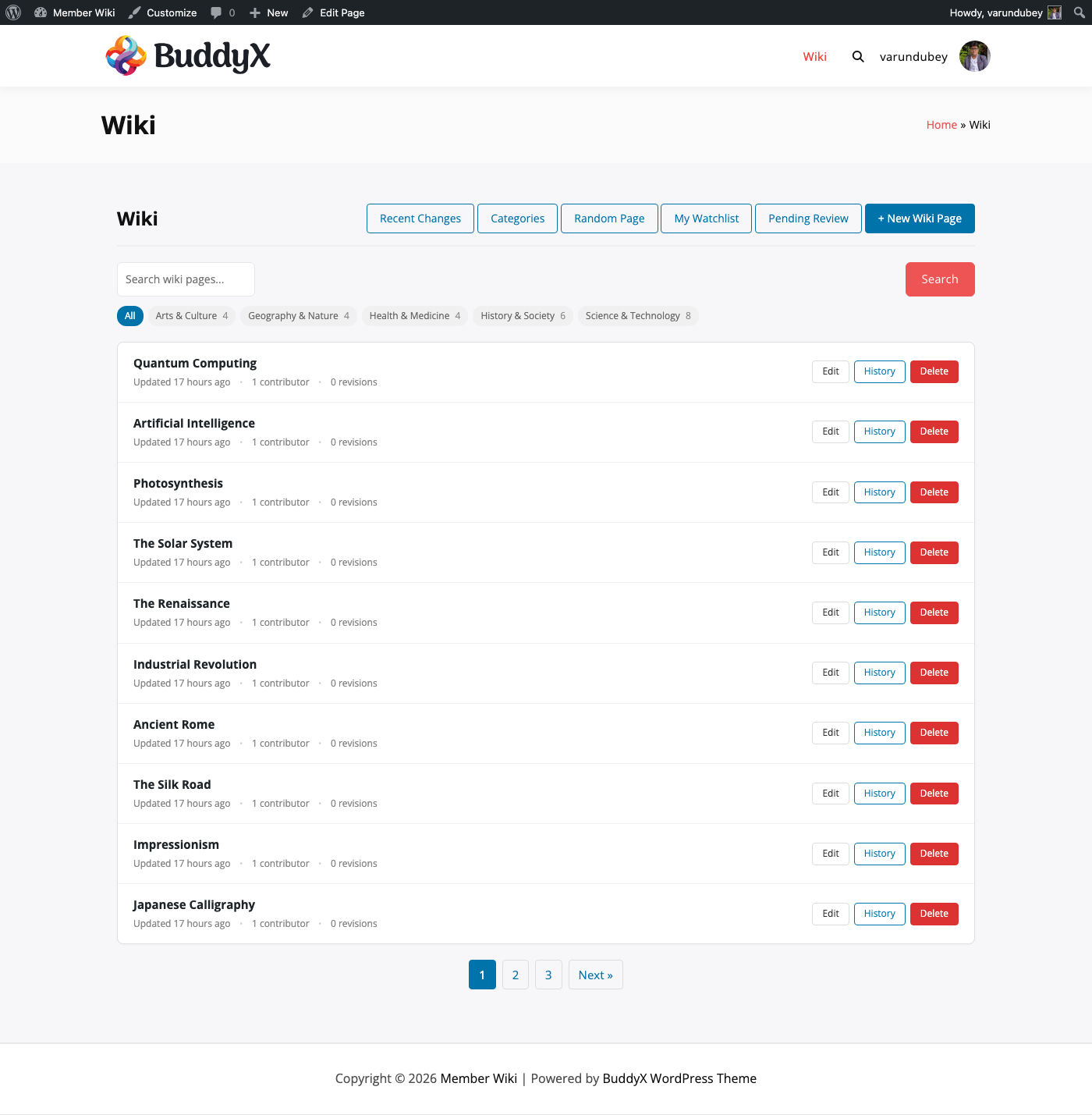
Your community's knowledge, finally organized. — product screenshot

Your community has answers. They're just impossible to find.

Buried in forum threads
Answered in 2022, buried under 400 newer posts, never found again
In pinned posts nobody reads
Static, admin-only, out of date the moment it's published
In FAQs only the admin can update
One person bottleneck — your community's knowledge waiting on your schedule
In emails and DMs that disappear
Every time a member helps privately, that knowledge is lost to the community
WB Member Wiki gives that knowledge a permanent, searchable, community-maintained home.
The only plugin of its kind

The only WordPress wiki built for community contribution.

MediaWiki is a separate server. Confluence is a separate platform. WordPress Pages have no revision history, no cross-linking, and no community contribution model. Nothing was built for member-owned knowledge inside WordPress — until now.

01

The only wiki with native BuddyPress/BuddyBoss/PeepSo profile tabs

No other WordPress wiki adds a Wiki tab to member profiles automatically. WB Member Wiki does — zero configuration required. Your community finds the wiki where they already spend time.

02

The only one with a full moderation workflow

Enable moderated roles and member submissions go into a pending review queue before anything publishes. You review and approve. Admin email notification on every new submission. Community contributions without quality risk.

03

The only one that imports from MediaWiki, Notion, and Confluence

Switching platforms? Upload your export and pages are created automatically — with page hierarchy, categories, tags, and images. You're not starting from scratch.

Your community wiki is live in under 5 minutes

1
Install & activate
Upload the plugin zip, activate in WordPress. No separate server, no MediaWiki install, no external accounts to set up.
2
Add the wiki page
Create a WordPress page and add [member-wiki-dashboard]. Your wiki dashboard is live — search, browse, and create all in one place.
3
Set permissions & invite members
Choose which roles can create and edit pages. Members contribute from the front end. BuddyPress wiki tabs appear automatically.

Built for communities that take code seriously

BuddyPress & BuddyBoss communities
Wiki tab on every member profile, automatic — no setup. Members contribute and their pages live alongside their activity and connections
Membership sites
Give members something to contribute to — not just consume. A wiki built by your community is one of the stickiest features you can add
Online educators
Turn students into contributors. They create and update pages, building a shared study resource the whole cohort benefits from
Professional associations
Let your members document industry knowledge, best practices, and guides — reducing support load and increasing the value of membership
Internal teams on WordPress intranets
Replace scattered Notion docs and Google Docs with a searchable, structured wiki on your existing WordPress install — no extra tool, no per-user pricing
WordPress agencies
A wiki engine you can build on. 40+ hooks and filters, template override system, full REST API. Deploy across client sites with the Developer or Agency license

Nothing else was built for WordPress community knowledge bases

MediaWiki is a separate server. Notion is a separate platform. WordPress Pages have no revision history or contribution model. WB Member Wiki lives inside your WordPress site — same login, same theme, same member profiles.

Capability
WB Member Wiki
WordPress
MediaWiki
Self-hosted
Notion
SaaS
Self-hosted on your WordPress site
No separate login required
WordPress plugin (1-click install)
BuddyPress / BuddyBoss profile tab
Front-end editing (no admin access needed)
Full revision history + diff view
[[WikiLink]] auto-linking syntax
Role-based permissions per capability
Moderated review queue
Watchlist + email notifications
Import from Notion / Confluence / MediaWiki
Single license (not per-user pricing)
Full REST API

No other option gives you a member-owned wiki inside WordPress. WB Member Wiki is purpose-built for community contribution — with the BuddyPress/BuddyBoss integration, moderation workflow, and developer API that other solutions simply don't have.

Built for BuddyPress, BuddyBoss & PeepSo

Your members' wiki contributions, right on their profiles

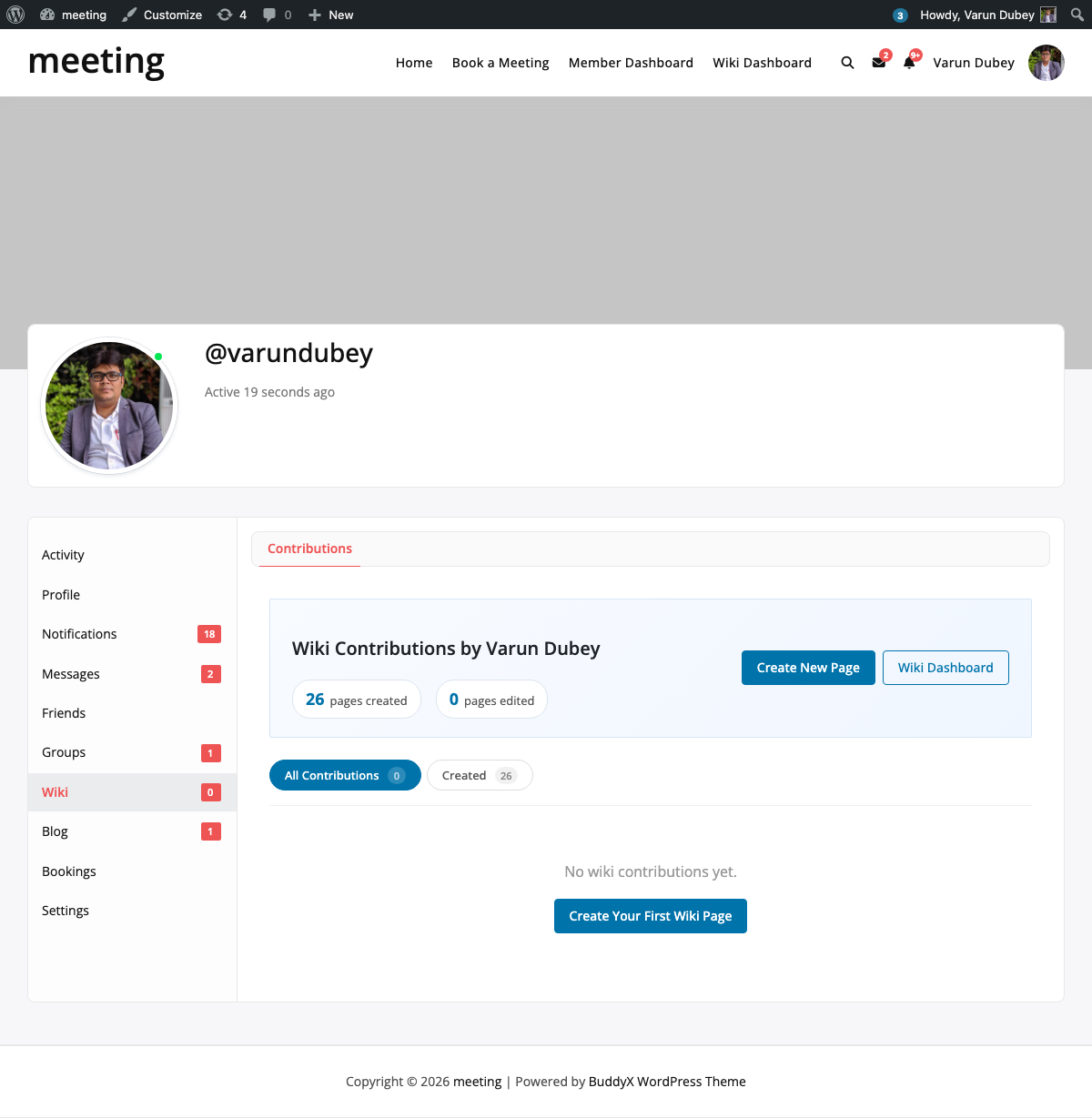
WB Member Wiki adds a Wiki tab to every BuddyPress and BuddyBoss member profile automatically. No configuration. Members' pages live alongside their activity, friends, and connections — contribution becomes visible.
Wiki tab on every profile
Members' contributed wiki pages appear on their BuddyPress profile tab automatically — zero setup, zero configuration
Works with BuddyBoss & PeepSo
Full integration with BuddyPress, BuddyBoss Platform, and PeepSo — all three community platforms supported
Same login, same theme
Members use their existing WordPress account — no new username, no separate platform, no extra tools to manage
BuddyPress member profile with Wiki tab

Wiki tab on a BuddyPress member profile — appears automatically, no configuration required

Everything your community needs

No extensions to buy. No integrations to configure. It ships with all of this.

Full revision history

Every save creates a revision. Compare any two versions with word-level diff. Restore any previous state with one click. No edit is ever permanent.

Role-based permissions + moderation

Set which WordPress roles can create, edit, delete, or protect pages. Enable moderated roles — member submissions go to a pending queue, you approve before anything publishes.

[[WikiLink]] auto-linking

Members type [[Page Title]] anywhere and it becomes a link automatically. Wanted links show in red — a built-in signal of what to write next.

BuddyPress, BuddyBoss & PeepSo integration

Wiki tab appears on member profiles automatically when community platforms are active. No configuration. Members' contributions live on their profile.

Watchlist & email notifications

Members watch pages they care about. When a watched page changes, they get an email with a link to the change. Brings members back when content they care about updates.

Edit locking

When one member opens a page to edit, others see a notice that it's in use — and by whom. No conflicting saves. Lock releases automatically when the session ends.

Automatic Table of Contents

Pages with three or more headings get a collapsible TOC generated automatically. No shortcode. Long pages become scannable without any extra work from the author.

Import from MediaWiki, Notion & Confluence

Upload your export file and pages are created automatically — page hierarchy, categories, tags, and images included. Migrate your existing knowledge base without starting over.

Search with zero-result logging

Full-text search with category and tag filtering. Searches that return no results are logged in the admin — so you know exactly what content gaps to fill.

REST API + 40+ developer hooks

Full REST API for wiki pages and revisions. 40+ actions and filters. Template override system — every piece of output can be customized without touching plugin files.

A complete platform, not a simple widget

The wiki dashboard — listing, search, and creation in one place, driven by the [member-wiki-dashboard] shortcode

Members create and edit pages from the front end — no admin access needed

Single wiki page with automatic Table of Contents and [[WikiLink]] cross-references

Automatic TOC and helpfulness rating widget on a real wiki page

Wiki tab on a BuddyPress member profile — appears automatically, no configuration required

Role-based permissions — set who can create, edit, delete, and protect pages per WordPress role

Simple, honest pricing

One-time payment or annual subscription. All features included in every plan — no hidden add-ons.

Personal
1 site
$49 /year
  • 1 site license
  • 1 year of updates & support
  • All features included
  • BuddyPress, BuddyBoss & PeepSo integration
  • REST API access
Get Personal
Most popular
Developer
5 sites
$79 /year
  • 5 site licenses
  • 1 year of updates & support
  • All features included
  • BuddyPress, BuddyBoss & PeepSo integration
  • REST API & developer hooks
  • Priority support
Get Developer
Agency
Unlimited sites
$149 /year
  • Unlimited site licenses
  • 1 year of updates & support
  • All features included
  • BuddyPress, BuddyBoss & PeepSo integration
  • REST API & developer hooks
  • White-label ready
  • Priority support
Get Agency

Annual plans renew automatically. Cancel any time before renewal.

30-day money-back guarantee. No questions asked.

Common questions

Do members need admin access to create wiki pages?
No. Members create and edit wiki pages entirely from the front end of your site. You control which WordPress roles have which permissions from the plugin's Permissions tab — create, edit, delete, and protect are all configurable independently.
What if a member edits something incorrectly?
Every save creates a new revision. You can compare any two versions side by side with word-level diff highlighting and restore any previous version with one click. Nothing is permanently lost.
Does this work without BuddyPress?
Yes. Add the [member-wiki-dashboard] shortcode to any WordPress page and the wiki runs completely independently — no BuddyPress, BuddyBoss, or PeepSo required. Works with any WordPress theme.
Can I require review before member pages publish?
Yes. Enable moderated roles in the Permissions tab. Submissions from those roles go into a pending review queue and only publish when you (or an editor) approves them. You also get an email notification for every new submission.
Can I import my existing wiki from Notion or Confluence?
Yes. WB Member Wiki imports Notion Markdown ZIPs, Confluence HTML ZIPs, and MediaWiki XML exports. Pages are created automatically with their hierarchy, categories, tags, and images.
Does it work with my membership plugin?
Yes. WB Member Wiki uses standard WordPress roles for permissions — so it works with any membership plugin that assigns WordPress roles (MemberPress, Paid Memberships Pro, LearnDash, LifterLMS, and others).
What's the difference between annual and lifetime?
Annual gives you updates and support for 1 year — after that, the plugin keeps working but won't receive new updates until you renew. Lifetime gives you updates and support permanently with a single payment.
Can developers customize the output?
Yes. The plugin includes 40+ hooks and filters, a full REST API for wiki pages and revision history, and a template override system — copy any template to your-theme/wb-member-wiki/ and your version takes precedence. Everything is customizable without editing plugin files.

Ready to give your community a knowledge base?

Install WB Member Wiki today — one-time payment, instant download, works with any WordPress theme.

Buy WB Member Wiki Read the docs